Upgrading Win 7 32 bit to Win 10 64 bit

  • Thread starter Thread starter Wrichik Basu
  • Start date Start date
  • Tags Tags
    Bit Windows 10
Click For Summary
SUMMARY

Upgrading from Windows 7 32-bit to Windows 10 64-bit requires a clean installation, as there is no direct in-place upgrade path between different architectures. Users must utilize the Windows Media Creation Tool for installation and should back up their data beforehand. Formatting the C: drive is necessary, while other partitions can remain intact if they contain user files. The upgrade process may not be officially supported if the free upgrade period has expired, and users should consider purchasing a new Windows 10 license for a smooth transition.

PREREQUISITES
  • Understanding of Windows installation processes
  • Familiarity with the Windows Media Creation Tool
  • Knowledge of disk partitioning and formatting
  • Experience with system backup methods
NEXT STEPS
  • Research the Windows Media Creation Tool for installation procedures
  • Learn about disk partitioning and formatting in Windows
  • Explore options for backing up data before an OS upgrade
  • Investigate the benefits of using SSDs for improved performance
USEFUL FOR

Individuals upgrading their operating system, IT professionals assisting with OS installations, and users looking to optimize their Windows performance.

Wrichik Basu
Science Advisor
Insights Author
Gold Member
Messages
2,180
Reaction score
2,690
TL;DR
Some questions regarding upgrading a Windows 7 Professional 32-bit desktop to Windows 10 Professional 64-bit.
We have a Windows 7 Professional 32-bit desktop running on an Intel core i3 processor which is 64-bit capable. No idea why 32-bit version of OS was installed. I want to upgrade it, as stated above. I will be doing this for the first time, so there are some unanswered questions.

I will be using the Windows media creation tool available online. I will also take a full system backup before proceeding.
1. Can I directly upgrade from Win 7 32-bit to Win 10 64-bit? Or should I first upgrade Win 7 to 64-bit, and then to Win 10?​

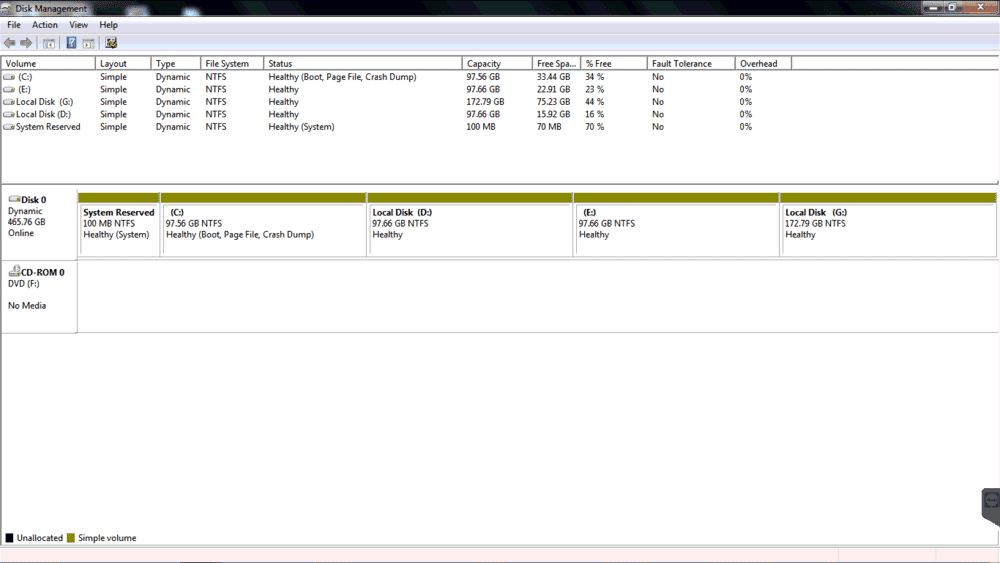
2. I know that I will have to format some HDD partitions, but which one? Disk Management shows the following:​
1576217251270.png
Currently the OS is installed in C: drive as usual. D:, E: and G: have user files only. So when I upgrade to 64-bit, do I just format C: drive and leave the rest unaltered?​
I checked YouTube. This video, focusing on upgrading Win 10 32-bit to 64-bit, uses the "Custom" installation option and formats only one partition. (However, I don't know whether the other partitions have other OS, or are used for storing files, like in my case.) Another video, which aims at upgrading Win 7 32-bit to 64-bit, uses the "Upgrade" option instead, and only one partition is shown after that. Upgrading is supposed to preserve personal files, and if I don't format the other partitions, that too should preserve data therein. ∴ Which option?​
3. From the above two videos, it seems that the drives are denoted by "Drive 0 Partition #". Will the drive letters (like C:, D:, etc.) also appear there?​
4. Should I keep System reserved partition as it is?​
5. The PC has Akamai Netsession Interface installed. Neither my father nor I have any idea how it was installed (installed maybe 6 years back). I checked online to find that it is not available for download. I had a small chat with their agent, and they asked me to contact Windows support. I searched through Windows product help forums, and there was nothing useful. Any idea how to reinstall this? Does it come bundled with Windows?​

Any additional advice?
 
  • Like
Likes   Reactions: WWGD
Computer science news on Phys.org
The only good advice I can give you is to clone your disk first.
Then safely you can experiment installing new software.
You will most definitely run into trouble, otherwise.
 
  • Like
Likes   Reactions: Nik_2213 and davenn
Wrichik Basu said:
1. Can I directly upgrade from Win 7 32-bit to Win 10 64-bit? Or should I first upgrade Win 7 to 64-bit, and then to Win 10?
There is no in-place upgrade from 32- to 64-bit for either Win 7 or Win 10 so normally I would say there is no point doing it in 2 stages, just do a clean install of Win 10 64 bit. However the free upgrade from Win 7 to Win 10 expired about 3 years ago so unless you have paid for a new Win 10 license (in which case you should have instructions and support from whoever you bought it from) then you are trying to do something that is not officially supported. That doesn't necessarily mean it won't work :cool:, but it does mean that you can't rely on it working like it says in any instructions - you're on your own, sorry!

Wrichik Basu said:
5. The PC has Akamai Netsession Interface installed. Neither my father nor I have any idea how it was installed (installed maybe 6 years back). I checked online to find that it is not available for download. I had a small chat with their agent, and they asked me to contact Windows support. I searched through Windows product help forums, and there was nothing useful. Any idea how to reinstall this? Does it come bundled with Windows?
Ignore this, you don't need it.
 
  • Like
Likes   Reactions: davenn
pbuk said:
However the free upgrade from Win 7 to Win 10 expired about 3 years ago so unless you have paid for a new Win 10 license (in which case you should have instructions and support from whoever you bought it from) then you are trying to do something that is not officially supported.
Why do you assume that I will be doing something illegal (like installing a cracked version)? If I wanted to do that, I would not have posted here, because I know that moderators would soon close my thread in that case.

I will buy the license in January before installing. But they would only give the activation key through email, no physical installation CD.
 
You are looking at a fresh install, during the initia install phase it will ask you where to install the OS, just select the existing C: drive partition which is thefirst one after the system partition. The system partition contains the boot instructions for Windows and is needed. If you delete it, it and the C: drive it will only get recreated during the install.

You have a puzzling disk configuration there. Having so many partitions on 1 physical disk doesn't really make much sense, you may as well just have 1 big C: drive. If you have a external USB disk of sifficient capacity, I would just copy off all the data from your data drives and then copy it back later after the Windows is installed. That way during the install phase you can delete all the partitions and let Windows create a big C: drive. Your disk si also configured as a Dynamic disk for no reason, it should be a basic disk. Again if you can wipe all the partition Windows will install as a basic disk.
 
MikeeMiracle said:
If you have a external USB disk of sifficient capacity, I would just copy off all the data from your data drives and then copy it back later after the Windows is installed.
Yes, as I said in the OP:
Wrichik Basu said:
I will also take a full system backup before proceeding.
For me, backup means copying files to an external HDD.
MikeeMiracle said:
Your disk si also configured as a Dynamic disk for no reason, it should be a basic disk. Again if you can wipe all the partition Windows will install as a basic disk.
No idea why it was formatted as a dynamic drive. Does it have any advantage over basic disk?
MikeeMiracle said:
you may as well just have 1 big C: drive.
Yeah, I thought about that before. Let's see what I can do.
 
Backup: Yes copying the data to an external drive is the same thing. Note that we are talking about data here, not part of any installed program. A full system backup would also include the Windows 7 install so you could restore it later via the install media if your upgrade goes wrong.
Disk Type: A dynamic disk is meant to be part of a redundant array of disk (RAID) which you cannot have with just 1 disk. No real difference but changing drive/partition sizes later can be complicated if it's dymanic.

With a fresh install it will be like you just got a new PC, none of your programs / configuration will carry over. If you want to keep things like your browser links you can look at the "User State Migration Tool" from Microsoft. This will copy your local config to your hard disk which you can then restore later.
 
Wrichik Basu said:
Why do you assume that I will be doing something illegal (like installing a cracked version)? If I wanted to do that, I would not have posted here, because I know that moderators would soon close my thread in that case.
I didn't assume that at all. It is common knowledge that regardless of what Microsoft's official upgrade policy says, if you download and install Win 10 over Win 7 it might just work anyway: try it!

Wrichik Basu said:
I will buy the license in January before installing. But they would only give the activation key through email, no physical installation CD.
Well with a new activation key you should have no problems, download and run the installation media and it will detect the old Win 7 32 bit and ask you what you want to do with it. Alternatively follow the tips below and keep your old HD intact...
  • If you can afford it I'd recommend doing a bare metal install on a decent SSD - this will improve performance a great deal and avoid any backup worries.
  • If you can't afford an SSD, I'd recommend doing a bare metal install on a new or repartitioned HD (or a slightly second hand one from a friend that has upgraded - most people I know have a couple lying around) - this will again avoid any backup worries.
  • For a full list of what is installed on your current Win 7, including product keys, download and install Belarc Advisor.
 
  • Like
Likes   Reactions: Nik_2213
pbuk said:
Well with a new activation key you should have no problems, download and run the installation media and it will detect the old Win 7 32 bit and ask you what you want to do with it.
Problem is, it will upgrade it to Win 10 32-bit. For 64-bit, it perhaps has to be a clean install.
pbuk said:
If you can afford it I'd recommend doing a bare metal install on a decent SSD - this will improve performance a great deal and avoid any backup worries.
The motherboard is Asus P7H55-M LX from 2013. As far as I know, it doesn't support SSD.
pbuk said:
If you can't afford an SSD, I'd recommend doing a bare metal install on a new or repartitioned HD (or a slightly second hand one from a friend that has upgraded - most people I know have a couple lying around) - this will again avoid any backup worries.
Will think about that, thanks for the suggestion.
pbuk said:
For a full list of what is installed on your current Win 7, including product keys, download and install Belarc Advisor.
That's a good software. I created a full system report of the PC with it some months back.
 
  • #10
Wrichik Basu said:
Problem is, it will upgrade it to Win 10 32-bit. For 64-bit, it perhaps has to be a clean install.
Yes I think you are probably right.

Wrichik Basu said:
The motherboard is Asus P7H55-M LX from 2013. As far as I know, it doesn't support SSD.
SATA is SATA*, the motherboard only cares about the interface not what is on the other end.

I agree with @MikeeMiracle, there is no point in partitioning a windows desktop so if this was my machine I'd:
  • Unplug the existing HD
  • Do a bare metal install on a new 500 MB SSD
  • Plug the old HD in (while switched off of course) and copy all the data over to the SSD
  • Repartition the old HD to a single partition and do a full reformat to mark dud sectors
  • Copy media files back to the newly formatted HD - this will free up space on the SSD and you won't notice the difference in loading time.
* that MoBo appears to be SATA II whereas most SSD on the market now are SATA III, but there is backward compatibility
 
  • Like
Likes   Reactions: Wrichik Basu
  • #11
pbuk said:
[*]Do a bare metal install on a new 500 MB SSD
GB.

I strongly recommend this approach. SSDs have gotten pretty cheap and they provide a massive performance improvement over spinning platters.
 
  • Like
Likes   Reactions: Wrichik Basu
  • #12
pbuk said:
There is no in-place upgrade from 32- to 64-bit for either Win 7 or Win 10 so normally I would say there is no point doing it in 2 stages, just do a clean install of Win 10 64 bit.
I'm not questioning this statement, but don't know for a fact that it is true. With the past two weeks I upgraded by 6-year old HP with an Intel i7 processor from 64-bit Win 7 to 64-bit Win 10 (Home). I delayed for a long time because I don't care for the so-called Metro interface. It turns out that you can download a free app from http://ninite.com to make Win 10 look like Win 7, but retain the improvements that Win 10 offers.
pbuk said:
However the free upgrade from Win 7 to Win 10 expired about 3 years ago so unless you have paid for a new Win 10 license (in which case you should have instructions and support from whoever you bought it from) then you are trying to do something that is not officially supported.
I missed out on the free upgrade period, and because MSFT is discontinuing support for Win 7, I thought I would not to lay out some $ for Win 10. It turns out that you can still get Win 10 for free (this might be limited to the Home edition, which is missing some features of Win 10 Pro). If you have a legal version of Win 7 or 8, you don't even have to enter a product key. I don't remember the site I used, but here is one I found right now:
https://www.howtogeek.com/266072/yo...ws-10-for-free-with-a-windows-7-8-or-8.1-key/

I was able to upgrade to Win 10 in place - I didn't have to do a clean install. Before I did the upgrade, I did a system backup to an external drive. After the upgrade, I did another system backup.

The whole process went very smoothly, something of a surprise to me. I'm very pleased at how quick and easy it was.
 
  • #13
Mark44 said:
I was able to upgrade to Win 10 in place - I didn't have to do a clean install.
That's because you upgraded from and to 64-bit. Changing word length of OS means a clean install - this is what I learned from the net.
 
  • Like
Likes   Reactions: pbuk
  • #14
pbuk said:
Do a bare metal install on a new 500 MB SSD
ahhhh no, get into the GB size 250GB minimum
You won't even fit WIN10 on a 500MB drive :wink:
 
  • Like
Likes   Reactions: pbuk
  • #15
Wrichik Basu said:
Summary:: Some questions regarding upgrading a Windows 7 Professional 32-bit desktop to Windows 10 Professional 64-bit.

...should I first upgrade Win 7 to 64-bit, and then to Win 10?
My advice would be to stay with the Win 7 64-bit (less intrusive than Win 10). My Win 7 64-bit machine also blocks upgrading to Win 10 using the GWX Control Panel tool.
 
  • #16
dlgoff said:
My advice would be to stay with the Win 7 64-bit (less intrusive than Win 10).
Windows 7 support and (feature and security) updates is coming to an end on January 14, 2020. That is one of the reasons why I want to shift to Windows 10. Why do you call Win 10 intrusive? I have been working on Win 10 in my laptop for a number of months now without any major issue.
 
  • #18
Been using Windows 10 for ages, I don't see anything intrusive in it. The main difference is the start menu but most people just "pin" their favourite apps to the task bar so you don't need to use the start menu that often. It's by no means terrible, just different to what came before. Basically just stick to the desktop OS side and don't start messing with Microsoft "apps" from the microsoft store which use the dodgy tablet interface.

Staying on Windows 7 is just asking for trouble due to no security patches being released for it. Your basically asking to get infected by malware. It's the same for those who refuse to update their PC each month.
 
  • Like
Likes   Reactions: Wrichik Basu
  • #19
@dlgoff why do you find it comforting that a piece of software that has been download from an anonymous website without even an SSL certificate tells you "You appear to be safe"? Microsoft may not be perfect, but I know who they are and what motivates them, and that there are organisations with a lot more to lose than I have that ensure that when M$ screw up it is fixed, quick. Until EOL, which is less than a month away for Win 7.
 
  • #20
pbuk said:
@dlgoff why do you find it comforting that a piece of software that has been download from an anonymous website without even an SSL certificate tells you "You appear to be safe"?
Well, I'm safe from not getting Windows 10.
 
  • Haha
Likes   Reactions: atyy and pbuk
  • #21
Why I'm using Windows 7 Professional:

https://www.microsoft.com/en-us/download/details.aspx?id=8002 said:
Windows XP Mode for Windows 7 makes it easy to install and run many of your productivity programs that run on Windows XP directly from a computer that runs Windows 7.
 
  • #22
dlgoff said:
Why I'm using Windows 7 Professional:
To use an app that presumably hasn't received security patches for the last 10 years? Well, whatever floats your boat, but I'd want to isolate this in a VM without any internet access. And I think you should probably state your reason for using Win 7 when advising anyone else to do the same.
 
  • #23
I am planning on an upgrade too. Already backed up important drive on my SSD but Windows Media Creation Tool keeps saying 'the process can not be completed. please try again'. I already did this multiple times, even changed another USB for the task. still no luck. Any better alternative to replace Windows Media Creation tool?
 
  • #24
Try running it by right-clicking and selecting "Run as Administrator." It should work fine after that.
 
  • #25
pbuk said:
And I think you should probably state your reason for using Win 7 when advising anyone else to do the same.
I thought I did. "Windows 7 makes it easy to install and run many of your productivity programs that run on Windows XP" Lots of my work involves running several 16 bit applications that only run on XP.
 
  • #26
You can trick the program into thinking it is running on a previous verion of Windows.

Right click your programs icon and select properties. In there you will find a compatibility tab. From there you can choose the OS compatibility type, so it could run the program designed for XP as it presents it with the same type of data XP would.

It's not full proof but works most of the time for running older software not designed to run on modern operating systems.
 
  • #27
dlgoff said:
"Windows 7 makes it easy to install and run many of your productivity programs that run on Windows XP" Lots of my work involves running several 16 bit applications that only run on XP.
Fortunately we don't have any such apps.
 
  • #28
I have forgotten to post one question. While working with my Win 10 laptop, I find there is a hotspot and a VPN feature. In our desktop, there is no internal WiFi adapter; I have bought one external USB adapter, and mainly use it to tether the internet connection of the desktop through Connectify. The question is, when I install Windows 10, will the hotspot and VPN feature also be installed by default, so that I don't have to use Connectify any longer?
 
  • #29
MikeeMiracle said:
You can trick the program into thinking it is running on a previous verion of Windows.
Yes, but not well and not at all for my older versions of AutoCAD and AutoSketch.
 
  • #30
dlgoff said:
Yes, but not well and not at all for my older versions of AutoCAD
Don't want to derail the thread, but any specific reason to stick to old version of AutoCAD? Is it related to some license issue? My father uses the latest version in his office on a Win 10 machine, and I never heard him complaining that it doesn't work.
 

Similar threads

  • · Replies 8 ·
Replies
8
Views
2K
Replies
23
Views
7K
  • · Replies 1 ·
Replies
1
Views
2K
  • · Replies 7 ·
Replies
7
Views
3K
Replies
6
Views
5K
  • · Replies 17 ·
Replies
17
Views
1K
Replies
5
Views
2K
  • · Replies 3 ·
Replies
3
Views
2K
Replies
35
Views
10K
Replies
2
Views
3K