Graduate Weird pattern for a laser beam spot

Click For Summary
SUMMARY

The discussion centers on measuring the Gaussian profile of a laser beam using a camera and optical wedges. Users identified that interference fringes observed in the beam profile may stem from reflections between the camera sensor and its glass window, rather than the laser itself. Suggestions include adjusting the exposure time on the camera and testing for interference by rotating the camera. A well-placed isolator is recommended to mitigate interference issues.

PREREQUISITES
  • Understanding of Gaussian beam profiles and modes, specifically T00.
  • Familiarity with optical components such as wedges and their reflective properties.
  • Knowledge of camera settings, particularly exposure time adjustments.
  • Basic principles of interference and etalon effects in optics.
NEXT STEPS
  • Investigate the effects of optical wedge spacing on interference patterns.
  • Learn about the impact of non-angled, uncoated optics on beam profiling.
  • Research the use of optical isolators in laser applications to reduce interference.
  • Explore methods for testing interference sources in optical setups, such as rotating the camera.
USEFUL FOR

Optical engineers, laser technicians, and researchers involved in beam profiling and interference analysis will benefit from this discussion.

Malamala
Messages
348
Reaction score
28
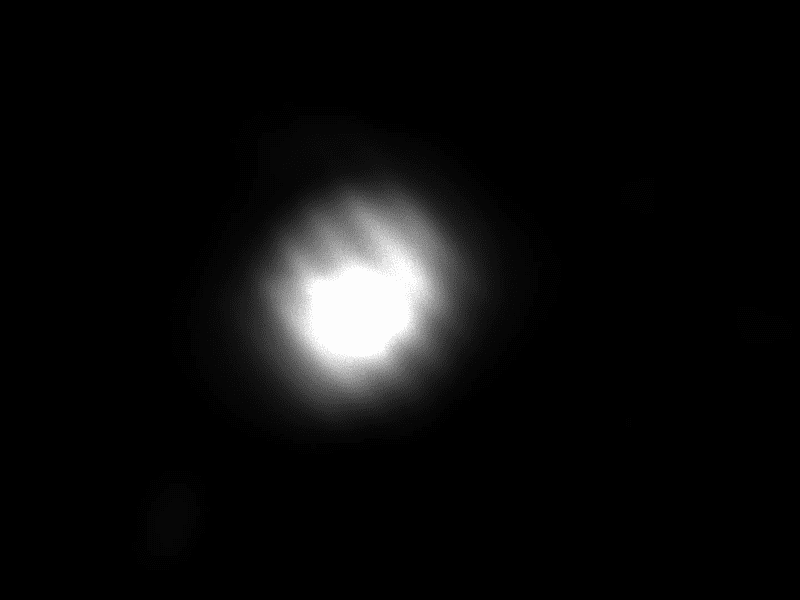
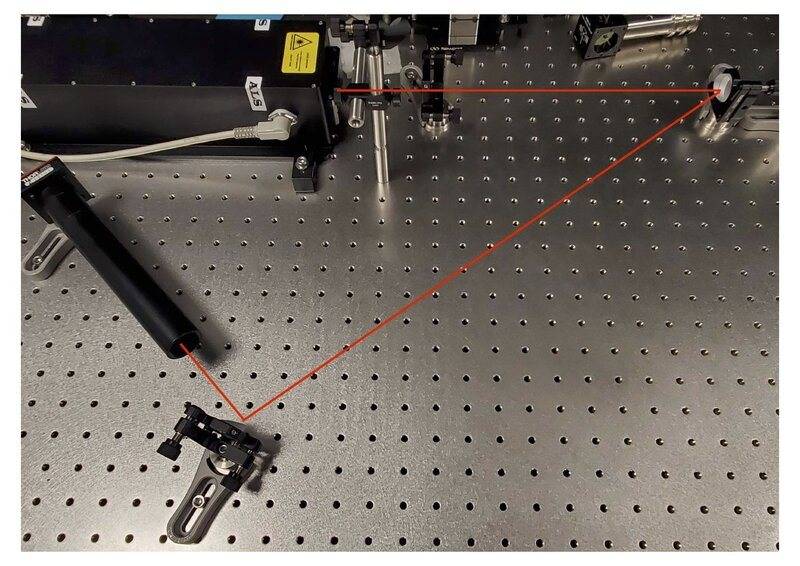
Hello! I am trying to measure the gaussian profile of a laser beam, which is supposed to be T00. The profile shown in the specifications looks very Gaussian, and the laser is brand new. I am using this camera and I am using 2 of these wedges to guide the laser beam into the camera (mainly to reduce the power). However what I am getting is the figure below. The central, bright spot looks basically like what I expect, but on top of that I see some sort of interference fringes. I don't think this is from the laser (I hope not!) as these would be a lot higher order modes than the expected T00, but I am not sure what they can be from. I made sure (as much as I could) that the light hits the camera perpendicularly. Does anyone have any idea what can cause this? Thank you!

Edit: I attached below a picture of my setup.
setup.jpg


00001.png
 
Last edited:
Science news on Phys.org
Are you reflecting from the wedges? I don't understand your setup.
 
hutchphd said:
Are you reflecting from the wedges? I don't understand your setup.
Yes, I am reflecting from them. The reflection from the first wedge goes into the second wedge. And the refection from the second wedge into the camera.
 
There are then four different surfaces that both reflect and refract the beam. There must be several distinct good paths to follow How far apart are the wedges (relative to their diameter) . If you double that distance I would expect the spacing of fringes to change and shift.
 
hutchphd said:
There are then four different surfaces that both reflect and refract the beam. There must be several distinct good paths to follow How far apart are the wedges (relative to their diameter) . If you double that distance I would expect the spacing of fringes to change and shift.
Thanks for this. I am not totally sure I see why reflection from the back surface would be important here. The angle of the wedge is 10 degree, so far enough from the wedges (I would say that the distance between the optical elements are about 10 x the wedge diameter) the 2 beams won't overlap at all basically.
 
  • Like
Likes Twigg
@hutchphd The front and back surfaces of the wedges are angled so that you don't see interference between the two reflected beams (front reflected and back reflected).

What are those optics in the lens tube on your camera? Lenses? ND filters? I bet those are what's causing your interference. Non-angled, uncoated optics make etalons that cause the interference you see.

Alternative, a well placed isolator can solve this interference issue.

For the purpose of beam profiling, you can ignore those fringes. Turn the exposure time down on your camera to make sure there isn't more significant weirdness that you can't see above 'cause of the saturation.
 
  • Informative
  • Like
Likes DaveE and berkeman
Twigg said:
@hutchphd The front and back surfaces of the wedges are angled so that you don't see interference between the two reflected beams (front reflected and back reflected).

What are those optics in the lens tube on your camera? Lenses? ND filters? I bet those are what's causing your interference. Non-angled, uncoated optics make etalons that cause the interference you see.

Alternative, a well placed isolator can solve this interference issue.

For the purpose of beam profiling, you can ignore those fringes. Turn the exposure time down on your camera to make sure there isn't more significant weirdness that you can't see above 'cause of the saturation.
Thanks a lot for your reply! Actually there is nothing in the tube. I added it just to protect from other sources of light, but I see the fringes even if I remove the tube completely. What someone suggested to me (after I made this post) was that the interference might be due to the camera itself. The sensor of the camera seems to be behind a glass window, and that might lead to interference (e.g. from reflections between the camera sensor and that glass). Can this be the reason?
 
  • Like
Likes Twigg
Yes. The interference is from the two surfaces of the glass window itself. It should be easy to tell if it is in the camera or in your set-up.
 
  • Like
Likes Malamala and Twigg
Yep, sounds like that's it. If you wanted to test it, you'd need to rotate the whole camera while keeping the beam on screen. If its the camera's window, then the fringes will not appear to rotate. If its fringes on the beam itself, then the fringes will appear to rotate. Best of luck!
 
  • Like
Likes DaveE, Malamala and hutchphd
  • #10
The camera was my first thought as well. Pull out grandpa's SLR and try film.
 
  • Like
Likes Twigg

Similar threads

  • · Replies 6 ·
Replies
6
Views
2K
  • · Replies 10 ·
Replies
10
Views
2K
  • · Replies 5 ·
Replies
5
Views
4K
  • · Replies 4 ·
Replies
4
Views
4K
  • · Replies 14 ·
Replies
14
Views
3K
  • · Replies 9 ·
Replies
9
Views
4K
  • · Replies 0 ·
Replies
0
Views
3K
  • · Replies 6 ·
Replies
6
Views
2K
Replies
2
Views
2K
  • · Replies 30 ·
2
Replies
30
Views
2K