Which factors of a PC determine the opening time of a program and a large file
Join the discussion
Registration is free. Start your own thread to ask a follow-up.
38 replies · 5K views
Physics news on Phys.org
mech-eng
- 826
- 13
Sorry for that.Rive said:We are shooting in the dark here for almost a week long already, and it's not really productive this way.
Rive said:Would you please elaborate the problem?
The problem was from the past but a few weeks later I might encounter the same problem. Then I can give detailed knowledge for my specific problem. But I thought my second question about RAM and CPU interaction was a clear and general one.
Science Advisor
Homework Helper
- 9,608
- 4,831
FactChecker said:Have you looked at the Performance Monitor and determined that I/O to a drive is the bottleneck?
That is not an answer. Why can't you give us more information? Is this something that happened a while ago and you can not replicate it?mech-eng said:As relevant question, If the bottleneck is either disk or CPU, is doubling the RAM a meaningful act? If you are having issues related to CPU or disk, to double the RAM is a bad idea?
mech-eng
- 826
- 13
FactChecker said:Why can't you give us more information? Is this something that happened a while ago and you can not replicate it?
Yes. it had happened a while ago, in the past. I will give you the information from the Performance Monitor in the future when my file become larger. I don't have a such big file for now.
Science Advisor
Homework Helper
- 9,608
- 4,831
That explains it. If you have the opportunity now, it might be wise to make a simple, large file to test it. Otherwise, when you have a real file that large, you might not have time to fix anything.mech-eng said:Yes. it had happened a while ago, in the past. I will give you the information from the Performance Monitor in the future when my file become larger. I don't have a such big file for now.
mech-eng
- 826
- 13
FactChecker said:It might be wise to make a simple, large file to test it. Otherwise, when you have a real file that large, you might not have time to fix anything.
Well, I will try to make one and check for which component is the bottleneck.
mech-eng
- 826
- 13
I have tried to copy and paste a large amount of data into OpenOffice spreadsheet. The data was so big that it gave the error of "bad allocation". Above is Performance Monitor.
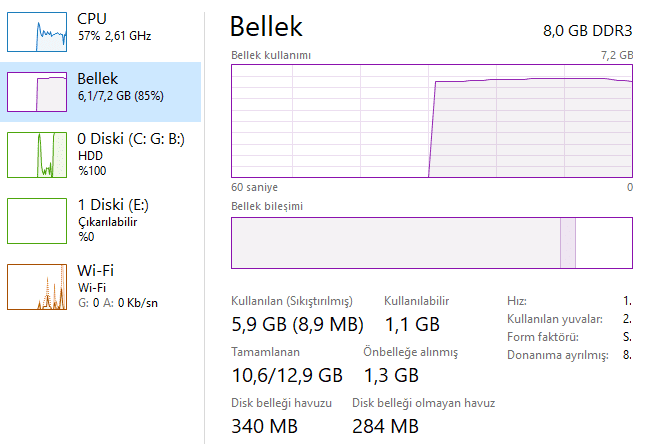
It seems that Disk is the bottleneck.
It seems that Disk is the bottleneck.
mech-eng
- 826
- 13
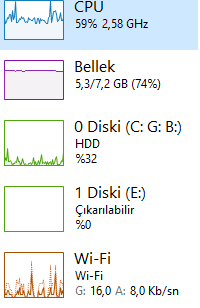
And this is from a copy-paste to the openoffice. The operation has been taking a few minutes.
Science Advisor
Homework Helper
- 9,608
- 4,831
It's hard to know whether the "copy/past" into an Openoffice spreadsheet is the same as reading a file to open. I imagine that there can be a lot going on in a "paste". I guess that "Bellek" is RAM memory. In the second screenshot, it is very stressed and the CPU is also. I recently had to increase my RAM memory above 8 gb because of problems with the Foxfire web browser. It can be tricky to get RAM that is compatible with a particular computer. If you search for RAM, search for an exact match to your computer.