Creating a fan control via a Potentiometer

Click For Summary

Discussion Overview

The discussion revolves around creating a fan control system using a potentiometer, specifically focusing on the wiring and functionality of the circuit. Participants explore the correct connections and the behavior of the fan in response to adjustments made with the potentiometer.

Discussion Character

  • Technical explanation, Conceptual clarification, Experimental/applied

Main Points Raised

  • One participant describes their setup using a 100-ohm potentiometer connected to the yellow wire of the fan, noting that the fan operates at full speed regardless of the potentiometer's position.
  • Another participant questions whether the circuit diagram shared accurately represents the setup, suggesting that the potentiometer is being used as a voltage divider with only one resistance.
  • A third participant provides clarification on the typical color coding of fan wires, indicating that the red wire is likely +12V, the black is ground, and the yellow is for tachometer output, while noting that color coding can vary by manufacturer.
  • One participant suggests using a multimeter to check if the resistance changes when the potentiometer is adjusted, highlighting the ambiguity in the color coding of the wires used.
  • The original poster confirms the wiring and acknowledges confusion regarding the color labels on the power supply, indicating a lack of expertise in electronics.
  • After making adjustments to connect the potentiometer to the correct wire, the original poster reports success in controlling the fan speed.

Areas of Agreement / Disagreement

Participants generally agree on the importance of correct wiring and the potential confusion arising from color coding. However, there was some initial uncertainty regarding the specific connections and functionality of the potentiometer in the circuit.

Contextual Notes

The discussion includes assumptions about the standard color coding of wires and the behavior of the potentiometer in the circuit, which may not apply universally. The effectiveness of the solution depends on the specific components used and their compatibility.

CyborgPatrick
Messages
2
Reaction score
0
Hi, I wanted to create my own computer fan control and bought a 100ohm potentiometer.

I have hooked the pot as shown in the picture except that it is in the yellow wire (+12V) and not the red one (+5V) , black is ground.
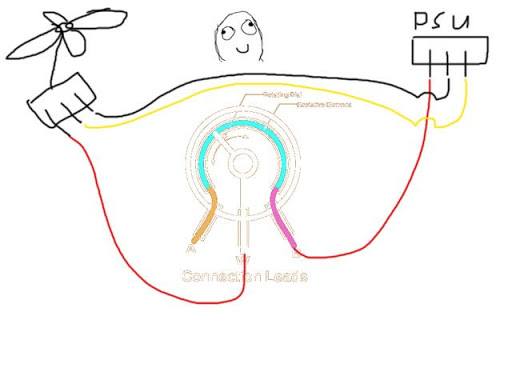
control.jpg


The fan will start at full speed and doesn't change one bit if I turn the knob. Any ideas why the pot doesn't work?
 
Engineering news on Phys.org
Just for clarification, does the attached circuit accurately represent what you have done? i.e. you're essentially trying to create a voltage divider with only one resistance (assuming the load resistance is << the potentiometer).
 

Attachments

  • Potentiometer.JPG
    Potentiometer.JPG
    4.4 KB · Views: 1,241
If this is a standard computer fan, the red wire is probably 12V (or sometimes 5V), black is ground, and yellow is the tachometer OUTPUT from the fan. HOWEVER, the colours are not standardized across all manufacturers (though the functions will be--the fan label usually tells you which is which).

Can you hook up a multimeter to the leads you've connected, and see if the resistance is actually changing when you turn it?

EDIT: What I meant to say with the colour coding is that you've left it somewhat ambiguous as to which red and which yellow wires you're using: the fan's or the power supply's.
 
The POT is currently attached to the yellow wire as Zryn's picture shows. And the other wires are unchanged. My PSU has a color label saying yellow (+12V) black (ground), another black (ground) and a red (+5V) .
But I think you are right about the color coding of the 3-pin fan wires, red is +12V, yellow is monitor (RPM) and black is ground.

I will try putting the POT on the red one and see if it fixes it. Seeing the color label on the PSU just confused me a bit + I'm not that good with electronics.

Added 6.12 PM
Works like a charm, thanks for the help!
 
Last edited:

Similar threads

  • · Replies 3 ·
Replies
3
Views
3K
Replies
29
Views
28K
  • · Replies 15 ·
Replies
15
Views
2K
  • · Replies 2 ·
Replies
2
Views
2K
  • · Replies 5 ·
Replies
5
Views
6K
  • · Replies 6 ·
Replies
6
Views
4K
  • · Replies 6 ·
Replies
6
Views
4K
  • · Replies 37 ·
2
Replies
37
Views
5K
Replies
34
Views
4K
Replies
16
Views
3K