Desmos: Formula input in Firefox

Click For Summary
SUMMARY

The forum discussion centers on issues with formula input in Desmos when using Firefox, specifically version 32 on Ubuntu 14.04. Users report that typing expressions like x, /, 1, +, x results in incorrect outputs, such as $\frac{x}{1}+x$, instead of the expected $\frac{x}{1+x}$. In contrast, the same inputs work correctly in Chrome 37. The discussion highlights inconsistencies in formula entry across different browsers and operating systems, with users suggesting that the problem may be specific to Firefox's handling of Desmos.

PREREQUISITES
  • Understanding of LaTeX syntax for mathematical expressions
  • Familiarity with browser compatibility issues
  • Basic knowledge of Desmos graphing calculator functionalities
  • Experience with Ubuntu operating system and its versions
NEXT STEPS
  • Investigate the differences in formula input handling between Firefox and Chrome for Desmos
  • Test Desmos functionality on various operating systems and browser versions
  • Explore updates or patches for Firefox that may resolve input issues
  • Learn about LaTeX input methods in different online calculators
USEFUL FOR

Mathematicians, educators, students, and developers using Desmos for graphing and mathematical modeling, particularly those experiencing compatibility issues with Firefox.

Evgeny.Makarov
Gold Member
MHB
Messages
2,434
Reaction score
4
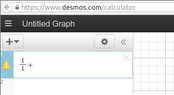
Is it just me or Desmos ruined its formula input? In the past when I typed [m]x[/m], [m]/[/m], [m]1[/m], [m]+[/m], [m]x[/m] I got $\frac{x}{1+x}$. Now I'm getting $\frac{x}{1}+x$. In fact, I can't figure out how to type $\frac{x}{1+x}$ at all. Even if I have $\frac{1}{1x}$ and the cursor is between 1 and $x$ in the denominator, typing $+$ turns it into $\frac{1}{1x}+$. For another example, after I type [m]cos(sin[/m] I get $\cos(\sin\ )$ and the cursor is immediately after "n" (Desmos automatically inserts closing parenthesis). But when I type [m]([/m] again, I get $\cos(\sin\ )(\ )$. The only way for me to enter formulas seems to be to type them in a text editor and then copy-paste them to Desmos.

I am using Firefox 32 in Ubuntu 14.04. I tried these examples in Chrome 37, and they work fine.
 
Physics news on Phys.org
Evgeny.Makarov said:
Is it just me or Desmos ruined its formula input? In the past when I typed [m]x[/m], [m]/[/m], [m]1[/m], [m]+[/m], [m]x[/m] I got $\frac{x}{1+x}$. Now I'm getting $\frac{x}{1}+x$. In fact, I can't figure out how to type $\frac{x}{1+x}$ at all. Even if I have $\frac{1}{1x}$ and the cursor is between 1 and $x$ in the denominator, typing $+$ turns it into $\frac{1}{1x}+$. For another example, after I type [m]cos(sin[/m] I get $\cos(\sin\ )$ and the cursor is immediately after "n" (Desmos automatically inserts closing parenthesis). But when I type [m]([/m] again, I get $\cos(\sin\ )(\ )$. The only way for me to enter formulas seems to be to type them in a text editor and then copy-paste them to Desmos.

I am using Firefox 32 in Ubuntu 14.04. I tried these examples in Chrome 37, and they work fine.

When I type [m]x[/m], [m]/[/m], [m]1[/m], [m]+[/m], [m]x[/m] in both Chrome and Firefox I get $$\frac{x}{1+x}$$. By default once typing in the denominator of the fraction is seems to stay there unless I hit the right-arrow key.

When I type in [m]cos(sin[/m] I immediate see this: $\cos( \sin( \ ))$ and my cursor between the two parentheses after $\sin$, which is logical and convenient. I didn't quite catch what is happening on your computer but I think it's different than this.

I'm using OS X 10.9.4 on a Macbook Pro.
 
Could someone using Firefox in other operating systems, especially Linux, say if they see the behavior I described?
 
Testing...

[desmos="-10,10,-10,10"]x/1+x[/desmos]

I entered the formula as part of selecting Desmos in the quick menu.
I entered a second formula x/1+x (not visible), which behaves differently - as expected.

So entering it in the edit box of setup screen comes out as $\frac x 1 + x$, while entering it in interactive mode comes out as $\frac{x}{1+x}$.

I'm using Firefox 31 on Ubuntu 14.04 here.
 
I like Serena said:
I entered the formula as part of selecting Desmos in the quick menu.
I entered a second formula x/1+x (not visible), which behaves differently - as expected.

So entering it in the edit box of setup screen comes out as $\frac x 1 + 1$, while entering it in interactive mode comes out as $\frac{x}{1+x}$.
Thanks, ILS.

What I meant, in fact, was entering formulas on the Desmos site itself, not on MHB. What I described happens when I go to https://www.desmos.com/calculator and start entering a formula in the top-left corner of the page

View attachment 3454

Could you try this? Are you able to enter $\frac{1}{1+x}$?
 

Attachments

  • desmos.png
    desmos.png
    5.6 KB · Views: 121
Sure.
The result is the same.
1/1+x comes out as $\frac{1}{1+x}$.
I do not get what you show in the screenshot.
 
OK, it may be just my problem. I do get strange behavior in some text boxes in different applications. (Are they a part of GTK? I am using Unity.) For example, in such diverse applications as Evince and Firefox, when I am entering the name of a bookmark, if I press a capital letter, the input terminates as if I pressed the Enter key. Maybe it's related.
 

Similar threads

  • · Replies 5 ·
Replies
5
Views
1K
  • · Replies 3 ·
Replies
3
Views
2K
  • · Replies 5 ·
Replies
5
Views
1K
  • · Replies 5 ·
Replies
5
Views
2K
Replies
3
Views
2K
  • · Replies 11 ·
Replies
11
Views
8K
  • · Replies 6 ·
Replies
6
Views
7K
  • · Replies 4 ·
Replies
4
Views
3K
  • · Replies 4 ·
Replies
4
Views
3K
Replies
12
Views
2K