How Can I Record a Raw Analog Signal with an Arduino Using a Circuit Board?

Click For Summary

Discussion Overview

The discussion revolves around how to record a raw analog signal using an Arduino and a circuit board, specifically focusing on the use of an Analog-Digital Converter (ADC) and potential storage solutions like an SD card. Participants explore circuit board recommendations and the necessary components for interfacing with the analog signals.

Discussion Character

  • Technical explanation
  • Exploratory
  • Debate/contested

Main Points Raised

  • One participant suggests using an ADC to convert the analog signal to digital data for storage.
  • Another participant inquires about the voltage range of the input signals and the source, indicating that if the voltage is within 5V, the built-in ADC of the Arduino could be utilized.
  • A different viewpoint is presented regarding the use of a data logger, specifically mentioning the LabJack U6 Pro as a capable device for handling a wider voltage range and providing additional features.
  • One participant reiterates the importance of knowing the voltage range and input source to determine the necessary circuitry for interfacing with the Arduino's ADC.
  • A later reply mentions the availability of Arduino resources for ADC at the specified voltage range, indicating that it can convert the 0-2V input signal to a digital value.

Areas of Agreement / Disagreement

Participants express varying opinions on the best approach to recording the analog signal, with some advocating for the use of an Arduino and built-in ADC, while others suggest alternative solutions like dedicated data loggers. The discussion remains unresolved regarding the optimal method and components to use.

Contextual Notes

There are limitations regarding the assumptions about the input source and the specific requirements for circuitry before the ADC pins on the Arduino, which remain unclear.

Tone L
Messages
72
Reaction score
7
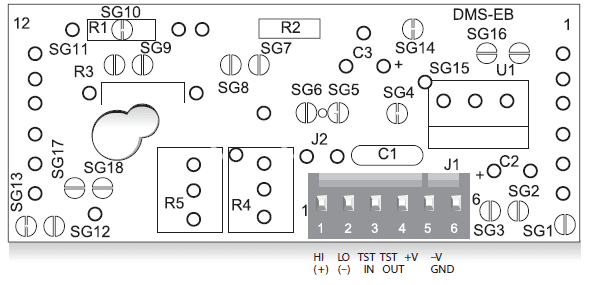
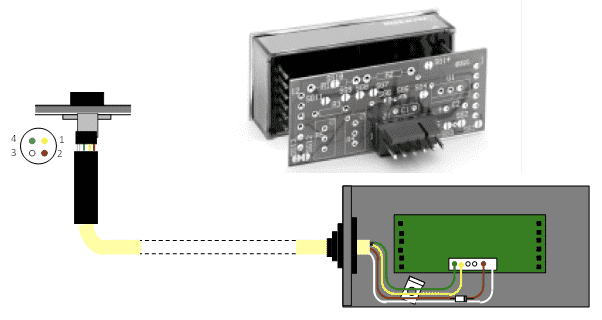
Greetings. I have a system that is powered by 5V . You will see below in the image. The system displays the difference between the Hi and Lo signal digitally, on the display which the board is plugged into. However. I want to store the data maybe in a SD card? Using Arduino? How do I harness the Hi Lo signal?

I am looking for circuit board recommendations i think.
upload_2018-10-17_9-53-34.png

upload_2018-10-17_9-53-49.png
 

Attachments

  • upload_2018-10-17_9-51-8.png
    upload_2018-10-17_9-51-8.png
    14.9 KB · Views: 508
  • upload_2018-10-17_9-53-34.png
    upload_2018-10-17_9-53-34.png
    14.9 KB · Views: 794
  • upload_2018-10-17_9-53-49.png
    upload_2018-10-17_9-53-49.png
    15 KB · Views: 702
Engineering news on Phys.org
You probably want an Analog-Digital Converter(ADC) that will convert the analog signal to digital at some fixed time interval. Then you can store the digital data as you would any other digital data.
 
  • Like
Likes   Reactions: osilmag, Asymptotic and davenn
What is the voltage range of the two input signals? And what is the input source?

If the input voltage is less or equal to 5V you could use the built-in ADC in an Arduino or similar. How much circuitry you need in front of the ADC pins on the Arduino depends on the source of yhe hi/lo sigal.
 
  • Like
Likes   Reactions: Tone L
What you want (I think) is a data logger. LabJack makes some nice ones that are in the ~$300 - $500 range. I use the U6 Pro because it has a nice instrumentation amplifier and variable ADC resolution. Works +/-10V down to micro volts. Small USB powered unit. Plenty of digital IO timers etc.
 
  • Like
Likes   Reactions: Tone L
Lord Crc said:
What is the voltage range of the two input signals? And what is the input source?

If the input voltage is less or equal to 5V you could use the built-in ADC in an Arduino or similar. How much circuitry you need in front of the ADC pins on the Arduino depends on the source of yhe hi/lo sigal.

Thanks! The voltage range of the two input signals is 0-2V. The input source is 5V I think, what exactly do you mean by this? Sorry :D
 

Similar threads

  • · Replies 12 ·
Replies
12
Views
17K
  • · Replies 2 ·
Replies
2
Views
2K
  • · Replies 8 ·
Replies
8
Views
4K
  • · Replies 2 ·
Replies
2
Views
2K
  • · Replies 1 ·
Replies
1
Views
4K
Replies
1
Views
2K
Replies
13
Views
4K
Replies
1
Views
2K
  • · Replies 28 ·
Replies
28
Views
4K
Replies
3
Views
4K