Megastat's Regression Analysis keeps asking confidence level

Click For Summary

Discussion Overview

The discussion revolves around the use of Megastat for regression analysis, specifically addressing issues related to setting a confidence level during data input. Participants share their experiences and troubleshooting steps related to this statistical software.

Discussion Character

  • Technical explanation, Homework-related

Main Points Raised

  • One participant expresses difficulty in setting the confidence level for regression analysis in Megastat, trying various formats like 95% and 0.95 without success.
  • Another participant suggests checking the dropdown options for valid entries and mentions that the confidence level should be a number between 0 and 1, proposing that 0.95 or 0.05 should be valid.
  • The original poster indicates that they have already checked the dropdown options and the help section without finding a solution.
  • A later reply claims that the correct input is simply "95" in the field, implying this resolves the issue.

Areas of Agreement / Disagreement

The discussion does not reach a consensus, as the original poster continues to experience issues despite suggestions, while a later response offers a potential solution that may or may not have been verified by others.

Contextual Notes

There are limitations regarding the clarity of the dropdown options available in Megastat and the specific requirements for inputting the confidence level, which remain unresolved.

ohno
Messages
3
Reaction score
1
Hi,

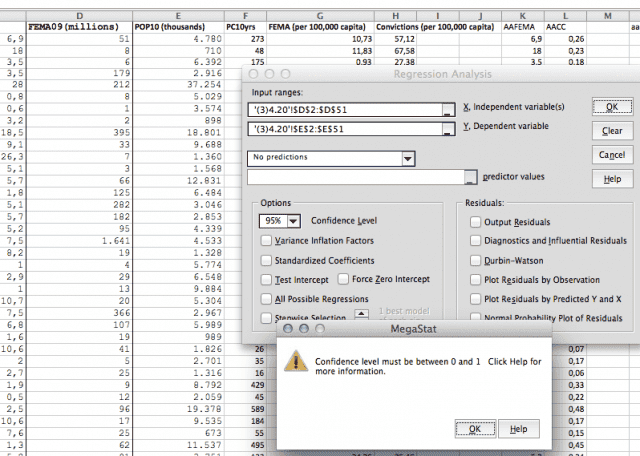
Anyone out there using Megastat? The course I am in requires using it/knowing how to use it for processes. Whenever I try to get a regression analysis it insists that I need to set a confidence level - I've tried different versions of typing 95%/0.95 into no avail, and I don't know what else in the data input it could be.
Screen_Shot_2018_07_31_at_17_09_27.png
 

Attachments

  • Screen_Shot_2018_07_31_at_17_09_27.png
    Screen_Shot_2018_07_31_at_17_09_27.png
    62 KB · Views: 722
Physics news on Phys.org
I am not familiar with that statistics package, but you should hit the down arrow at the right of the data entry and see what the valid options are. Select one of the available options.
It clearly says that it must be a number between 0 and 1. I would expect either 0.95 or 0.05 to be a valid entry, but maybe not one of the options available.
You could also check what information they give you when you click "Help"
 
I've done both of those things prior to writing on here, no changes or help there either. No matter which drop down option, an error occurs. I'll have to keep looking. Thank you for the answer.
 
Okay, the answer is to type "95" in the field!
 
  • Like
Likes   Reactions: FactChecker

Similar threads

  • · Replies 4 ·
Replies
4
Views
2K
  • · Replies 8 ·
Replies
8
Views
3K
  • · Replies 1 ·
Replies
1
Views
3K
  • · Replies 6 ·
Replies
6
Views
3K
  • · Replies 21 ·
Replies
21
Views
3K
  • · Replies 4 ·
Replies
4
Views
2K
Replies
27
Views
3K
  • · Replies 3 ·
Replies
3
Views
2K
  • · Replies 7 ·
Replies
7
Views
2K
Replies
15
Views
3K