Discover Visible Wavelengths for Neon Spectrum | Resources & Links Included

Click For Summary
SUMMARY

The discussion focuses on obtaining a concise list of visible wavelengths for neon, specifically seeking resources that link these wavelengths to a spectrum color chart. The NIST Atomic Spectra Database is recommended as a primary tool, with suggestions to filter results by wavelength range and minimum relative intensity to narrow down the output. Users can set a minimum relative intensity of 20,000 to retrieve a manageable number of significant lines, specifically 11 lines, which provides a focused dataset for analysis.

PREREQUISITES
  • Understanding of atomic spectra and visible wavelengths
  • Familiarity with the NIST Atomic Spectra Database
  • Basic skills in data manipulation using Excel
  • Knowledge of spectral intensity and its significance in data filtering
NEXT STEPS
  • Explore the NIST Atomic Spectra Database for neon wavelengths
  • Learn how to filter data by wavelength range and relative intensity
  • Research methods for linking wavelengths to color charts
  • Practice data sorting and analysis techniques in Excel
USEFUL FOR

Researchers, physicists, and educators interested in atomic spectra, particularly those focusing on neon and its visible wavelengths.

greswd
Messages
764
Reaction score
20
I need a list of neon visible wavelengths.

I wonder if any of you know of any good resources.

I've tried searching but sometimes I get too many numbers. I also need to link each number with the spectrum colour chart, but so far I can't find anything like that.

cos I don't want just want an image of the spectrum with a scale, I want the numbers. Thank you.

The only one I've managed to find is this:
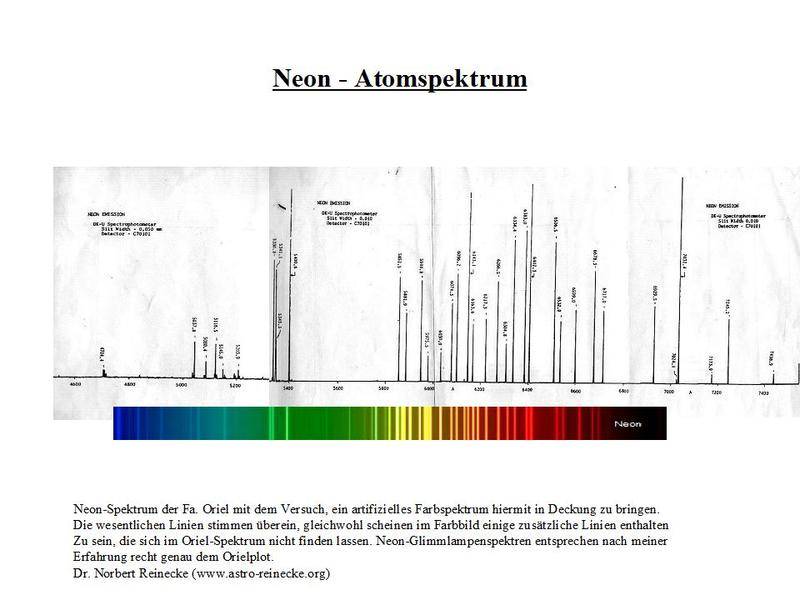
Neon%20-%20Atomspektrum.jpg


But the numbers are too blurry
 
Physics news on Phys.org
Vagn said:
Have you tried the NIST Atomic spectra database?

like I mentioned earlier, it throws out everything. too much info. i only need the visible ones.
 
greswd said:
like I mentioned earlier, it throws out everything. too much info. i only need the visible ones.
You can input a wavelength range.
 
You can also have it output to a text file that you could read into something like Excel. Then you can sort it however you want.
 
Vagn said:
You can input a wavelength range.

I did that too. Still too many. Maybe you can help me narrow it down?

I just need the wavelengths for these few lines:

neon_spectral_lines.png
 
You can also set the minimum relative intensity so that you just see the brighter lines. For example, if you set the minimum relative intensity to 20,000 (at the bottom), you just get 11 lines. This should be a small enough sample to get you started.
 
phyzguy said:
You can also set the minimum relative intensity so that you just see the brighter lines. For example, if you set the minimum relative intensity to 20,000 (at the bottom), you just get 11 lines. This should be a small enough sample to get you started.
thanks bro
 

Similar threads

  • · Replies 27 ·
Replies
27
Views
3K
  • · Replies 1 ·
Replies
1
Views
1K
  • · Replies 4 ·
Replies
4
Views
6K
  • · Replies 9 ·
Replies
9
Views
3K
  • · Replies 5 ·
Replies
5
Views
2K
  • · Replies 1 ·
Replies
1
Views
2K
Replies
2
Views
876
Replies
4
Views
2K
  • · Replies 15 ·
Replies
15
Views
3K
  • · Replies 3 ·
Replies
3
Views
1K