Our Beautiful Universe - Photos and Videos

Click For Summary
The discussion focuses on sharing the beauty of the Universe through photos, videos, and animations, emphasizing the aesthetic appeal of space alongside scientific information. Participants are encouraged to post clips and images that comply with mainstream scientific guidelines, avoiding fringe theories. Notable contributions include time-lapse videos from the ISS and clips related to NASA missions, such as the Dawn and New Horizons projects. The thread also highlights the emotional impact of experiencing the vastness of space through visual media. Overall, it celebrates the intersection of art and science in showcasing the wonders of the Universe.
  • #1,381
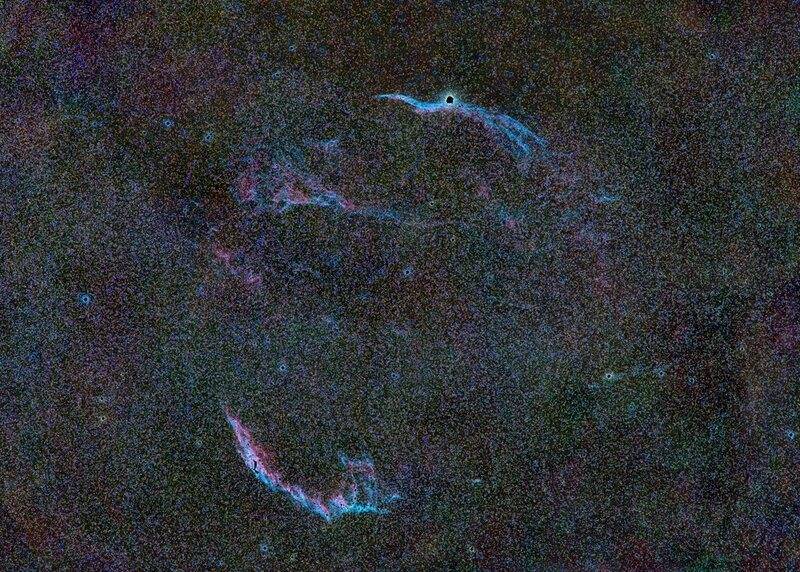
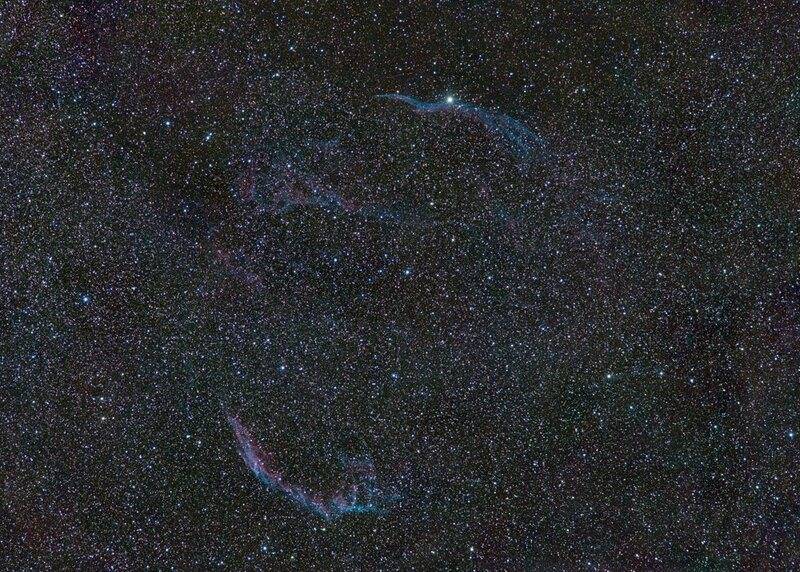
Veil nebula, just barely fits into the frame @ 400/2.8, 5 hrs:
veil-St-20137s.tiff (RGB)-1.jpg


And the same image after removing the bright stars and renormalizing:

Result of veil-St-20137s.tiff (RGB)-2.jpg
 
  • Like
Likes DennisN and Devin-M
Astronomy news on Phys.org
  • #1,382
NGC 6819 (in Cygnus), 1.5 hrs integration @ ISO 64 w/ 400/2.8 lens. Full frame:
NGC_6819-mod-St-5840s.tiff (RGB).jpg


and a 200% crop of the central region:

NGC_6819-mod-St-5840s.tiff (RGB)-3.jpg
 
  • Like
Likes berkeman, DennisN, Keith_McClary and 1 other person
  • #1,383
https://www.speakev.com/attachments/img-0939-gif.147805/
 
  • Like
  • Wow
  • Love
Likes TSny, DennisN, berkeman and 2 others
  • #1,384
A nice report on CBS 60 Minutes about the Ingenuity helicopter and the search for life on Mars, including short interviews with some engineers and scientists:

Perseverance rover, Ingenuity helicopter, and the search for ancient life on Mars (CBS 60 Minutes)
"Anderson Cooper reports on the nerve-wracking Mars landing of the rover Perseverance, the painstaking process of launching the tiny helicopter Ingenuity, and the extraordinary images the two have already sent back to Earth."
 
  • Like
Likes collinsmark
  • #1,385
DennisN said:
A nice report on CBS 60 Minutes about the Ingenuity helicopter and the search for life on Mars, including short interviews with some engineers and scientists:

Perseverance rover, Ingenuity helicopter, and the search for ancient life on Mars (CBS 60 Minutes)
"Anderson Cooper reports on the nerve-wracking Mars landing of the rover Perseverance, the painstaking process of launching the tiny helicopter Ingenuity, and the extraordinary images the two have already sent back to Earth."

"Video unavailable
The uploader has not made this video available in your country."
 
  • #1,386
Keith_McClary said:
The uploader has not made this video available in your country."
Yeah, it appears that @DennisN is a number of time zones ahead of us. :wink:
 
  • #1,387
Here's a portrait of my telescope attempting to image Saturn, a night or two ago, in spite of the neighborhood lights. (Image of Saturn to come -- more on that below.)

TelescopeActionShot_0.jpg


TelescopeActionShot_1.jpg


I've been victim to an unusual assault of various hardware failures recently on both my telescope and my main computer. Maybe it's the heat. I don't know, but many things seem to be falling apart lately.

Many of the various hardware/computer failures are affecting my ability to process that Saturn image. I've got about 2 terabytes of data that I have to sift through and process. I'm still making progress, but it's going slowly.
 
  • Like
Likes Keith_McClary, Devin-M and DennisN
  • #1,388
collinsmark said:
Here's a portrait of my telescope
What a beast! :smile:
collinsmark said:
Many of the various hardware/computer failures are affecting my ability to process that Saturn image. I've got about 2 terabytes of data that I have to sift through and process. I'm still making progress, but it's going slowly.
I hope your luck turns! :smile:
 
  • Like
Likes collinsmark
  • #1,389
A portion of Cygnus, showing NGC 6871, Sharpless 101 (Tulip nebula) and Cygnus X-1: full frame @ 400/2.8, about 4 hours @ ISO 64

g_cygni-St-41566s copy 2.jpg


And a 1:1 crop of Sharpless 101 (barely visible at bottom) and Cygnus X-1 (w/arrow). I probably need another 20+ hours to really pull out the nebula and hopefully start to visualize the black hole's bow shock (https://www.astrobin.com/355681/B/)

g_cygni-St-41566s copy 3.jpg
 
  • Like
  • Informative
Likes Keith_McClary, collinsmark, DennisN and 1 other person
  • #1,390
Saturn reached opposition a couple of days ago. Now is a good time to observe it if you haven't already. Here is my photo/image, captured last Monday night:

2021_08_03_rgb-compose_02.jpg

Saturn at opposition, year 2021.

General comments:

The seeing conditions were not terrific, but they were at least "good." As a matter of fact, San Diego hadn't had good conditions for astronomy for about a month. So the fact that seeing conditions were "good" at Saturn's opposition was good enough for me. Also, Saturn was a little lower in the sky compared to last year (due to where the ecliptic lines up). [Edit: nevermind about the altitude.] All that, combined with hardware failures involving the telescope and computers processing the data, I'll call the image a success.

I'll keep trying in the coming weeks if I can find another night with good seeing.

Equipment:

Meade 10" LX200-ACF
Tele Vue 4x Powermate
ZWO Atmospheric Dispersion Corrector (ADC)
Astronomik RGB filters
ZWO filter wheel
ZWO ASI290 MM monochrome camera
Laptop connected to camera and telescope running FireCapture software.

Total exposure time: 36 minutes
Midpoint timestamp: 2021-08-03 0809.2 UT.

Processing:

SER video files were processed with Autostakkert! software. Nine, 4-minute contiguous videos were ultimately chosen, three with the Red filter, three with the Green filter, and three with the Blue filter, for a total exposure time of 36 minutes. (Note: if you're using this as a guide and you have a big telescope, 36 minutes is way too long to capture any non-banded weather detail on Saturn. I sacrificed the possibility of that [not that I could capture it anyway with my telescope] in order to get more data to increase the signal to noise ratio [SNR]).

The R, G, and B images were then individually sharpened using Registax.

The images were then combined into their respective color channels in Gimp, where final adjustments were made.
 
Last edited:
  • Like
  • Love
Likes DennisN, bruha, Devin-M and 2 others
  • #1,391
Devin-M said:
(Milky Way animation)
Gorgeous animation!
Andy Resnick said:
I probably need another 20+ hours to really pull out the nebula and hopefully start to visualize the black hole's bow shock
That sounds cool, I wish you good luck!
collinsmark said:
Saturn reached opposition a couple of days ago. Now is a good time to observe it if you haven't already. Here is my photo/image, captured last Monday night
Very beautiful, and inspiring!
 
  • #1,392
Ultralazy astrophotography:

A couple of nights ago I had planned to photograph Jupiter and Saturn with my mirrorless camera attached to my cheap scope, but when I unpacked the T-mount adapter I could not fit it to the camera. :biggrin:
Somehow I had bought the wrong adapter, so I will get a new one.

As consolation, I very lazily photographed Saturn from indoors, through a window, using only my Sony A6000 camera and my vintage Tokina 400mm tele lens, to see if it worked.

It did!

But Saturn was very small of course, and the cropped photo below has a very low resolution.
But it was fun to see that it actually worked.
(I also had to edit out a window reflection of Saturn in the original photo :smile:)

Photo info: 1/100s shutter speed, ISO 1600, 11 stacked photos.
1a - Selec_g8_ap3_conv_m2.jpg
 
  • Like
Likes Andy Resnick, collinsmark and Bystander
  • #1,393
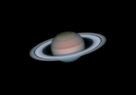
Here's another take on the Saturn at opposition, year 2021 image. It's from the same raw data as the image in my last post, but this time with more aggressive Registax wavelet sharpening. I think I like this one better.

2021-08-0813_2_rgb-compose_AggressiveSharpening.jpg


I've also inserted a thumbnail, if you prefer to view the image that way.
2021-08-0813_2_rgb-compose_AggressiveSharpening.jpg

As long as I'm posting, let me relate the hardware troubles I've had lately, and add a little commentary about lucky imaging techniques.

I'll start with the "lucky imaging." Lucky imaging takes a stupid amount of data. And by "stupid," I don't mean dumb. I mean "mind numbing," as in lucky imaging takes a mind numbing, ridiculous, unholy, stupid amount of hard-drive space.

The idea behind lucky imaging is to gather data as fast as humanly possible (well, as fast as the camera and computer combination is capable of gathering it). Then later when processing, ignore some of the "bad" frames -- maybe half of the total -- and still have enough left over for the central limit theorem to do its thing when warping and stacking. And you'll find that some runs are simply better than others due to general atmospheric seeing conditions. So you'll want to take many runs, and then choose the best run.

As an example, for this Saturn image I imaged over two nights, taking between 5 and 7, 36 minute runs per night. I averaged over a terabyte of hard-drive space per night. All that data has to be processed, at least a little bit, in order to determine which runs are better than the other runs. But even after weeding out the bad runs, it still means that a given image starts out as hundreds of megabytes gigabytes of raw data.

It also means that if you're imaging multiple nights in a row, you need to get that data off the laptop's hard-drive (technically an SSD) from the first night, in order to make room for the second night, because that drive will fill up. Realize that you don't necessarily have the option to space out your imaging sessions, because the planets and the weather won't wait. Sometimes that data needs to be processed, or at least transferred, immediately.

And processing the data isn't instant. AtuoStakkert! is a great program, but it takes a while. It's good to have a fast desktop computer, if you can.

Getting back to my story, after packing up after the first night of imaging, I immediately plugged a hard-wired ethernet cable into my laptop to start transferring some of that data over to Clubber Lang (my main desktop computer). But it was taking a long time. Like a really long time. The transfer speeds were like one tenth the speed of even a wireless connection, and here my network equipment is wired and Gigabit speed capable. What the hell?

I spent much of that night and the next day (during daylight hours), processing as much as a could on the laptop (which wasn't that much), deleting the raw data once processed, and using a 256 GB USB flash drive to transfer the rest of the data to Clubber Lang. But remember: stupid amount of data. Each run took hours to write to the USB flash drive, and another 45 minutes for Clubber Lang to read it. A Stupid, unholy, godforsaken amount of data. I had to swap the USB drive back and forth about a good half-dozen times. And that coming night was the only decent weather forecast for the foreseeable future, so that data had to get off the laptop one way or another.

So I finally got the data off my laptop by evening, and fired up the telescope for the next night of imaging. But the telescope was frozen, and wouldn't respond to the hand controller key-presses. I suppose I could do all the control from the laptop, since that was connected to the telescope anyway, but I'm old-school like that and like to use the hand-controller. About a year ago, I noticed the hand-controller's cable was becoming a bit frayed, and I fortunately thought ahead and scrounged up a new RJ11 cord and kept it handy, just in case. That did the trick, thank goodness. (If you look at the picture of my telescope a few posts ago, you can see the old hand-controller cable on the table, to the lower right, behind the laptop.)

Then the telescope wouldn't acquire a GPS fix. I still don't know if that problem is temporary or permanent. It's not a showstopper though; I just punched in the time and my location manually. From there I was able to finish out the second night of imaging (the image of Saturn in this post is from that night).

----------------

Then comes the network debugging. Running some speed tests, I was able to narrow down the culprit to my desktop computer, Clubber Lang (the laptop and router were fine). The weird thing was, the hardware LEDs and even the drivers indicate that the network is working perfectly and at Gigabit speeds, and yet Clubber Lang's actual network speed is slow as molasses in January. As a debugging step, I also switched over to WiFi, and even the WiFi was slow. That lead me to the conclusion that it wasn't a bad connection, but rather something above the physical layer.

But both the WiFi and the Ethernet are controlled by the Intel Z390 chipset on the motherboard. Maybe that was it. I reinstalled the driver from my motherboard manufacturer (ASUS). No change. I installed another version of the driver directly from Intel. No change. I got on Amazon and rush-ordered a PCIe Network card because I was losing faith in the motherboard's networking capability.

I remembered I had a USB WiFi dongle that I was using for another computer. So I grabbed that and plugged it into Clubber Lang, heard the Windows USB enumeration tone, but then decided I should plug it into a different USB port and did so. But this time no Windows USB enumeration tone. Did I unplug the dongle when it was writing to its internal storage? Did I zap it some sort of electrostatic discharge? It's not clear. All I know for sure is I bricked the USB dongle then and there. 'Just my luck. That debugging step would have to wait until the new network card arrived.

A couple of months ago Clubber Lang had an SSD failure. I didn't lose any important data, but I did have to do a fresh install of Windows 10. Maybe that had something to do with it, and I just haven't noticed the slow network until now (The network still worked, it was just slow). But I had already gone through Windows 10 network settings with a fine-toothed comb, and didn't see anything suspicious. But I figured I should re-install Windows 10 again, and see if that helps. So I did, (keeping my apps and files though). Still no change.

A couple days later the PCIe network card arrived, so I installed that. Once again, no change. Even with the new network card, everything was still slow. So the problem had to be either Windows or something running on top of Windows.

So I went through every program that I installed (recall I had to reinstall everything a couple of months ago) and came across a program called "GameFirst V" It's a program that ASUS packages with it's motherboard, right along side the chipset driver and motherboard tools. I had installed it a couple months ago, when doing the fresh Windows 10 install, without giving it any thought. After a little research I found it has something to do with networking, so I uninstalled it and Voila! Glory be, my network was fast again! :oldlove:

But good god, ASUS, really?! Apparently the sole purpose of this program is to cripple the networking capability of any non-gaming application that runs on the computer, even if you're not gaming. And that's its default behavior. And when installed, the program starts automatically on startup. Are you freaking kidding me?! Gaaah! I'm pulling my hair out as I write this.:headbang:

So if you've read this far, and you're looking for some sort of moral to the story, it's to be careful what programs you install, even if they come with your motherboard.

(Oh, I forgot to mention, a Display Port cable is on the fritz too. I ordered a new one along with the PCIe network card.)

Summary of recent casualties:
  • 2 TB NVMe SSD
  • Telescope's hand-controller cord
  • Telescope's GPS functionality (maybe; this is still uncertain.)
  • USB WiFi dongle
  • Display Port cable
  • My sanity
  • Hair

Newfound benefits:
  • I now have a spare network adapter card, just in case.
 
Last edited:
  • Like
Likes DennisN and Ibix
  • #1,394
collinsmark said:
And processing the data isn't instant. AtuoStakkert! is a great program, but it takes a while. It's good to have a fast desktop computer, if you can.
I just wanted to let you know there's a software called PIPP (Planetary Imaging PreProcessor), if you didn't know about it. It's a preprocessor (cropping etc.) that can be used to prepare the images/movies for stacking in e.g. AutoStakkert.

I'm actually going to buy a new computer soon (with a SSD harddrive), since my current, old computer has started to feel a bit sluggish.
 
  • Like
Likes collinsmark
  • #1,395
By the way, purely by chance I stumbled across was seems to be cosmic ray artifact in one of the frames of Saturn's raw data (it's just in the one frame). I'm guessing it's a muon formed from a cosmic ray interaction in the upper atmosphere. At least I think it is; I'm not sure. I'm not sure what path it would take to get to the sensor. There's a lot of mirrors and glass that the light passes through. I'm guessing muons might take a different path. Could it be terrestrial based (maybe from some nearby rocks or something)?

I'm lead to believe these sorts of things are not too terribly unusual in astrophotography. But, then again, I'm not sure. Has anybody else caught a cosmic ray, or cosmic ray decay product, or maybe some other decay product in one of their subs?

2021-08-03-0757_1-R-Sat_Exposure=11.9ms_Gain=529(off)_F_00016876_Muon_annotated.png
 
Last edited:
  • #1,397
Devin-M said:
24mm, f/2.8, 400iso, 117sec, full frame sensor, single shot, bortle 2, shasta county, northern california, usa

https://www.speakev.com/attachments/bb7abeb1-f8a3-4ad0-975f-2109406abff3-jpeg.147788/
You captured the "Kiwi"
did you know that ?

Edit: ...I have to assume you know what a kiwi is ? :smile: Dave
 
  • #1,398
davenn said:
I have to assume you know what a kiwi is ? :smile:
D74D6CCF-E43E-4358-A6EF-6F9019983173.jpeg
gettyimages-598311777.jpg
 
  • Love
  • Haha
  • Informative
Likes collinsmark, davenn, Keith_McClary and 1 other person
  • #1,399
I suspect there’s at least 2 geostationary satellites visible in this animation (in addition to several low Earth orbit satellites).
97C48FA9-7678-47FF-9DDB-BFDBEF7CC061.jpeg

https://www.speakev.com/attachments/img-0939-gif.147805/
 
  • Like
Likes collinsmark and Keith_McClary
  • #1,400
perhaps there’s 3…
5A39FE3E-587D-4699-826B-E7F2E2C70D72.jpeg
 
  • Like
Likes Keith_McClary
  • #1,401
There’s actually 2 3 4 geostationary or geosynchronous satellites inside the 3rd circle (lower, right), for a total of 4 5 6.

5a39fe3e-587d-4699-826b-e7f2e2c70d72-jpeg.jpg


https://www.speakev.com/attachments/img-0939-gif.147805/
 
Last edited:
  • Like
Likes collinsmark
  • #1,402
does anyone have a clue what this object is? I highlighted 2 objects with short white lines above the objects. The one on the left side I believe is a geostationary/geosynchronous satellite, the one on the right is dimmer, more diffuse, takes up a larger area, not traveling parallel to the geostationary satellite, seems to be moving a little quicker... these are 30 second exposures.

IMG-0939-2.gif
 
  • #1,403
Welp. This turned out better than expected. Taken Friday night from my back patio. Jupiter is at opposition this week (the peak of opposition is August 19-20th), so now's a pretty good time to get out and see it. Acquisition and processing details below.

2021-08-14-0720_3-Combined-RGB_Registax.jpg

Figure 1. Jupiter

Equipment:
Meade 10" LX200-ACF (telescope)
Tele Vue 4x Powermate (basically a 4x Barlow lens)
ZWO Atmospheric Dispersion Corrector (ADC)
ZWO filter wheel with Astronomik RGB filter set
ZWO ASI290MM (monochrome camera)

Software:
FireCapture
Autostakkert!
Registax
WinJUPOS
Gimp

Midpoint timestamp: 2021-08-14 07:20.3 UT
Total integration time: 9 minutes, 50% of frames kept, no normalization.

So, this image was taken on Friday night, but it really started by my throwing away all the data taken Thursday night, which was garbage due to inadequate dew management. About a terabyte of data down the drain. "I don't need a dew shield," I had said, "I've got my active dew heater strap going. That should be enough," I told myself. "I'll be fine." I was an idiot.

So anyway, back to Friday night. This time I set up with proper dew prevention (Fig. 2).
TelescopeWithDewShieldSmall.jpg

Figure 2. Telescope

Using FireCapture software, I took several sequences of alternating Red, Blue, and Green filters, 1 minute videos per filter, 18 minute sequences. In other words, I would capture RGBRGBRGBRGBRGBRGB, where each letter corresponds to a 1 minute, uncompressed video. I only planned on processing 9 minutes of video data, but these 18 minute sequences give me some flexibility to choose the best 9 minute window within any given sequence. In-between sequences I re-leveled the ADC and refocused. Five sequences were taken. About 2/3 of a terabyte of Jupiter data was captured that night.

By a stroke of luck, the best seeing for the evening occurred somewhat early (before Jupiter crossed the meridian), when the Great Red Spot (GRS) was visible. I'll take that!

All the videos were processed using Autostakkert! software, keeping 50% of frames, no normalization.

I should note that Autostakkert! gives the option to output an additional, sharpened image, with a "conv" in the filename, in addition to the regular, unsharpened image. Regardless of what Dylan O'Donnell might suggest for his workflow (), I don't suggest using the "conv" images in your subsequent processing; they are only a quick-and-dirty sharpening meant for evaluation purposes. Wavelet sharpening such as Registax does a much better job. That said, the Autostakkert! produced "conv" images are a great at helping you choose which outputs to keep and move forward with, and which outputs to throw away. My point is once you decide which files you want to keep (and by all means use the "conv" images to help you choose), don't use the "conv" images for further processing; use the unsharpened images moving forward.

So anyway, after evaluating all the processed data, I chose a 9-minute window in my third sequence, centered around 07:20.3 UT, for further processing. This window includes 3 images with the Red filter, 3 with the Green filter, and three with the Blue filter, alternating RGBRGBRGB.

I then individually sharpened the images using Registax wavelet sharpening, keeping the same settings for each of the three images of a given color filter, although the settings were different for different color filters. (To be clear, all the images are still black-and-white at this point, it's just that 3 images were taken with the Red filter, three with the Green filter, and three with the Blue). I was fairly aggressive on the sharpening in this step, knowing that the noise would be reduced a little bit in the upcoming WinJUPOS derotation combination step.

You may be asking, "why did you start with nine, 1 minute videos instead of three, 3 minute videos?" That's because Jupiter rotates really fast; it's day only about 10 hours. Any video over about a minute or so will begin to blur when processed due to Jupiter's rotation.

Once you have sharpened images you can use WinJUPOS to combine even a few more images together using WinJUPOS's "De-rotation of Images" tool. This tool warps indivdual images in a way that mimics Jupiter's rotation, and then combines them together into a single image, synchronized to the target timestamp.

By the way, recall that I used FireCapture to initially capture the raw data in the form of uncompressed videos. Firecapture has a setting that automatically puts the midpoint timestamp of each video in the filename, as part of the WinJUPOS file naming convention. I keep this same filename convention all through the processing (all through Autostakkert!, Registax, etc.) That makes it really easy to keep track of exact time the videos were taken, and WinJUPOS automatically sets up the time by reading the images' filenames. So using the WinJUPOS naming convension of all your files makes the workflow really easy. And again, it all starts with checking a single checkbox in FireCapture's filename settings.

If you're new to WinJUPOS, there is a bit of a learning curve, but then it's really easy to work with once you get the hang of it.

So at this point in the process, I now have three monochrome images, one taken with the Red Filter, one with the Green, and one with the Blue. I then used WinJUPOS's "De-rotation of R/G/B frames" tool to combine the three images into a single, color image. Note that I didn't really do any de-rotation in this step, since all the de-rotation was done in the previous step. But I did use this WinJUPOS tool to combine the three images into a single, color image.

In images submitted in my previous posts I used Gimp combine the three channels into a single, color image, but this time I used WinJUPOS. I think the team at WinJUPOS might have made some improvements in this area since last year, because it worked great this time.

Then I went back into Registax for a second time, and gave the color image one final round of wavelet sharpening.

To end the processing, I used Gimp for final adjustments (color curves, contrast, saturation, etc.)
 
Last edited:
  • Like
  • Love
Likes chemisttree, davenn, DennisN and 1 other person
  • #1,404
I think I figured out which satellites those actually are. I was shooting near Shingletown, CA at about 11:09pm on 7/28/21.

I suspect some of the satellites are:

-AT&T T-16 (Norad 44333)
NSF-2019-06-20-13-55-25-274.jpg


-SES-11 Echostar 105 (Norad 42967)
-11_manufactured_by_airbus-_photo_credit_airbus_ds.jpg


-Galaxy 30 (Norad 46114)
galaxy-30__1.jpg


-USA 134 (Norad 25019)
[classified payload]

-USA 227 (Norad 37377)
[classified payload]
 
Last edited:
  • Like
Likes DennisN and collinsmark
  • #1,405
I took this shot back on 7/28/21 along with the Milky Way photo. I didn't post it at the time because it didn't turn out nearly as good as I was hoping, but it's still interesting enough to post.

Some of the reasons it didn't turn out well...
-I waited until it was right next to the horizon because I was shooting the milky way earlier
-I under exposed the raw frames
-Since it was so poor anyway I didn't bother stacking or using the darks and flats I captured

Antares Nebula
300mm, f/4.5, 60 sec, 800iso, single shot, full frame sensor, moonless bortle 2, shasta county, northern california, usa

https://www.speakev.com/attachments/img-0955-jpg.148487/

https://www.speakev.com/cdn-cgi/image/format=auto,onerror=redirect,width=1920,height=1920,fit=scale-down/https://www.speakev.com/attachments/5596149-jpeg.148488/
 
Last edited:
  • Like
Likes DennisN and collinsmark
  • #1,406
collinsmark said:
Figure 1. Jupiter
Magnificient! That's probably the best "amateur" photo I've seen of the planet!
Congratulations! :partytime:

Edit: Maybe you could consider suggesting it to APOD?

collinsmark said:
About a terabyte of data down the drain. "I don't need a dew shield," I had said, "I've got my active dew heater strap going. That should be enough," I told myself. "I'll be fine." I was an idiot.
:biggrin:
 
  • Like
Likes collinsmark
  • #1,407
614AAF24-BEAC-45D6-9E53-0E9B2233299B.jpeg
 
  • Like
Likes DennisN and collinsmark
  • #1,408
Hello, I attach two Jupiter images (low and higher exp) and three Saturn images (one without and two with blue filter). SV Ebony eyepiece camera on Skywatcher telescope 1000 x 200 mm. o_O :smile:
 

Attachments

  • Capture_00093G.jpg
    Capture_00093G.jpg
    2 KB · Views: 150
  • Capture_00106GA.jpg
    Capture_00106GA.jpg
    3.2 KB · Views: 144
  • Capture_00017G2.jpg
    Capture_00017G2.jpg
    2.9 KB · Views: 160
  • Capture_00061G.jpg
    Capture_00061G.jpg
    2.1 KB · Views: 138
  • Capture_00078G.jpg
    Capture_00078G.jpg
    3.6 KB · Views: 159
  • Like
Likes DennisN and collinsmark
  • #1,409
wildfire smoke… it’s been impairing my observing conditions… the new normal is driving around with a portable air filter…

60270E67-FE4A-4419-B27D-58B730137E33.jpeg
https://www.speakev.com/attachments/smoke-gif.148647/
 
  • Like
Likes Keith_McClary and DennisN
  • #1,410
This is my most ambitious astrophotography project thus far: a time-lapse video of Jupiter.


Processing was essentially the same as most of my last posts, except this time, the back-end parts such as the WinJUPOS derotation, instead of being done just once, I had to do it hundreds of times. I do think the end result is worth the effort, but it did take a lot of effort. If you're looking to do this sort of thing yourself, make sure you enter into it with a lot of patience and free time. To be frank: it took a lot of work.

Also, YouTube's compression algorithm took a toll. Here's a frame from the video before sending it to YouTube, for comparison:

2021-08-16-0823_0-R-RGB-SharpenAI-softness.jpg


Equipment:
Meade 10" LX200-ACF (telescope)
Tele Vue 4x Powermate (basically, a Barlow lens)
ZWO Atmospheric Dispersion Corrector (ADC)
ZWO filter wheel
Astronomik RGB filter set
ZWO ASI290MM (camera)

Software:
FireCapture
AutoStakkert!
RegiStax
WinJUPOS
GNU Image Manipulation Program (GIMP)
Topaz Sharpen AI GarageBand (for the music)
CyberLink PowerDirector (to combine images into video format)

Acquisition and processing details:

Atmospheric seeing conditions were quite good that night, not necessarily excellent, but at least pretty darned good.

Exposure time was adjusted in FireCapture to keep the frame rate as reasonably high as possible, and the camera gain was adjusted to keep the right-most side of the histogram curve between 1/2 to 1/3 below saturation. 781 GB of raw data taken between 07:28 and 09:53, 2021-08-16 UT, in the form of 1 minute long SER video files, alternating between physical Red, Green, and Blue filters (438 files total, 146 for each color filter). About every ~18 minutes, I re-leveled the ADC and checked focus.

AutoStakkert! was used to process each SER file, producing a TIFF image file for each. 50% of frames were stacked, no normalization.

RegiStax wavelet sharpening was used on each TIFF file, to produce sharpened images.

WinJUPOS "De-rotation of images..." tool was used to produce frames for each 30 second real-time interval (from 07:28 to 09:53 timestamps) based on the nearest 3 (sometimes 4) images from the previous step, for a smooth progression, maintaining continuity. This was done separately for each of the physical Red, Green, and Blue filter sets of images.

WinJUPOS "De-rotation of R/G/B frames..." tool was used to combine the images in the previous step into color images. No actual "de-rotation" was done in this step, since that was done in the previous step, however, the tool was used to combine the three sets of monochrome images into a single set of RGB color imges.

Used python scripts (plugins) in GIMP to adjust contrast and saturation of all images from the last step. (I had to write the saturation one myself. Fortunately, I found the contrast one online, and used that as a reference.)

Topaz Sharpen AI was used for a final sharpening/denoise step. At this point, there were 291 color images, each corresponding to a real-time 30 second interval, ready for the video (9.7 seconds of video at 30 fps).

Threw together some music in GarageBand.

CyberLink PowerDirector (plus some text and stuff produced in GIMP) was used to make the video out of all of that.
 
Last edited:
  • Love
  • Like
Likes davenn, Andy Resnick, Devin-M and 2 others

Similar threads

  • · Replies 23 ·
Replies
23
Views
3K
  • · Replies 12 ·
Replies
12
Views
3K
  • · Replies 9 ·
Replies
9
Views
3K
  • · Replies 24 ·
Replies
24
Views
3K
  • · Replies 13 ·
Replies
13
Views
2K
  • · Replies 4 ·
Replies
4
Views
2K
  • · Replies 9 ·
Replies
9
Views
2K
  • · Replies 11 ·
Replies
11
Views
3K
  • · Replies 10 ·
Replies
10
Views
3K
  • · Replies 30 ·
2
Replies
30
Views
4K