Running a Github File on VS code for windows 10- File system problem (

Click For Summary
SUMMARY

The forum discussion centers around running the Python script `test_calculator.py` from the GitHub repository SimpleMC on Windows 10 using Visual Studio Code. The user encountered an ImportError related to the `mpi4py` package, indicating a missing DLL. The solution involved installing Microsoft MPI v10.1.2 and reinstalling `mpi4py`, which resolved the issue. This highlights the importance of ensuring all dependencies, especially non-Python ones, are correctly installed on Windows systems.

PREREQUISITES
  • Familiarity with Python programming and script execution
  • Understanding of package management in Python, specifically using pip
  • Knowledge of Microsoft MPI installation and configuration
  • Basic experience with Visual Studio Code as an IDE
NEXT STEPS
  • Install Microsoft MPI v10.1.2 from the Official Microsoft Download Center
  • Learn how to manage Python packages using pip on Windows
  • Explore troubleshooting ImportErrors in Python, particularly with external libraries
  • Research the differences in package management between Windows and Unix-based systems
USEFUL FOR

Python developers, data scientists, and researchers working with cosmological simulations or similar projects who need to run code from GitHub on Windows systems.

Arman777
Insights Author
Gold Member
Messages
2,163
Reaction score
191
I am doing a cosmological work and I need to run a code form this github page

https://github.com/ja-vazquez/SimpleMC

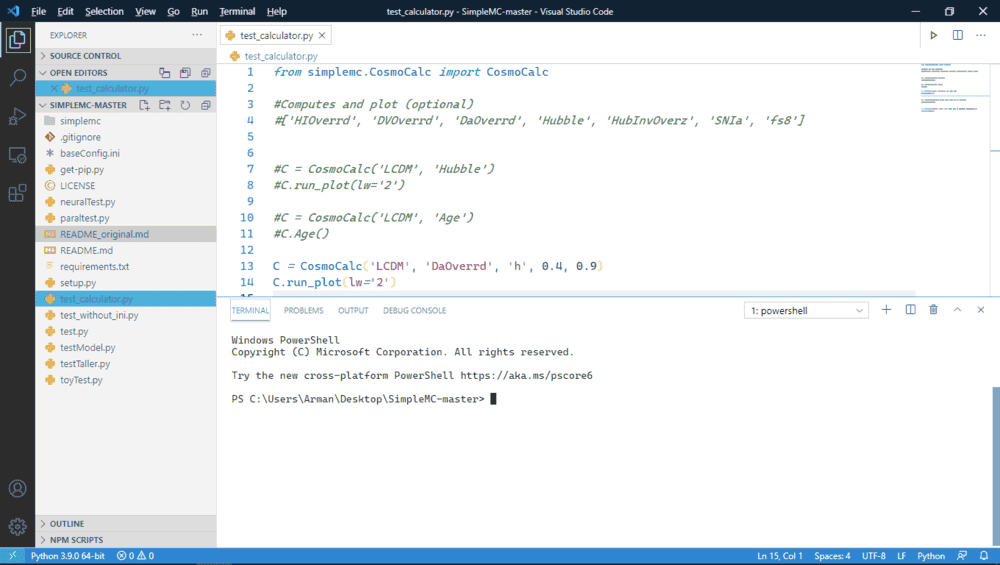
I download the whole repository as .zip file and I inserted into my desktop. Then I opened it through vs code and this is how it looks like
1614345556927.png
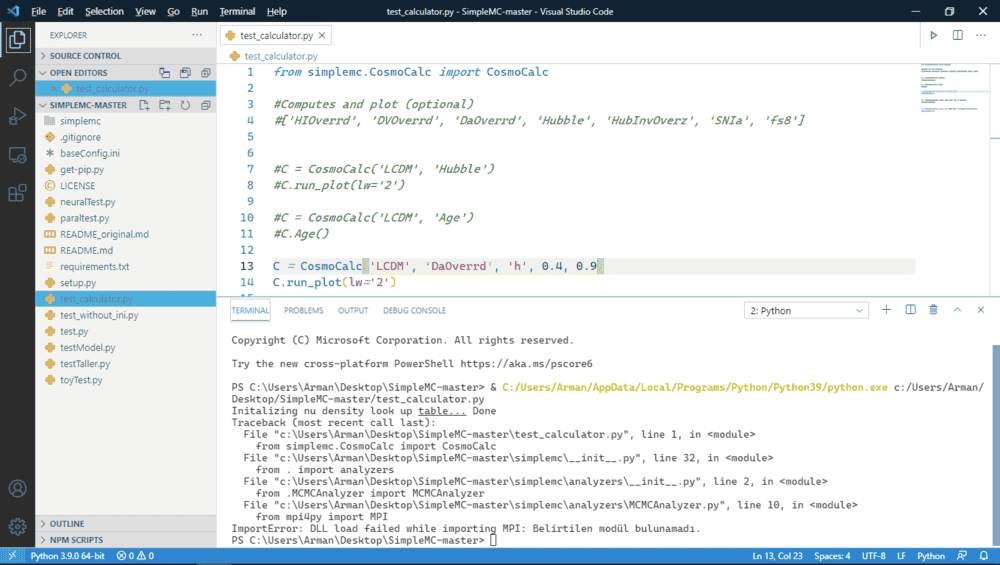
The problem is that, when I run `test_calculator.py` or any other file I get an error
1614345566116.png


Python:
  Initalizing nu density look up table... Done
    Traceback(most recent call last):
    File "c:\Users\Arman\Desktop\SimpleMC-master\test_calculator.py", line 1, in <module >
    from simplemc.CosmoCalc import CosmoCalc
    File "c:\Users\Arman\Desktop\SimpleMC-master\simplemc\__init__.py", line 32, in <module >
    from . import analyzers
    File "c:\Users\Arman\Desktop\SimpleMC-master\simplemc\analyzers\__init__.py", line 2, in <module >
    from .MCMCAnalyzer import MCMCAnalyzer
    File "c:\Users\Arman\Desktop\SimpleMC-master\simplemc\analyzers\MCMCAnalyzer.py", line 10, in <module
    >
    from mpi4py import MPI
    ImportError: DLL load failed while importing MPI: Belirtilen modül bulunamadı.

I guess there's something wrong with the file system. Such that the code cannot use ìmport` properly. But I don't know how to fix it. I am using Windows 10.

Does this happen for other system such as jupyter etc ?

In general how can I run this gihtub files ? Any ideas ? I don't have to use VS Code
 
Technology news on Phys.org
I don't use Windows, so maybe I am no help. But I'm surprised you need to download it and unzip it. On a Mac or Unix system you just type git clone https://<name of repository> and it just downloads and creates the whole directory. You mean this doesn't work on Windows?
 
phyzguy said:
I don't use Windows, so maybe I am no help. But I'm surprised you need to download it and unzip it. On a Mac or Unix system you just type git clone https://<name of repository> and it just downloads and creates the whole directory. You mean this doesn't work on Windows?
I guess not
 
Arman777 said:
I guess there's something wrong with the file system.

If "not having the file needed by the package you're importing" counts as "something wrong with the file system", then maybe. But I don't think that's what you meant.

Arman777 said:
Such that the code cannot use ìmport` properly.

Rather than a basic function of your Python interpreter being broken, which would mean you'd be unable to run any Python code at all, you should consider the far more likely possibility that you're simply missing a DLL that comes with the package mpi4py that the code you're running is trying to import.
 
phyzguy said:
You mean this doesn't work on Windows?

You have obviously mistaken Windows for an OS that works. :wink:

There might be a way to install git on Windows that gives you a command line program, but Windows generally wants you to use GUI programs (which its braindead single message queue implementation can then cause to lock up for reasons that should never happen on a so-called multitasking OS, but that's another rant...), and AFAIK most Windows users use whatever git interface is built into their IDEs.
 
  • Like
Likes   Reactions: phyzguy
Arman777 said:
I opened it through vs code

Doesn't vs code have a way to clone git repositories?
 
PeterDonis said:
that comes with the package mpi4py that the code you're running is trying to import.
I have already downloaded that package.
PeterDonis said:
Doesn't vs code have a way to clone git repositories?
I manage to do it but it does not make a difference

1614354195074.png


This problem to be happened before actually see this post that I have created before

https://www.physicsforums.com/threads/import-a-python-function-inside-a-subfolder.996640/

Let me ask my question in a different way. How you guys download and run this test_calculator.py to work ?
 
Arman777 said:
I have already downloaded that package.

Downloaded how? If you didn't install it, either using pip or whatever Windows installer the package's authors provided, it's probably not installed in a way that is usable.
 
PeterDonis said:
Downloaded how? If you didn't install it, either using pip or whatever Windows installer the package's authors provided, it's probably not installed in a way that is usable.
1614354685674.png
check this out
 
  • #10
On my Ubuntu laptop, I could run the file test_calculator.py properly. It even gave me this graph:

Figure_1.png

I cloned the repo using git clone https://github.com/ja-vazquez/SimpleMC.git --branch master --single-branch

In order to run the file, you need two packages: mpi4py and deap. You have already installed the former. Have you installed the latter?
 
  • #11
Wrichik Basu said:
On my Ubuntu laptop, I could run the file test_calculator.py properly. It even gave me this graph:

View attachment 278732

I cloned the repo using git clone https://github.com/ja-vazquez/SimpleMC.git --branch master --single-branch

In order to run the file, you need two packages: mpi4py and deap. You have already installed the former. Have you installed the latter?
Yeah I did.. I guess its due to using windows or VS code file system. I guess I need to use something else.
 
  • #12
Arman777 said:
Yeah I did.. I guess its due to using windows or VS code file system. I guess I need to use something else.
I don't think that the file system is the problem. The library mpi4py needs some other non-python dependencies. On Ubuntu, I had to install libopenmpi-dev before installing mpi4py. I thought that this problem is unique to Ubuntu, but a Google search using the keywords importerror dll load failed while importing mpi the specified module could not be found windows shows that you are not the only one facing this problem.
 
  • Like
Likes   Reactions: Arman777 and PeterDonis
  • #13
This GitHub issue for a different repo states the same error. A proposed solution in that same issue says you have to install Microsoft MPI. Give it a try.
 
  • Like
Likes   Reactions: Arman777
  • #14
Yes this seems to be the problem. Let me try
 
  • Like
Likes   Reactions: Wrichik Basu
  • #15
  • Like
Likes   Reactions: Wrichik Basu

Similar threads

  • · Replies 4 ·
Replies
4
Views
2K
  • · Replies 2 ·
Replies
2
Views
1K
  • · Replies 4 ·
Replies
4
Views
3K
Replies
3
Views
2K
  • · Replies 8 ·
Replies
8
Views
2K
  • · Replies 2 ·
Replies
2
Views
2K
  • · Replies 2 ·
Replies
2
Views
1K
  • · Replies 7 ·
Replies
7
Views
2K
  • · Replies 4 ·
Replies
4
Views
7K
  • · Replies 9 ·
Replies
9
Views
1K