Troubleshooting a Mini-Hifi Right Channel Audio Issue

Click For Summary
SUMMARY

The forum discussion focuses on troubleshooting a right channel audio issue in a Sharp XL-S10 mini-hifi system when using tape player connections as an AUX input. The user experienced a loud clicking noise from the right channel, attributed to improper connections and potential circuit design issues involving the IC201 amplifier. Recommendations include bypassing the IC201 chip, which is designed for magnetic tape signals, and injecting audio signals directly into the power amplifier stage for improved sound quality.

PREREQUISITES
  • Understanding of audio signal flow in mini-hifi systems
  • Basic knowledge of soldering and circuit connections
  • Familiarity with IC design and function, specifically IC201 in audio applications
  • Ability to read and interpret electronic schematics
NEXT STEPS
  • Research how to bypass audio amplifier ICs in consumer electronics
  • Learn about signal injection techniques in audio circuits
  • Study the specifications and functionality of the Sharp XL-S10 service manual
  • Explore alternative AUX input configurations for mini-hifi systems
USEFUL FOR

Audio engineers, hobbyists modifying mini-hifi systems, and anyone troubleshooting audio signal issues in consumer electronics.

richardstan
Messages
13
Reaction score
0
I know this is a physics forum, but someone may be able to help.

I have a mini-hifi that I want to use the tape player connections from as an aux in.

I've soldered a stereo cable into the connections on the hi-fi as shown in the electronic diagram. The left channel works fine, without any distortion. However, the audio for the right channel creates a horrible loud clicking noise like a bad connection whenever the volume is turned up and down or music plays. I assume this has something to do with the right tape head also being a record head, but when the hi-fi is in playback mode, i don't know why it would still make this noise?

Both left and right tape heads are to a voltage output VCC2 on IC201, which is just small voltage output of about 0.9V or something, as well as connecting to terminal 4 of L501.

PB2P and PB1P are the playback inputs for the IC201 AMP.

Both left and right audio input cables are coax cables. There is a single input wire covered with plastic, these are connected to the 4th and 3rd connector of the tape connector. This is then surrounded with what I am guessing is the return path of the circuit, which I have soldered to ground

Could someone tell me why this is and how to fix it?
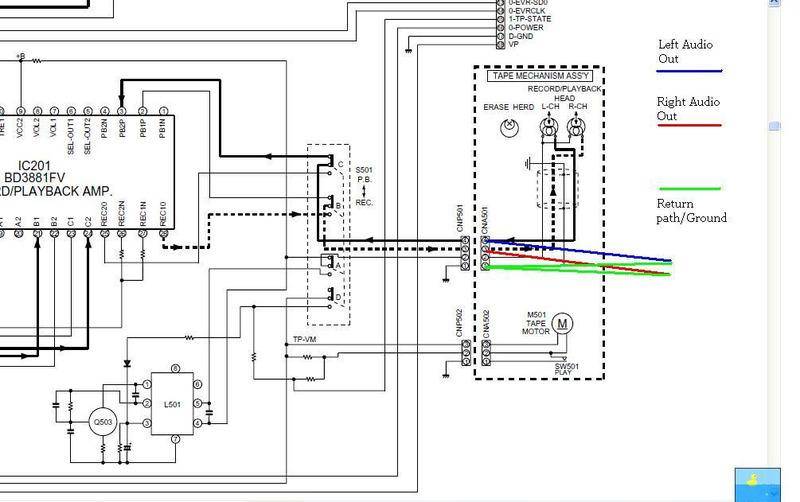
5789512555_d1a2c9257d_b.jpg
 
Engineering news on Phys.org
both heads are record or playback depending on the position of SW S501

ok obvious question ... I hope you are not trying to have the tape heads across the input at the same time as the external signal source ?

you need to use one or the other and if you still want to be able to use the tape heads, then you need to have a separate switch to switch them out of cct whilst you are using that for an AUX input.

cheers
Dave
 
I've completely removed the 4 pin connector for the tape ***. The audio in is now considerably quieter and there isn't any distortion when the pc audio level is at full. I think that that voltage amplified the signal but caused distortion somehow. I think there just isn't sufficient current being supplied from the pc audio out to the amp ic to overcome the high resistance so I won't bother with this project.
 
Last edited:
I suspect that because of the equalisation etc for tape playback that will be incorporated into that chip. That is probably what is causing the hassles.
you may be better off putting the AUX input in some where else, what immediately springs to mind would be at the outputs of the chip. if you really didnt want to use the tape anymore you could cut away the output pins so that the chip internals didnt upset the signal you were injecting at that point.

cheers
Dave
 
As it stands once the 4pin tape connector is removed, left and right audio channels go directly into pb1p and pb2p of the ic201. Are you suggesting I should bypass this chip as I is causing errors. If this isn't the case, do you think there would be a way of elevating the sound levels for the injected audio by altering some pins or something?
 
richardstan said:
As it stands once the 4pin tape connector is removed, left and right audio channels go directly into pb1p and pb2p of the ic201. Are you suggesting I should bypass this chip as I is causing errors. If this isn't the case, do you think there would be a way of elevating the sound levels for the injected audio by altering some pins or something?

Yes that's right. That chip is designed to take a signal specifically from a magnetic tape head, signal condition and amplify it appropriately.

Just reading your first post again, I noticed that you didnt comment on what the source of your new inputted signal was. Maybe you are trying to input music from a MP3 player of some description ?
If so the level from one of them is relatively high and there should be no prob amplifying it to a decent level :)
Let's see more of the circuit, particularly what there is between the output of that chip and the input of the main amplifier stage and see what I can suggest to you.

ohhh an afterthought ... this hifi has a tape player, what other music sources does it have ? it may be easier to modify one of them

cheers
Dave
 
I'll post more circuit pics soon or a service manual with details. It's also got a cd player and radio tuner. It's the sharp xl-s10.
 
I gave up trying to find a site where I could d/l the manual for free. wasnt going to pay for it when it wasnt my system ;)

its also got an AUX input on the rear so the user manual says so are you already using that for something else ? you could always switch that input between multiple sources

Dave
 
Here's a copy of the service manual. If you look at page 10, there's a Power amp before the speaker and headphone stage. I think this would be the best place to inject the signal, correct?

Just click on the document link.
http://cid-dbf36a87da2b59ef.office.live.com/embedicon.aspx/Public/sharp^_xl-s10h^_sm^_[ET].pdf
 
Last edited by a moderator:

Similar threads

  • · Replies 3 ·
Replies
3
Views
2K
  • · Replies 14 ·
Replies
14
Views
2K
  • · Replies 3 ·
Replies
3
Views
2K
Replies
2
Views
6K
  • · Replies 56 ·
2
Replies
56
Views
54K
  • · Replies 4 ·
Replies
4
Views
7K