Troubleshooting audio in Win 10

Click For Summary

Discussion Overview

The discussion revolves around troubleshooting audio issues in Windows 10, specifically addressing problems with sound output devices not being recognized or functioning properly. Participants share their experiences, suggestions, and potential solutions related to both hardware and software aspects of audio management in the operating system.

Discussion Character

  • Exploratory
  • Technical explanation
  • Debate/contested
  • Homework-related

Main Points Raised

  • One participant reports that their laptop does not play sound and indicates that no audio output devices are installed, despite attempts to update drivers.
  • Another suggests trying different headphones to see if that resolves the issue, questioning whether the built-in speakers are still functional.
  • Several participants share links to external resources for fixing audio issues, though one participant notes that a specific guide did not help them.
  • A participant mentions that closing the laptop instead of rebooting resolved their audio problem, suggesting that shutdowns may reset more than reboots.
  • Another participant discusses common driver collision issues in Windows, suggesting that a clean reinstall may be necessary for persistent problems.
  • One participant describes their experience with low volume from internal speakers while headphones work fine, indicating a potential hardware issue.
  • There are mentions of the headphone jack potentially causing issues due to oxidation or dirt, with suggestions to unplug and replug to resolve temporary problems.
  • Another participant points out that multiple volume controls in Windows may lead to situations where only system sounds are audible, recommending checking the volume mixer.
  • Some participants express frustration with recurring audio issues and share their methods for troubleshooting, including uninstalling and reinstalling drivers.

Areas of Agreement / Disagreement

Participants express a range of experiences with audio issues, with no clear consensus on a single solution. Various methods are proposed, but the effectiveness of these methods appears to vary among users.

Contextual Notes

Some participants note that the problems may be related to hardware issues, such as the headphone jack or internal speaker functionality, while others focus on software solutions involving drivers and system settings. There is also mention of the variability in how Windows handles audio devices, which may contribute to the confusion.

Who May Find This Useful

This discussion may be useful for Windows 10 users experiencing audio issues, particularly those seeking troubleshooting tips or sharing similar experiences with sound output problems.

DaveC426913
Gold Member
2025 Award
Messages
24,318
Reaction score
8,512
TL;DR
No audio output device detected
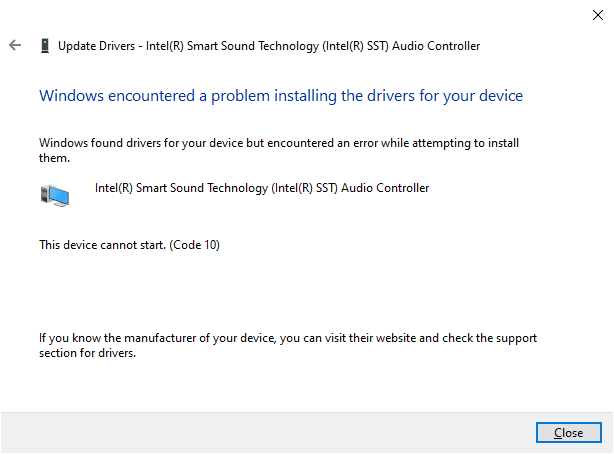
I opened up my lappie today to discover that it will not play any sound.
Says there are no audio output devices installed.
I went through various Google suggestions, including pointing it at my system drivers (Device Mgr > System Devices > Hi Def Audio > Update > Choose from my drive) and then rebooting, but no joy.

Suggestions?

Only thing that I've changed recently is a little more use of my headphones. It asks what kind of device I'e just plugged in. This has worked fine before, so I don't know how it's related to this problem.
1587224787608.png
 
Computer science news on Phys.org
try plugging a different pair in and perhaps that will jog its memory or give you more clues on what is going on.

Basically your lappie (I like that word) can't play thru its built in speakers anymore?

I guess if you was to add in the brand name then do you have a lennie or dellie or hughiep ?
 
Yeah.I found that first DriveEasy one and walked through it. Didn't help.

In the comments though, someone suggested closing the lappie rather than rebooting it. I tried that, though still had to reboot after, and it seems to be fine now.

Windoze magic.
 
  • Like
Likes   Reactions: davenn, hutchphd, berkeman and 1 other person
Yeah, sometimes you need to shutdown vs reboot as not everything gets reset in a reboot.

On PC-DOS machines I remember there was a memory location we could check and if it was non-zero (I think it had a numeric bit pattern) then we knew the machine had been rebooted and not shutdown. I imagine even in the day of these modern OS that feature is still hidden in there somewhere as a low-level ROM thing.

On my mac-mini recently, it loses the external monitor connection. Reboots don't fix the problem but shutdowns work.
 
  • Like
Likes   Reactions: berkeman and atyy
With windows, device-not-installed problems are common. For example, my Win10 laptop sometimes does not recognise my phone when I connect it for USB debugging. Whatever I do, it just won't work. After a few days, it comes back to normal.

Try rolling back drivers (if Windows allows you to do so). Also disable and then enable the driver.
 
If you just plug in headphones then it's likely using the built in sound card. If that has problems then you can try and re-install the driver but it might have a hardware fault also.

If you plugging in a headset via USB, it might have an on board sound card in the device which it's struggling to find. To narrow it down try removing your headset/headphone and see if you get any sound out of the built in speakers.
 
Yeah, I tried plugging the headphones back in, in case it was struggling to find them. No effect.

Anyway, it's magically fixed.
 
Windows has consistent driver collision issues, when an updated version of the driver tries to install and for various reasons makes the system confused about which version to use. People who have been around for awhile are always prepared for a clean reinstall. The truly paranoid virtualize everything.
 
  • #10
The audio on my HP laptop is perfectly OK using headphones, but the volume from the internal speakers has dropped to barely audible unless the sound is a Windows generated one, such as the test tones in the audio troubleshooter! After so many failed attempts to restore the volume I just use the headphones.
 
  • #11
Win10?
 
  • #12
DaveC426913 said:
Yeah, I tried plugging the headphones back in, in case it was struggling to find them. No effect.

Anyway, it's magically fixed.
That sounds annoyingly familiar. I've had it happen on both my HiFi amp and on this tower computer

The systems here use wireless headphones so the jacks aren't toyed with very much, and the applied voltage & load current are tiny.

The headphone jack has a built-in switch to disconnect the built-in speakers if the headphones are connected.

Over an extended time of no movement of the headphone plug/jack, the contacts seem oxidize or collect dirt and cause loss of one or both channels.

Unplugging/re-plugging cures it for many months.

Cheers,
Tom
 
  • #13
If you're dead certain it's the contacts, get contact cleaner
 
  • #14
jamesson said:
If you're dead certain it's the contacts, get contact cleaner
Naah, at least not right away. IMO it's not worth the aggravation and mess until plugging/unplugging a few times fails... or it's an often-repeatiig failure.
 
  • #15
Tom.G said:
That sounds annoyingly familiar. I've had it happen on both my HiFi amp and on this tower computer

The systems here use wireless headphones so the jacks aren't toyed with very much, and the applied voltage & load current are tiny.

The headphone jack has a built-in switch to disconnect the built-in speakers if the headphones are connected.

Over an extended time of no movement of the headphone plug/jack, the contacts seem oxidize or collect dirt and cause loss of one or both channels.

Unplugging/re-plugging cures it for many months.

Cheers,
Tom
For me, the problem occurred long after I had already removed the headphones (that had been working fine) - the next time I woke it up.

Putting it to sleep, rather than rebooting seems to have fixed it.
 
  • Like
Likes   Reactions: Tom.G
  • #16
If only Windows sounds play through then the rest are muted or turned down. Windows has multiple volume controls. If you right click on the speaker next to the time in the bottom right and click "Open Volume Mixer" you will see all available volumes. You will need any application you want to see the volume mixer for open before it will show up.

It sounds like everything is turned down apart from "System Sounds" if you can only hear Windows noises.
 
  • #17
This is a good post.
 
  • #18
I've seen this several times. Its basically Windows being stupid with drivers. I always go to device manager and uninstall the driver. Then restart computer. Be connected to internet so Windows can just install them again.
 
  • #19
I was bricking it when I booted up and had no sound. This fixed mine a week ago.
 
  • #20
omigosh said:
I was bricking it when I booted up and had no sound. This fixed mine a week ago.
That link lists 5 'methods' ##-## you didn't say what worked for you, or what the problem turned out to be . . .
 

Similar threads

  • · Replies 3 ·
Replies
3
Views
1K
  • · Replies 1 ·
Replies
1
Views
2K
  • · Replies 15 ·
Replies
15
Views
6K
  • · Replies 21 ·
Replies
21
Views
9K
Replies
2
Views
3K
  • · Replies 30 ·
2
Replies
30
Views
3K
  • · Replies 4 ·
Replies
4
Views
2K
Replies
7
Views
9K
  • · Replies 7 ·
Replies
7
Views
11K
  • · Replies 123 ·
5
Replies
123
Views
20K