Finding the stability of a system using Python code

Click For Summary
SUMMARY

The discussion focuses on using Python code to analyze a system's stability through temperature cycles and eigenvalue calculations. The provided code utilizes the odeint function from the SciPy library to solve ordinary differential equations (ODEs) based on user-defined parameters such as a11 and forcing. Participants seek clarification on whether to use unique coefficients from a provided table or default values for specific tasks. The importance of correctly implementing the Temperature_Cycles function in the model is emphasized for accurate plotting of results.

PREREQUISITES
  • Familiarity with Python programming and libraries such as NumPy and SciPy.
  • Understanding of ordinary differential equations (ODEs) and their numerical solutions.
  • Knowledge of matrix operations and eigenvalue calculations in Python.
  • Basic concepts of plotting data using Matplotlib.
NEXT STEPS
  • Learn how to implement and manipulate the odeint function from SciPy for solving ODEs.
  • Explore the use of NumPy for numerical computations and array manipulations.
  • Study eigenvalue problems and their significance in stability analysis using SymPy.
  • Investigate advanced plotting techniques in Matplotlib for visualizing dynamic systems.
USEFUL FOR

This discussion is beneficial for students and researchers in computational science, particularly those working on dynamic systems modeling, stability analysis, and numerical methods in Python.

appletree23
Messages
12
Reaction score
2
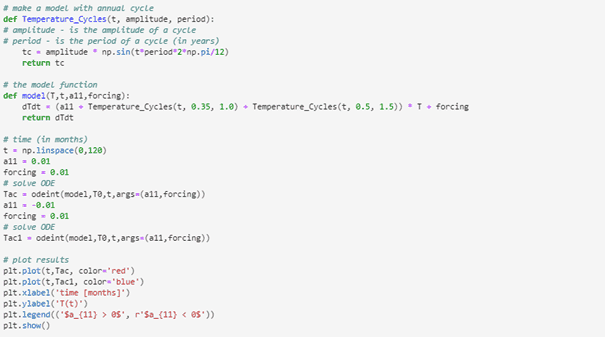
I'm given this code to plot the system for task 1 where my teacher have used some random numbers just to show us how the code can be used:
1612477667285.png


The code makes a plot that is given below:
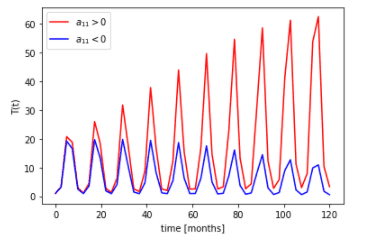
1612477711327.png

So my professor just gave us this code and plot without saying anything more. All the students in the class have also been given a set of unique coefficients in a table for a11, a12, a21,a22, forcing and amplitude and period for the second cycle it says. We are supposed to use this code above to solve a-c. What I don't understand is the line:

dT/dt=( a11+Temperature_Cycles(t, 0.35, 1)+Temperature_Cycles(t, 0.5, 1.5) )*T+forcing

I guess in a and b I set forcing=0 since they don't ask about adding forcing. But when making an annual cycle, should I just get rid of one of the Temperature_Cycles () in the line above? And when plotting the systems with two cycles, I must keep both Temperature_Cycles expressions?

I also struggle with understanding problem number 2:

1612478038426.png

I don’t understand if I should use the values a11=a12=a21=1 or my own unique value given from the table in both task 2a and 2b because it says table in the text above in brackets after the task defines the values. How do you guys interpret this?

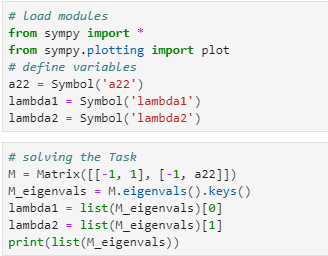
This is the code (down below) we are supposed to use to solve task 2 by the way if someone wonder. And my teacher says we are only supposed to change the values in matrix except from a22.
1612478328463.png
 
Technology news on Phys.org
Welcome to PF. Fun problem :smile:

It would help a lot if you could post each piece of code as text enclosed in "code tags" instead of as images. That would help us a lot in reviewing your code, and quoting any issues that we see.

To enclose your text code in code tags, just use these tags without the spaces:

[ code ]
<< your text here >>
[ /code ]

So it looks like this:

Code:
#include <stdio.h>
int main() {
   // printf() displays the string inside quotation
   printf("Hello, World!");
   return 0;
}
 
berkeman said:
Welcome to PF. Fun problem :smile:

It would help a lot if you could post each piece of code as text enclosed in "code tags" instead of as images. That would help us a lot in reviewing your code, and quoting any issues that we see.

To enclose your text code in code tags, just use these tags without the spaces:

[ code ]
<< your text here >>
[ /code ]

So it looks like this:

Code:
#include <stdio.h>
int main() {
   // printf() displays the string inside quotation
   printf("Hello, World!");
   return 0;
}
Ok, I will do that and post the individual codes right away. I'm not able to edit my orginal post, so I have to post the code under here
 
  • Like
Likes   Reactions: berkeman
The code for the first task:

Python:
# make a model with annual cycle
def Temperature_Cycles(t, amplitude, period):
# amplitude - is the amplitude of a cycle
# period - is the period of a cycle (in years)
    tc = amplitude * np.sin(t*period*2*np.pi/12)
    return tc

# the model function
def model(T,t,a11,forcing):
    dTdt = (a11 + Temperature_Cycles(t, 0.35, 1.0) + Temperature_Cycles(t, 0.5, 1.5)) * T + forcing
    return dTdt

# time (in months)
t = np.linspace(0,120)
a11 = 0.01
forcing = 0.01
# solve ODE
Tac = odeint(model,T0,t,args=(a11,forcing))
a11 = -0.01
forcing = 0.01
# solve ODE
Tac1 = odeint(model,T0,t,args=(a11,forcing))

# plot results 
plt.plot(t,Tac, color='red')
plt.plot(t,Tac1, color='blue')
plt.xlabel('time [months]')
plt.ylabel('T(t)')
plt.legend(('$a_{11} > 0$', r'$a_{11} < 0$'))
plt.show()

And the plot for the second task is these three cells:

Python:
# load modules
from sympy import *
from sympy.plotting import plot
# define variables
a22 = Symbol('a22')
lambda1 = Symbol('lambda1')
lambda2 = Symbol('lambda2')

Python:
# solving the Task
M = Matrix([[-1, 1], [-1, a22]])
M_eigenvals = M.eigenvals().keys()
lambda1 = list(M_eigenvals)[0]
lambda2 = list(M_eigenvals)[1]
print(list(M_eigenvals))

In this cell above one shall change the values in the matrix, except for a22. And the last cells makes the plot to solve the task:

Python:
# plot the results: 1st eigenvalue red, 2nd - blue
p = plot(re(lambda1), re(lambda2), line_color='red', title='Eigenvalue (real part)', xlabel=r'$a_{22}$', ylabel=r'$\lambda_{1,2}$', show=False)
p[1].line_color = 'blue'
p.show()
p = plot(im(lambda1), im(lambda2), line_color='red', title='Eigenvalue (imagery part)', xlabel=r'$a_{22}$', ylabel=r'$\lambda_{1,2}$', show=False)
p[1].line_color = 'blue'
p.show()
 
  • Like
Likes   Reactions: berkeman
@berkeman . Do you have any suggestions regarding the first task?
 

Similar threads

  • · Replies 2 ·
Replies
2
Views
4K
  • · Replies 10 ·
Replies
10
Views
3K
  • · Replies 28 ·
Replies
28
Views
4K
Replies
2
Views
3K
  • · Replies 4 ·
Replies
4
Views
6K
  • · Replies 1 ·
Replies
1
Views
2K
  • · Replies 3 ·
Replies
3
Views
2K
  • · Replies 2 ·
Replies
2
Views
2K
  • · Replies 2 ·
Replies
2
Views
2K
  • · Replies 14 ·
Replies
14
Views
2K