How does tikx help to create graphs for a car's motion?

  • Context: MHB 
  • Thread starter Thread starter karush
  • Start date Start date
  • Tags Tags
    Physics
Click For Summary
SUMMARY

The discussion focuses on using the TikZ package to create graphs representing a car's motion, specifically its position, velocity, and acceleration over time. The car accelerates from rest to a speed of 2 m/s in 8 seconds, travels 60 meters at constant speed, and then decelerates to a stop over a total distance of 180 meters. Participants clarify the need for multiple graphs, suggesting that the x-axis should represent time while the y-axis should represent distance, velocity, or acceleration, depending on the graph type. The conversation highlights the importance of accurately depicting constant acceleration and the resulting graph shapes.

PREREQUISITES
  • Familiarity with TikZ package for LaTeX
  • Understanding of basic kinematics concepts (position, velocity, acceleration)
  • Knowledge of graphing techniques for motion analysis
  • Ability to interpret and manipulate mathematical equations related to motion
NEXT STEPS
  • Explore advanced TikZ features for creating dynamic graphs
  • Learn about kinematic equations and their applications in motion analysis
  • Research the graphical representation of acceleration and its implications in physics
  • Investigate how to effectively visualize motion diagrams using LaTeX
USEFUL FOR

This discussion is beneficial for physics students, educators, and anyone interested in visualizing motion through graphing techniques using LaTeX and TikZ. It is particularly useful for those studying kinematics and seeking to enhance their understanding of motion graphs.

karush
Gold Member
MHB
Messages
3,240
Reaction score
5
from tikx package...

\begin{tikzpicture}
%\draw (0,5) -- (6,5);
\draw [thick] (0,1) -- (18/2,1);
\node at (0,.8){0};
\node at (18/2,.8){180};
%\draw (1,5)--(1,4)--(2,4);
%\node at (1.5,4.1) {v};
\draw[step=.45 cm,gray,very thin,dashed]
%(-6,0)
grid (18/2,8);
\end{tikzpicture}

At $t=0$ a car is stopped at a traffic light
When the light turns green, the car starts to speed up,
and gains speed at a constant rate until it reaches a speed of $2 m/s \, 8s$ after the light turns green.
The car continues at a constant speed for $60m$
Then the driver sees a read light up ahead at the next intersection, and starts slowing down at a constant rate.
The car stops at the red light, $180 m$ form where it was at $t=0$a) Draw $x_t, v_t,$ and $a_t$ graphs for the motion of the car
b) In a motion diagram show the position, velocity and acceleration of the car.ok I am tying to do this using tikx but got stuck at the beginingI currently have the x-axis at distance but maybe it shud be time
we might need actually 2 graphs

I think the velocity is really $2m/s$
$v = v_0 + at$
then
$\dfrac{v-v_0}{t}=a$
so
$\dfrac{2m/s}{s}=\dfrac{2m}{s^2}=a$
 
Last edited:
Physics news on Phys.org
If you have the x-axis as distance, what is the y-axis? I suggest that the x-axis be t, time, and the x-axis be the distance traveled in that time. At constant speed the graph is a straight line, at constant acceleration or deceleration the graph is a parabola.
 
Last edited by a moderator:
why would a constant acceleration be a parabola the slope doesn't change

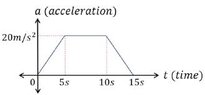
I think one graph a-t would be the one I should do

here is sample from another problem from google images

View attachment 9249
 

Attachments

  • a-t.jpg
    a-t.jpg
    4.8 KB · Views: 131
Last edited:
The speed of $2\text{ m/s}$ seems rather low for a car — it's a walking speed.

Either way, we could for instance draw the graphs like this:
\begin{tikzpicture}[xscale=0.2,yscale=.04]
%preamble \usepackage{amsmath}
\draw[xstep=2,ystep=10,lightgray,very thin] (0,-20) grid (150,260);
\draw (8,0) -- (8,250) (38,-18) -- (38,100) (150,-18) -- (150,180);
\draw[thick,->] (0,0) node[below] {0 s} -- (8,0) node[below] {8 s} -- (38,0) node[below] {38 s} -- (150,0) node[below] {150 s} -- (155,0) node
{$t$};
\draw[thick,->] (0,0) -- (0,260);
\draw[ultra thick,red] (0,250) -- node[below] {$a_t$} (8,250) node
{$0.25\text{ m/s}^2$} -- (8,0) -- (38,0) -- (38,-18) node
{$-0.018\text{ m/s}^2$} -- (150,-18);
\draw[ultra thick,cyan] (0,0) -- node[above left] {$v_t$} (8,100) node
{2 m/s} -- (38,100) node[above] {2 m/s} -- (150,0);
\draw[ultra thick,blue] (0,0) parabola (8,8) node[above left] {8 m} -- node[above left] {$x_t$} (38,68) node[below right] {68 m} parabola bend (150,180) (150,180) node[above] {180 m};
\end{tikzpicture}​
 
yeah I think it should be 20 not 2
the copy was really hard to read...
that would make the horizontal lite blue line to 8+3=11s
wow thanks for the graph

ok I did this fot a-t and 20 m/s

\begin{tikzpicture}[xscale=0.2,yscale=.04]
%preamble \usepackage{amsmath}
\draw[xstep=2,ystep=10,lightgray,very thin] (0,0) grid (40,160);
%\draw (8,0) -- (8,250) (38,-18) -- (38,100) (150,-18) -- (150,180);
\draw[thick,->]
(0,0) node[below] {0 s}
-- (16,0) node[below] {8 s} -- (11*2,0) node[below] {11 s} -- (15*2,0) node[below] {15 s} -- (40,0) node
{$t$};
\draw[thick,->] (0,0)-- (0,100) node
{20 m/s} -- (0,160);
%\draw[ultra thick,red] (0,250) -- node[below] {$a_t$} (8,250) node
{$0.25\text{ m/s}^2$} -- (8,0) -- (38,0) -- (38,-18) node
{$-0.018\text{ m/s}^2$} -- (150,-18);
\draw[ultra thick,cyan] (0,0) -- node[above left] {$v_t$} (8*2,100) -- (11*2,100) -- (30,0);

% \draw[ultra thick,blue] (0,0) parabola (8,8) node[above left] {8 m} -- node[above left] {$x_t$} (38,68) node[below right] {68 m} parabola bend (150,180) (150,180) node[above] {180 m};
\end{tikzpicture}

clueless about the speed parabola​
 
Last edited:

Similar threads

  • · Replies 2 ·
Replies
2
Views
2K
  • · Replies 2 ·
Replies
2
Views
2K
Replies
1
Views
1K
  • · Replies 3 ·
Replies
3
Views
1K
  • · Replies 2 ·
Replies
2
Views
3K
Replies
6
Views
2K
  • · Replies 49 ·
2
Replies
49
Views
4K
  • · Replies 1 ·
Replies
1
Views
3K
  • · Replies 5 ·
Replies
5
Views
2K
  • · Replies 6 ·
Replies
6
Views
3K