Java Reading and printing a string in Java - Assigning values

Click For Summary
The discussion revolves around a Java coding issue where a user needs to input a word and a number on a single line, which should then be processed to output in the format "word_number". The original code provided by the user fails to read input correctly, resulting in the display of initial variable values instead of user input. Key points include the importance of using the Scanner class methods, specifically next() for reading strings and nextInt() for integers. The conversation emphasizes the need for proper input handling and suggests reviewing Java documentation for better understanding. Ultimately, the user successfully resolves the issue by implementing the correct methods for reading input.
obeying
Messages
8
Reaction score
0
A user types a word and a number on a single line. Read them into the provided variables. Then print: word_number. End with newline. Example output if user entered: Amy 5
Result should read as: Amy_5
import java.util.Scanner;

public class SpaceReplace {
public static void main (String [] args) {
Scanner scnr = new Scanner(System.in);
String userWord = "";
int userNum = 0;

/* Your solution goes here */

return;
}
}-----------------------------------------------------------------------------------------------------------------------------------------

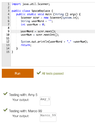
What I have so far this is the code and the product I'm getting:

Am I missing a step in the codes? userNum is an int and not a String, could this be why my setup isn't working? Thank you to all who reply and assist.View attachment 5885
 

Attachments

  • Screen Shot 2016-08-13 at 6.42.50 PM.png
    Screen Shot 2016-08-13 at 6.42.50 PM.png
    23.8 KB · Views: 357
Technology news on Phys.org
It appears to me that you aren't prompting the user for input, and so when the output is displayed you have the initial values for the two variables being displayed.
 
The problem statement does not seem to say anything about prompting the user. But Mark is right that OP's program does not read anything.

OP, you should read your textbook or Java documentation about reading methods in the [m]Scanner[/m] class. These methods include [m]next()[/m] for reading the next word and [m]nextInt()[/m] for reading the next integer.
 
Evgeny.Makarov said:
The problem statement does not seem to say anything about prompting the user. But Mark is right that OP's program does not read anything.

OP, you should read your textbook or Java documentation about reading methods in the [m]Scanner[/m] class. These methods include [m]next()[/m] for reading the next word and [m]nextInt()[/m] for reading the next integer.

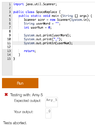
Thanks! This is the solution I achieved after applying the correct code/nextInt.

View attachment 5890
 

Attachments

  • Screen Shot 2016-08-15 at 6.49.14 PM.png
    Screen Shot 2016-08-15 at 6.49.14 PM.png
    28.2 KB · Views: 381
Learn If you want to write code for Python Machine learning, AI Statistics/data analysis Scientific research Web application servers Some microcontrollers JavaScript/Node JS/TypeScript Web sites Web application servers C# Games (Unity) Consumer applications (Windows) Business applications C++ Games (Unreal Engine) Operating systems, device drivers Microcontrollers/embedded systems Consumer applications (Linux) Some more tips: Do not learn C++ (or any other dialect of C) as a...

Similar threads

  • · Replies 8 ·
Replies
8
Views
2K
  • · Replies 4 ·
Replies
4
Views
5K
  • · Replies 2 ·
Replies
2
Views
13K
  • · Replies 2 ·
Replies
2
Views
12K
  • · Replies 2 ·
Replies
2
Views
2K
  • · Replies 3 ·
Replies
3
Views
1K
  • · Replies 2 ·
Replies
2
Views
2K
  • · Replies 0 ·
Replies
0
Views
593
Replies
8
Views
2K
  • · Replies 2 ·
Replies
2
Views
2K