Transfer equations from MathType to Matlab

  • Context: MATLAB 
  • Thread starter Thread starter Bababarghi
  • Start date Start date
  • Tags Tags
    Mathtype Matlab
Click For Summary

Discussion Overview

The discussion centers on the process of transferring equations from MathType to MATLAB, exploring the compatibility and functionality of pasting equations into MATLAB function files versus the command window. Participants examine the steps involved and the errors encountered during this process.

Discussion Character

  • Technical explanation
  • Debate/contested

Main Points Raised

  • One participant describes the steps to copy and paste equations from MathType into MATLAB, noting an error encountered when doing so.
  • Another participant questions whether the equations are being pasted into a function file or the command window, suggesting that the error may be related to the context of the paste.
  • A participant clarifies that function files (.m files) and the command window have different functionalities, emphasizing that equations in function files are treated as comments when prefixed with a % symbol.
  • There is a discussion about the implications of comments in MATLAB and how they affect the interpretation of pasted equations.
  • One participant mentions that when publishing the file, comments are converted to HTML, allowing the equations to be displayed, which raises questions about the purpose of comments in this context.
  • A later reply states that equations cannot be imported as usable functions from MathType and must be manually written out or defined as anonymous functions, clarifying the limitations of the process.

Areas of Agreement / Disagreement

Participants express differing views on the functionality of pasting equations into MATLAB, with some agreeing on the limitations of comments in function files while others question the implications of these limitations. The discussion remains unresolved regarding the best approach to handle equations from MathType.

Contextual Notes

Participants highlight the subtle differences between function files and the command window in MATLAB, noting that the handling of comments and equations varies between these contexts. There is also mention of the need for manual input of equations, which may depend on specific use cases.

Bababarghi
Messages
5
Reaction score
0
Hi,

Has anyone tried to paste equations from MathType into Matlab ? I follow every step described here

With MathType and MATLAB you can:
  • Add an equation to a MATLAB function file: Copy-and-paste equations and expressions from MathType directly into a MATLAB function file as TeX. How-to
  • Copy equations from MATLAB function files: Copy-and-paste an equation from a MATLAB function file into MathType and it should be ready to edit or use in a new document. How-to
Step-by-step instructions:
Setting up MathType to work with MATLAB
  1. From MathType's Preferences menu choose: Cut and Copy Preferences. On the Macintosh, this will be in the Preferences flyout of the MathType menu.
  2. In the MathML or TeX group, choose: LaTeX 2.09 and later. Click OK.
  3. Choose Format > Inline Equation. Note that MATLAB versions R2010b and earlier are only capable of display (or block) equations, but the steps below will be easier if you'll set MathType's Inline Equation property regardless.
Add an equation to a MATLAB function file
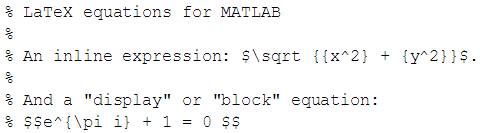
  1. To annotate a function file with an equation, begin the line with a % symbol.
  2. After creating the equation in MathType, select and copy it.
  3. Paste it into the function file. For example:
    09539720037936320288.jpg

  4. You'll need to manually insert an extra $ before and after a block equation, as you see in the example.
Depending on which MATLAB "contributed files" you may have installed, there may be additional capability for MathType equations, such as MathML.
No matter what equation I paste, I get following error in Matlab:

Code:
|
Error: The input character is not valid in MATLAB statements or expressions.
 
Physics news on Phys.org
Are you pasting into a function file? That looks like an error you would get in the command window.
 
kreil said:
Are you pasting into a function file? That looks like an error you would get in the command window.
No I am not. I thought Matlab deals with the concept the same. Was I wrong?
An equation definition in command window should be as valid as the same equation annotation in *.m file. (perhaps o_O)
 
Yes they are subtly different in a few ways. Function files (.m files) are reusable, so you can write a function and save it and call it whenever you want. You can't do that with functions you define at the command line (well you can make an anonymous function, but it only lasts as long as you have the variable around...). You can add comments to your code, debug, and do other stuff with function files that you can't do in the command window as well.

Since these equations you want to write are really comments in a file, entered as LaTeX code, entering them in the command window doesn't really work.
 
kreil said:
Since these equations you want to write are really comments in a file, entered as LaTeX code, entering them in the command window doesn't really work.

Well, that's the point. As you know adding a % character in the beginning of line in MATLAB, will make that entire line as a comment and will be ignored for interpretation purpose. How above sample code is suppose to define me a function where the function definition line is already commented out? That's my question I am afraid.
 
When you publish the file it turns the comments into HTML, so the equation renders and displays. The m file is just the source file that is published to produce the final output
 
hmmm. I see.

Thanks for all the replies Kreil.
 
Just to be clear, you can't import an equation into MATLAB as a usable function from math type. You'll need to do that manually by writing the expression out (or use an anonymous function). The functionality described above allows you to display the same equation as an annotation.

Please let me know if that answers your question
 

Similar threads

  • · Replies 3 ·
Replies
3
Views
8K
  • · Replies 2 ·
Replies
2
Views
4K
  • · Replies 11 ·
Replies
11
Views
4K
  • · Replies 1 ·
Replies
1
Views
9K
  • · Replies 1 ·
Replies
1
Views
4K
  • · Replies 3 ·
Replies
3
Views
3K
  • · Replies 8 ·
Replies
8
Views
14K
  • · Replies 3 ·
Replies
3
Views
4K
  • · Replies 6 ·
Replies
6
Views
4K
  • · Replies 1 ·
Replies
1
Views
2K