rootone
- 3,398
- 945
Some weird behaviour with graphics card initially, and my sound volume control disappeared.
OK after second reboot though ...
OK after second reboot though ...
Imager said:The bad news, my second display (HP 2159m) no longer works
 ...What should I do now?
HyperTechno said:I have windows 8 in my PC right now. So to get the WIN 10 update , should I update to WIN 8.1? The problem is, I searched the store to get the windows 8.1 update and for some reason it states that my system cannot be updated to WIN 8.1... I'm using genuine windows 8 Professional and my system is up to date. But I haven't got any windows 8.1 update nor windows 10 notification...
HyperTechno said:And If I not be able to upgrade online, the only alternative I have is to download the ISO from somewhere and install it via a USB drive because I do not have a DVD ROM...Do all the motherboards support booting via Pen Drives? Once I tried installing windows 8 via a USB drive but was unsuccessful, that nothing was shown up in the bios screen to accept the booting via the Pen drive......
First, do you have the folder "$Windows.~BT" under C:\ (or the corresponding drive Windows is installed on) -- turn hidden items on to see it come up?HyperTechno said:Can some one come up with a solution please?
Nope!StevieTNZ said:First, do you have the folder "$Windows.~BT" under C:\ (or the corresponding drive Windows is installed on) -- turn hidden items on to see it come up?
Do you have this icon on your computer?HyperTechno said:Nope!
I don't find that...
If the above icon is not showing, try downloading the ISO from https://www.microsoft.com/en-us/software-download/windows10 and mount the ISO (double click it) while still running Windows 8 (i.e. don't put it on a USB and boot from that; click setup.exe after mounting the ISO). See if that works.HyperTechno said:Can some one come up with a solution please?
Interestingly, after a few more updates, the game works again!russ_watters said:Now I'm having a new problem: Yesterday, I was playing an old Windows XP game, Command and Conquer Tiberium Wars. In the middle of the game, it disappeared and a survey from MS popped-up asking me about my experience upgrading. I thought the game had just minimized, but nope, it was gone. And now when I try to start it, I get an error message from the game, telling me it isn't compatible with my OS! Compatibility mode doesn't help.
If you signed up for the upgrade, more than likely Windows 10 has downloaded and is trying to install (but failing -- check Windows Updates).sappho.poiesis said:Hey everyone I signed up for the upgrade, I haven't downloaded it yet but now I'm afraid of the following, I have a lot of games installed, will I be able to. Play them on Windows 10? I'm afraid I won't :(
Oh okay - I assumed you were posting from the computer in question. I guess not.sappho.poiesis said:No it hasn't, since I currently have no Internet connection :/
StevieTNZ said:Oh okay - I assumed you were posting from the computer in question. I guess not.
There is no such icon either. Alright, I'll try the ISO... Thank you so much...StevieTNZ said:Do you have this icon on your computer?
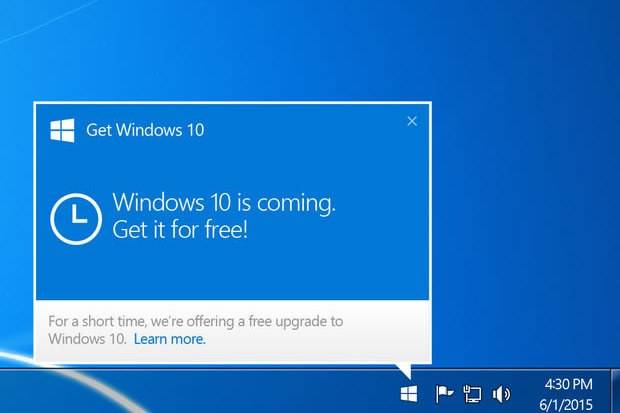
If the above icon is not showing, try downloading the ISO from https://www.microsoft.com/en-us/software-download/windows10 and mount the ISO (double click it) while still running Windows 8 (i.e. don't put it on a USB and boot from that; click setup.exe after mounting the ISO). See if that works.
MS_Windows10 said:Finally, we will access, disclose and preserve personal data, including your content (such as the content of your emails, other private communications or files in private folders), when we have a good faith belief that doing so is necessary to:
comply with applicable law or respond to valid legal process, including from law enforcement or other government agencies;
protect our customers, for example to prevent spam or attempts to defraud users of the services, or to help prevent the loss of life or serious injury of anyone;
operate and maintain the security of our services, including to prevent or stop an attack on our computer systems or networks; or
protect the rights or property of Microsoft, including enforcing the terms governing the use of the services - however, if we receive information indicating that someone is using our services to traffic in stolen intellectual or physical property of Microsoft, we will not inspect a customer's private content ourselves, but we may refer the matter to law enforcement.
Thanks for your help... I'll look into it...enorbet said:ping HyperTechno -
For you and anyone else who does not have an optical drive in addition to a BIOS with no viable "Boot USB drive" option there is a lifesaver called PLOP bootloader. It can be installed to anything, even a floppy, and when engaged it appends boot code via a simple bootloader and provides a configurable menu selection including "Boot USB". Explanation can be found here ====> https://www.plop.at/en/bootmanager/intro.html

You could upgrade, and if you find your games don't work revert back to your previous OS.sappho.poiesis said:I still don't know what to do :/
StevieTNZ said:You could upgrade, and if you find your games don't work revert back to your previous OS.