Calculate car angle on the route

  • Thread starter Thread starter hladon
  • Start date Start date
  • Tags Tags
    Angle Car
Click For Summary
SUMMARY

The discussion focuses on calculating the angle of a car's movement vector relative to the OX or OY axis in a 2D scene using recorded track points. The initial approach employed the arccos function, which proved inadequate due to excessive point density causing erratic image rotation. The recommended solution is to utilize the atan2 function, specifically alpha = atan2(x2 - x1, y2 - y1), to achieve a stable angle calculation and eliminate the "dancing" effect of the car image.

PREREQUISITES
  • Understanding of 2D coordinate systems
  • Familiarity with trigonometric functions, specifically arccos and atan2
  • Basic programming skills in a language that supports atan2
  • Knowledge of vector mathematics and movement representation
NEXT STEPS
  • Research the implementation of the atan2 function in your specific programming language
  • Explore vector mathematics to enhance understanding of movement calculations
  • Investigate techniques for smoothing movement in graphical applications
  • Learn about optimizing performance when handling dynamic point density in 2D graphics
USEFUL FOR

Game developers, graphics programmers, and anyone involved in simulating movement in 2D environments will benefit from this discussion.

hladon
Messages
1
Reaction score
0
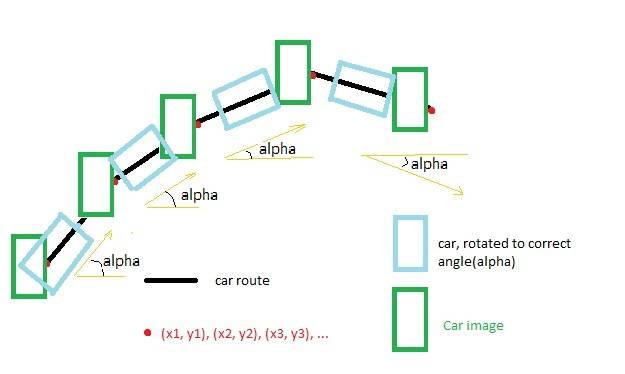
I am writing program which displays car movement through recorded track(2D scene).
So I have a set of points (x1, y1), (x2, y2), (x3, y3), ...(xk, yk), from which track consits.
And I need to calculate an angle between car movement vector and OX(or OY) axis so I could then rotate car image on correct angle.

y_e5bc1c3d.jpg
I tried to solve this problem by calculating angle as follows:

alpha = arccos( Yk / sqrt( x^2 + Yk^2 ) );

But looks like it's not the perfect solution, because if there is too much points on the route then car image starts dancing through the route:)

I also tried to compute angle between surely different points but the quantity of route points on the square inch can be changed dynamically in my program so if there's too much points, car is rotated really awful :(


Any ideas?
Thanks in advance,
Alex
 
Last edited:
Physics news on Phys.org
hladon said:
alpha = arccos( Yk / sqrt( x^2 + Yk^2 ) )
How did you arrive at this equation?
Show your coordinate reference on your drawing.
Have you computed the angles manually? Do they match your expectations? Please show these results.

But looks like it's not the perfect solution, because if there is too much points on the route then car image starts dancing through the route:)
Not very descriptive. Are you saying it works fine with fewer points? How many?
 
Hi hladon! Welcome to PF! :smile:

arccos won't do everything you want it to do.

To calculate alpha properly, you need the atan2 function, which is defined in the various computer languages.
There are 2 variants of it: the atan2(x,y) function and the atan2(y,x) function.

Since you didn't specify which computer language you use, you'll have to find out which variant you have.

To calculate the proper angle, you'll need something like:

alpha = atan2(x2 - x1, y2 - y1)

That should stop the dancing! :wink:


Cheers! :smile:
 

Similar threads

  • · Replies 6 ·
Replies
6
Views
2K
Replies
7
Views
3K
Replies
2
Views
5K
  • · Replies 6 ·
Replies
6
Views
2K
Replies
5
Views
2K
Replies
1
Views
4K
  • · Replies 2 ·
Replies
2
Views
3K
  • · Replies 14 ·
Replies
14
Views
4K
Replies
5
Views
2K
  • · Replies 15 ·
Replies
15
Views
4K