Firewall parameters and PC security

Click For Summary

Discussion Overview

The discussion revolves around concerns related to PC security, specifically focusing on firewall parameters, antivirus effectiveness, and network vulnerabilities. Participants share experiences and seek clarification on how to ensure their systems are secure from unauthorized access, particularly in the context of using WLAN and understanding network traffic.

Discussion Character

  • Exploratory
  • Technical explanation
  • Conceptual clarification
  • Debate/contested
  • Mathematical reasoning

Main Points Raised

  • One participant expresses confusion about unauthorized control of their PC despite having antivirus software and a firewall installed, questioning the effectiveness of these measures.
  • Another participant notes that automated tools are constantly scanning for vulnerabilities across devices, including IoT, suggesting that the issue is widespread.
  • Questions arise about the meaning of terms like "route," "incoming," and "outgoing" in the context of firewall settings.
  • Participants discuss internal IP addresses (e.g., 192.168.x.x) and their implications for network security, suggesting that such addresses typically indicate internal communication.
  • There is a discussion about identifying potentially harmful network connections using commands like netstat, with examples provided to illustrate typical local and foreign addresses.
  • Clarifications are made regarding port numbers, likening them to phone lines for software communication, and the significance of certain addresses being considered harmless.
  • One participant shares a detailed explanation of various IP addresses and their meanings, emphasizing the importance of understanding network configurations.
  • Concerns are raised about how to check for unauthorized devices on a WLAN, with suggestions to access router settings for connected devices.
  • Participants share experiences and caution against changing router settings without proper knowledge, highlighting the potential risks involved.
  • There is a question about whether the term "firewall" refers to software (like Windows Firewall) or a physical device, indicating a need for clarification on types of firewalls.

Areas of Agreement / Disagreement

Participants generally agree on the importance of understanding network security and the potential vulnerabilities present in home networks. However, there are multiple competing views regarding the effectiveness of firewalls and antivirus software, as well as differing interpretations of network traffic and security measures.

Contextual Notes

Limitations include varying levels of understanding among participants regarding network configurations and security measures, as well as the potential for misinterpretation of network traffic data. There are unresolved questions about the effectiveness of different security tools and the implications of various network addresses.

Who May Find This Useful

This discussion may be useful for individuals concerned about their personal computer security, those interested in understanding network configurations, and users seeking to enhance their knowledge of firewalls and antivirus software.

mech-eng
Messages
826
Reaction score
13
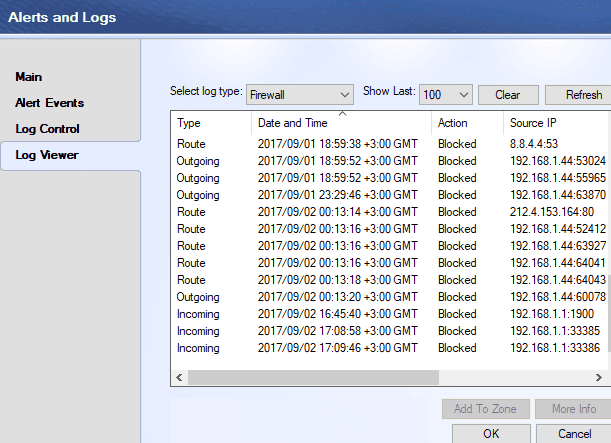
I have installed an antivirus. But one day I realized that somebody was controlling my PC. Then I installed a firewall. There are lots of attempts to my PC which are recoreded in the firewall. I am very confused why these are happening and who they are, how they can do this. Now some important performance issues has started. I do not know if I am secure. How can I completely be sure that my PC is secure? Can firewall stop all attempts. I did a full system scan. There is no virus or other malevolent programs. I use a wlan and how can I be sure if somebody is in my wlan? How can I close dangerous ports through which they can access to my PC?
firewall.png
 
Computer science news on Phys.org
There are automated tools scouring every internet computer looking for vulnerabilities to capitalize on. You are not the only one with this problem. Hackers are even targeting IoT devices, everything that's connected. It's information they can use or sell to whoever wants it.

Here's a partial index of tools and techniques:

https://flipboard.com/@ir0nf1re/security-tools,-scripts-and-tricks-3mcelheiz
 
  • Like
Likes   Reactions: mech-eng
What are those "route", "incoming", "outgoing" in the firewall?

Thank you.
 
Addresses that start with 192.168.1 are addresses within your own LAN and usually are nothing more than internal software communication. From the limited image, it looks like there are two main computers on your network - one at 192.168.1.1 and one at 192.168.1.44. I suspect that 1.1 is your computer but that's just a guess. Incoming and outgoing traffic within the network is generally harmless. The 30,000 and 60,000 range port numbers are a little odd but it's hard to know without more info.
 
  • Like
Likes   Reactions: jedishrfu, fluidistic and mech-eng
http://whatismyipaddress.com/ip/8.8.4.4 is a Google address so that looks harmless. The http://whatismyipaddress.com/ip/212.4.153.164 address is a server in the Czech Republic and port 80 means that you're connected through a web browser so it looks like you were viewing a page at a site hosted in that country when you took the screenshot.
 
  • Like
Likes   Reactions: WWGD, jedishrfu and fluidistic
If you want a good scare, open up a dos window and type netstat -ano. This will show a (long) list of all of the current network connections on your computer. Any entries that have 0.0.0.0, 127.0.0.1, [::], or a variation of 192.198.1.x for the local and foreign address (both sides) are typically harmless. If you get something outside of that, you might have something to worry about.

Here are a few examples from running it on my computer.
Code:
Proto   Local Address         Foreign Address   State         PID
TCP      192.168.1.151:61057  192.168.1.155:22  ESTABLISHED   1475
TCP      127.0.0.1:27017      0.0.0.0:0         LISTENING     1475
TCP      [::1]:27017          [::]:0            LISTENING     1475

192.168.1.151 is my computer's LAN address and 192.168.1.155 is the LAN address of my Raspberry Pi. I have a Putty session connected to the Pi which allows me to run commands on the Pi in a DOS-like window. My Putty session is connected through port 22. The second and third lines reference a tunnel that I've established through the Putty session that allows me to talk to a Mongo database on the Pi as if it was located on my computer. Mongo listens to requests on port 27017. The PID (Process ID) is the same PID that you would see if you open your computer's Task Manager and select the Processes tab.
 
Last edited:
  • Like
Likes   Reactions: WWGD, jedishrfu and mech-eng
It seems we will be able to solve these issues.
Borg said:
Any entries that have 0.0.0.0, 127.0.0.1, [::], or a variation of 192.198.1.x for the local and foreign address (both sides) are typically harmless. If you get something outside of that, you might have something to worry about..

How can we know that those addresses are harmless?
Borg said:
Here are a few examples from running it on my computer.

Proto Local Address Foreign Address State PID
TCP 192.168.1.151:61057 192.168.1.155:22 ESTABLISHED 1475
TCP 127.0.0.1:27017 0.0.0.0:0 LISTENING 1475
TCP [::1]:27017 [::]:0 LISTENING 1475

What are other numbers after coming 151, i.e 61057 and after 155, i.e 22?

Borg said:
192.168.1.151 is my computer's address and 192.168.1.155 is the address of my Raspberry Pi.
. How can you understand this?

Thank you.
 
mech-eng said:
How can we know that those addresses are harmless?
It is software that is running on your computer (0.0.0.0, 127.0.0.1, [::], or a variation of 192.198.1.x as described above). As long as they aren't trying to connect to the internet through ports other than 80 (unencrypted) or 443 (encrypted), they're most likely harmless.
mech-eng said:
What are other numbers after coming 151, i.e 61057 and after 155, i.e 22?
Those are port numbers. If you're not familiar with them, they are like phone lines that are connected to your computer. For example, if you and another person in your house wanted to talk on the phone to different people at the same time, you would need two phone lines (or ports) to the outside world. Your computer is continually establishing and destroying these ports based on the needs of the software running on it. Yes, even for internal communication.
mech-eng said:
How can you understand this?
Lots of experience. :oldwink: I'm not a sysadmin but I do end up dealing with it a lot.
 
Last edited:
  • Like
Likes   Reactions: jedishrfu
Here are a few more details that I've run across over the years.

ADDRESSES:
0.0.0.0 A non-existent or dummy address that does not refer to anything on the network

127.0.0.1 "Self." That is the current computer (some programs are structured to talk with other parts of themselves using this conceptual net address)

192.168.x.x Defines a private network that does not connect to the Internet; it is usually the default for your home (private) network for instance

192.168.1.1 The default address for the router on your home network

192.168.1.x The individual devices on your home network. Usually these default address assignments are done by your router

There is another private address range that may be used instead of 192.168.x.x. I don't remember for sure, but I think it starts with 24.?.x.x
mech-eng said:
I use a wlan and how can I be sure if somebody is in my wlan?
First read the manual/documentation for your router. Somewhere the will be a reference about "Connected Devices" or similar.

Open your browser and in the URL field (address field) enter 192.168.1.1 This is the default address to talk to your router. (If that doesn't work, find the dafault address in the documentation.)

DO NOT CHANGE ANY ROUTER SETTINGS WITHOUT BEING SURE YOU KNOW WHAT YOU ARE DOING AND WHY. It is possible to disable connectivity between the router and all of your devices. If this happens you will have to find in the documentation how to reset the router to "Factory Defaults" and then start over and reconfigure your network. This may require a wired (Ethernet) connection to the router.

Once the router screen shows up in the browser, follow the documentation instructions to display the Connected Devices. This will display a list of all the devices that are currently connected to your network. If something is shut off or out of range it will not be listed.

Well that's about all I know about it, and... Welcome to the maddening inner workings of networks. You can spend years looking into all the non-obvious details, most of us don't bother.
 
  • #10
Tom.G said:
Once the router screen shows up in the browser...
It might look something like this... my old one.

Basic Setup.JPG

As Tom.G said...
It is possible to disable connectivity between the router and all of your devices. If this happens you will have to find in the documentation how to reset the router to "Factory Defaults" and then start over and reconfigure your network.
I did... just once, though. .. lol
 
  • #11
Tom.G said:
0.0.0.0 A non-existent or dummy address that does not refer to anything on the network
0.0.0.0 can indicate a local listener.

When you say firewall, do you mean the "Windows Firewall" or a physical device (The firewall is not the same object as the switch/router.) My firewall looks like this
https://4.imimg.com/data4/BP/AB/MY-638336/cyberoam-firewall-box-500x500.jpg
 
  • #12
newjerseyrunner said:
0.0.0.0 can indicate a local listener.

When you say firewall, do you mean the "Windows Firewall" or a physical device (The firewall is not the same object as the switch/router.) My firewall looks like this
https://4.imimg.com/data4/BP/AB/MY-638336/cyberoam-firewall-box-500x500.jpg
I presumed the firewall would be software, rather than a physical device.
 
  • #13
mech-eng said:
I have installed an antivirus. But one day I realized that somebody was controlling my PC. Then I installed a firewall. There are lots of attempts to my PC which are recoreded in the firewall. I am very confused why these are happening and who they are, how they can do this. Now some important performance issues has started.

Unfortunately I can only guess what's happening in your logs without the "Destination IP" column being in view, it's like trying to understand a phone conversation by hearing one side of the conversation. I'll try to address the different questions you posed separately.

I do not know if I am secure. How can I completely be sure that my PC is secure?
You can never really be sure a networked computer is secure, the best you can do is take precautions, the most important being to backup you data to an external disk and store it somewhere else safe. See these recommendations from US-CERT for more internet security best practices.

Can firewall stop all attempts.
A firewall will stop all attempts that are not configured to be allowed. I suggest NOT changing the default rules if you don't have a solid grasp on network routing and packet filtering.

I use a wlan and how can I be sure if somebody is in my wlan?
You should be able to see all connected Wi-Fi devices when you log into your access point or router.

How can I close dangerous ports through which they can access to my PC?
You have done this by installing a software firewall.

What are those "route", "incoming", "outgoing" in the firewall?

ZoneAlarm doesn't define what the connection type "Route" means in their documentation, but I can infer it to mean connections your computer recently initiated, but are no longer valid for various reasons.

"Incoming" means connections initiated by another system to your computer.

"Outgoing" means connections initiated by your computer to another system.
 
  • Like
Likes   Reactions: mech-eng

Similar threads

  • · Replies 3 ·
Replies
3
Views
2K
Replies
17
Views
7K
  • · Replies 12 ·
Replies
12
Views
3K
  • · Replies 6 ·
Replies
6
Views
2K
  • · Replies 15 ·
Replies
15
Views
6K
Replies
2
Views
1K
  • · Replies 15 ·
Replies
15
Views
2K
  • · Replies 24 ·
Replies
24
Views
4K
  • · Replies 7 ·
Replies
7
Views
2K
Replies
2
Views
2K