Python Flow Chart For a 'for' Loop In Python

  • Thread starter Thread starter Taylor_1989
  • Start date Start date
  • Tags Tags
    Flow Loop Python
Click For Summary
The discussion centers on creating effective flowcharts to complement Python code. Participants highlight the challenge of representing concepts like loops clearly, noting that flowchart conventions can vary by programming language. While there are established shapes for different functions—such as rectangles for processes and diamonds for decisions—there's flexibility in how flowcharts are drawn and what information is included. The conversation emphasizes that flowcharts should serve the creator's understanding and communication needs, suggesting that the level of detail should reflect the intended audience and purpose. Some participants advocate for a concise, one-page flowchart approach to maintain clarity, while others argue for the necessity of more detailed representations for complex processes. The use of pseudocode is also mentioned as an alternative to flowcharts, appealing to those who prefer a textual representation of algorithms. Overall, the discussion underscores the balance between standardized flowcharting practices and personal expression in coding documentation.
Taylor_1989
Messages
400
Reaction score
14
I am currently learning python and to understand the my code fully and to make notes I am trying to draw flow charts to compliment my code. My issue is I am not sure what to put in the flow charts or really how to represent them as clearly as possible. I have done a google search but I am bit confused as there seem to be :

1. More that one way to represent a simply for loop flow wise

2. Seem language dependent i.e python flow chart is different to C flow chart for example

My current attempt
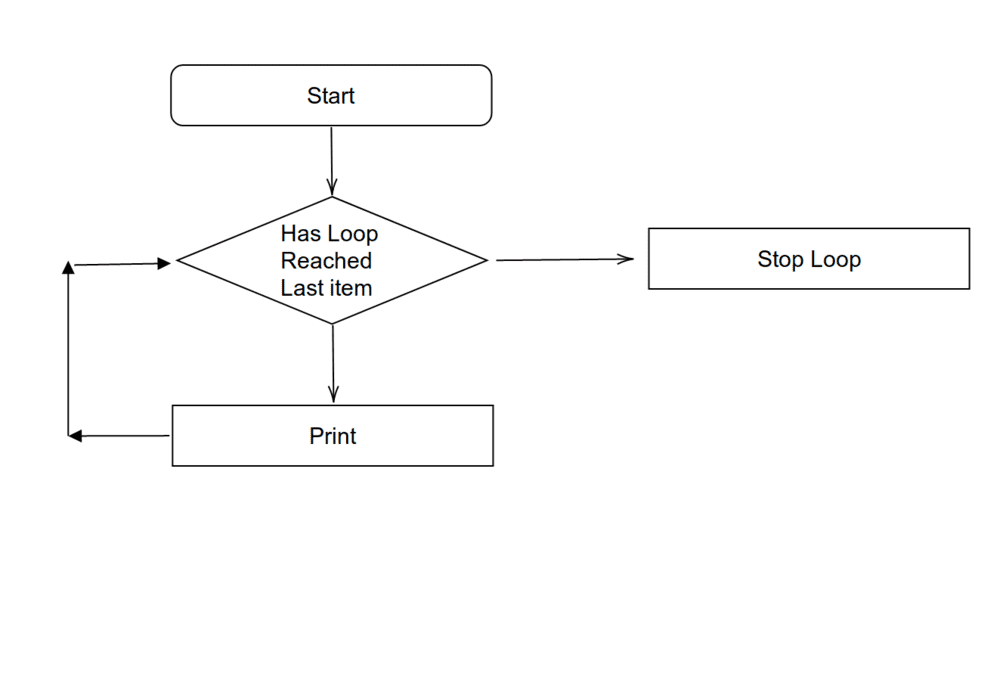
244539


What I would like to know is there a general way to do flow charts for or is it up to the person who designs the program? I understand the the shape of the boxes represent diffrent things i.e the top box, is speciffically for 'start/end' and the dimond box is for 'decisions' ect but I more wondering about how you draw them and what type of information you put in each box.
 

Attachments

  • Flow Chart.png
    Flow Chart.png
    8.2 KB · Views: 5,924
Technology news on Phys.org
Taylor_1989 said:
What I would like to know is there a general way to do flow charts for or is it up to the person who designs the program?
I think you can compare it to the rules for writing a sentence. Yes there are rules, but there is also much freedom of expression.

One rectangular box in a flow chart could represent a micro action (e.g. clear the A register) or a macro action (e.g. prepare and file your taxes).
 
  • Like
Likes Klystron, .Scott and Taylor_1989
A little research will show you possibly more than you're looking for -- here's a modified version of your chart to show a little more than you had, but a little less than you're looking for -- it's a flowchart for a FOR-NEXT loop in BASIC (in Python the structure could be similar) that prints the first 10 positive integers:

244573
 
Last edited:
  • Like
  • Informative
Likes Klystron, jedishrfu and Taylor_1989
@Taylor_1989 9 (and for others who may be reading) There's a detail missing in the modified version of the flowchart. It doesn't show what happens to the value of ##\mathtt{I}## at the end of the loop.

1. Should the Stop Loop box adjust the value? (hint: if it doesn't, as the flowchart stands, the value will be 11 after the loop ends).

2. If you wanted the value to be 10 after the loop, you could change the symbol in the test in the diamond from ##>## to ##=##, but that would meaning printing only up to 9. To fix that, you could put the Print ##\mathtt I## box ahead of the diamond, but you'd have to adjust some of the flow arrows. Can you draw the new chart that way, or some other way, or describe the changes that would have to be made?

I'll post an answer to those questions a little later.
 
There are always side effects and edge cases to consider when programming.

You might say programmers really live life to the fullest on the edge.
 
  • Like
Likes PhDeezNutz and Klystron
Doesn't python do for loops by iterating over a list? In which case the flowchart needs to show the list, initialise a pointer to the head of the list, update the pointer, and check for reaching the end of the list.
 
sysprog said:
It doesn't show what happens to the value of ##I## at the end of the loop.
Ouch, that's bad practice. You might get different answers in different languages or dialects. Much better to presume that I exists only within the loop and is undefined outside the scope of the loop.
 
  • Like
Likes Klystron and FactChecker
anorlunda said:
Ouch, that's bad practice. You might get different answers in different languages or dialects. Much better to presume that I exists only within the loop and is undefined outside the scope of the loop.
Shouldn't the flowchart reflect that detail?
 
  • #10
Ibix said:
Doesn't python do for loops by iterating over a list? In which case the flowchart needs to show the list, initialise a pointer to the head of the list, update the pointer, and check for reaching the end of the list.
The reason for the modification being in BASIC was to allow some guidance without depriving @Taylor_1989 of the benefit and satisfaction of completing the python-specific but otherwise general case himself.

Python For loops behave differently from their BASIC counterparts. You can check what Python For loops can iterate over, including lists, here: https://wiki.python.org/moin/ForLoop
 
Last edited:
  • #11
I only know some of BASIC, but no other programming languages (SOME of; not most of it).

In using a FOR-loop, the program will know or be given the number of times to run through the loop. As example, you have a program with a number c, for how many runs through the FOR-loop. Run through the loop body c number of times and then this loop session will be completed. (I am not making the drawing but the code may be like this:)

Code:
FOR i=1 to c
some line of code
some further lines of code maybe
NEXT i

If a specific example would help, this FOR-loop finds and shows the first eight multiples of 3:
Code:
LET c=8
REM value of variable c could be calculated somewhere earlier in the program.

FOR i = 1 to c
    p=3*c
    PRINT p
NEXT i
That's what they can look like in BASIC. I do not know about Python.

EDIT: Attempting to include picture but only see choice, "Attach files". Then there's button "Thumbnail Full image".
for_loop_prod_example.jpg
 
Last edited:
  • #12
jedishrfu said:
There are always side effects and edge cases to consider when programming.

You might say programmers really live life to the fullest on the edge.
You're no doubt aware that the level of detail for a flowchart should be determined by the intended use. Some old-school examples can be found in this manual: IBM System/360 Operating System Assembler (32K) Program Logic Manual

A lot of ingenuity went into squeezing that much functionality into 32K.
 
  • #13
symbolipoint said:
I only know some of BASIC, but no other programming languages (SOME of; not most of it).

In using a FOR-loop, the program will know or be given the number of times to run through the loop. As example, you have a program with a number c, for how many runs through the FOR-loop. Run through the loop body c number of times and then this loop session will be completed. (I am not making the drawing but the code may be like this:)

Code:
FOR i=1 to c
some line of code
some further lines of code maybe
NEXT i

If a specific example would help, this FOR-loop finds and shows the first eight multiples of 3:
Code:
LET c=8
REM value of variable c could be calculated somewhere earlier in the program.

FOR i = 1 to c
    p=3*c
    PRINT p
NEXT i
That's what they can look like in BASIC. I do not know about Python.
Do you know what the value of the counter variable will be after the loop has completed?
 
  • #14
sysprog said:
Do you know what the value of the counter variable will be after the loop has completed?
No, I am unsure. I could guess, but some other member undoubtedly can give a more reliable answer. I do not know if the variable is reset after finishing loop or if it keeps its last incremented value. You could try putting a PRINT i statement AFTER the loop and see what the statement tells you.
 
  • #15
I wish I could edit my post #13 in case I get time to make a drawing of a flow-diagram and post it into that post - otherwise I may just make an additional post.
My mistake - I was looking at someone else's post. Mine does have an "edit", for me to choose.
 
Last edited:
  • #16
symbolipoint said:
No, I am unsure. I could guess, but some other member undoubtedly can give a more reliable answer. I do not know if the variable is reset after finishing loop or if it keeps its last incremented value. You could try putting a PRINT i statement AFTER the loop and see what the statement tells you.
In Basic it's set to 0. You're right about how to prove that.
 
  • #17
Taylor_1989 said:
What I would like to know is there a general way to do flow charts for or is it up to the person who designs the program?

A flowchart is a graphical representation of an algorithm or of a portion of an algorithm. Like pseudocode, flowcharts are used to help in the development and in the representation of algorithms, although most programmers prefer pseudocode. So, these are enough to show the generality of a flow chart as a mean of graphical representation. Also, keep in mind that flowcharts are an old way to represent an algorithm used very often in the imperative programming style in the past. A good thing about flowcharts is that they clearly show how control structures operate.

Taylor_1989 said:
I understand the the shape of the boxes represent diffrent things i.e the top box, is speciffically for 'start/end' and the dimond box is for 'decisions' ect but I more wondering about how you draw them and what type of information you put in each box.

Additionally to what has already been said and the resources given, if you want to take a look at a very simple example of a problem solved using a flowchart you can take a look at my tutorial.
 
  • Like
Likes Klystron and sysprog
  • #18
Ibix said:
Doesn't python do for loops by iterating over a list?
Yes, or a range, such as in this example:
Python:
for i in range(11):
     print("i = ", i)
The output for this for loop looks like this (some output lines omitted):
i = 0
i = 1
i = 2
...
i = 10
 
  • #19
Ibix said:
Doesn't python do for loops by iterating over a list?

A Python for loop can iterate over lots of different kinds of things. The general term is "iterable"; basically it's anything that has an __iter__ method, or anything you can call the iter() builtin function on and not get an error. Examples other than lists are dicts, sets, ranges, and generators, plus the return values of lots of the functions in the itertools module. (Many of these iterables are infinite, which means if you iterate over them with a for loop and don't have a condition somewhere inside the loop that leads to a break statement, your program will never stop.)
 
  • Like
  • Informative
Likes PhDeezNutz and Klystron
  • #20
Taylor_1989 said:
I am currently learning python and to understand the my code fully and to make notes I am trying to draw flow charts to compliment my code. ...

...

What I would like to know is there a general way to do flow charts for or is it up to the person who designs the program? I understand the the shape of the boxes represent different things i.e the top box, is specifically for 'start/end' and the diamond box is for 'decisions' etc but I more wondering about how you draw them and what type of information you put in each box.
As @anolunda said, it's like writing a sentence. Both the rules and the narrative adapt to the purpose.

Flow charts predate computer programming by a lot. The "diamond" was originally for a decision made by a person - not a computer. And, of course, flow charts are still used to describe procedures for people.
In general, flow charts are intended to be agnostic to the computer language - looking to describe only the approach to the problem. But if the intent it to describe a specific implementation, they can be very language specific.

The keys are purpose and communication.
Your stated purpose is: "I am currently learning python and to understand the my code fully and to make notes I am trying to draw flow charts to compliment my code.". Since you will be the reader, you need to determine what level of comprehension you want to presume for yourself. If you have mastered Python loops, then you may only need these three components:
- 1) a box that says "Loop on each element of the 'whatever' array", followed by
- 2) a diamond that checks for the end of loop condition;
- 3) followed by the body of the loop; then
- 4) a path leading back up to the diamond.

On the other hand, if you are looking to document the details of the loop, you may have several boxes describing how the loop is set up, a box and diamond for the "next" and "exit" functions, and then the body of the loop.

I have also found the diamond to be a little inefficient when it comes to space. It doesn't provide a lot of room for text inside, and putting the text outside the diamond is sloppy. So creating a single "next, check for exit" rectangle which drops into the body or exits to the side is also fair play.

Flow charts have always been popular for describing how the human operators should operate the program - or for high level descriptions of what a computer system is doing.
But there was a time when flow charts were often required programming documentation. That fad didn't last very long. But in the 1980's I remember preparing detailed flowcharts to RADC (then part of the US DoD) and asking them if they really wanted the specified 20 copies - being that each copy would be a 16-inch stack of 8.5x11-inch paper.
They opted for only 6 copies and I am certain that those flowcharts were never used again.
 
  • Like
  • Informative
Likes Klystron, anorlunda and sysprog
  • #21
.Scott said:
But in the 1980's I remember preparing detailed flowcharts to RADC (then part of the US DoD) and asking them if they really wanted the specified 20 copies - being that each copy would be a 16-inch stack of 8.5x11-inch paper.
I think there were numerous examples of forced excessive documentation. Not only was it not read, but in the maintenance phase, the burden of maintaining the documentation proved to be overwhelming.

But coming back to this thread, how much flowchart detail is enough? I say one page. A one page flow chart will be read and understood. More than that and the probability of reading/understanding drops rapidly. You can make a one page flowchart for a simple for loop or for putting a man on the moon. Simply adjust the level of detail.
 
  • #22
From post #1:
Taylor_1989 said:
I am currently learning python and to understand the my code fully and to make notes I am trying to draw flow charts to compliment my code.
A question you should ask yourself is"why draw a flow chart?"
As @.Scott pointed out, flow charts were used before programming languages came along. Many textbooks for programming languages don't even bother with flow charts, but use pseudocode instead. Here's a wikipedia article on pseudocode, with examples in several styles: https://en.wikipedia.org/wiki/Pseudocode
 
  • #23
Shapes to help you in drawing a flow-chart:

Diamond - Begins a decision structure

Lengthened hexagon - Begins a loop, but some other shape might be chosen

Lengthened vertical line ended with a small circle - shows dropping out from the loop when the loop session is finished, but other structural pieces might be chosen

Rectangle with upper left corner "cut off" - user input for variables' values, but other shape might be chosen
 
  • Like
Likes Taylor_1989
  • #24
symbolipoint said:
Rectangle with upper left corner "cut off" - user input for variables' values, but other shape might be chosen
244632


(punch and download keypunch card images site: https://www.masswerk.at/keypunch/https://www.masswerk.at/keypunch/)
 
  • #25
sysprog, post #24
That must be why the shape was chosen for making flow-chart diagrams.
 
  • #26
symbolipoint said:
sysprog, post #24
That must be why the shape was chosen for making flow-chart diagrams.
Yes (as the text on the card image indicates). The corner cut was there to ensure that the card reader could tell when a card had been placed in a wrong position for reading. '9-edge in face down' was the convention.
 
  • #27
Taylor_1989 said:
to understand the my code fully and to make notes I am trying to draw flow charts to compliment my code.

As a normal part of the development cycle, coding proceeds from the flowchart - which is language agnostic - not the other way around.

That being said, you're just trying to get a handle on code that you've already written. I'd suggest conforming to a standard, and unpacking complex-statements completely. F'rinstance...

FOR I=1 TO 10 BY 1 PRINT I**2 unpacks into something like...

[CODE title="PRINT SQUARES 1 - 10"] I = 1 .
TOP-OF-LOOP.
PRINT I**2 .
IF I < 10
THEN INCREMENT I BY 1 ,
GOTO TOP-OF-LOOP .[/CODE]

Mark44 said:
From post #1:
Many textbooks for programming languages don't even bother with flow charts, but use pseudocode instead.

Yes, no, maybe : the method I use/taught included both, at different stages of the development cycle.
 
Last edited:
  • #28
sysprog said:
The corner cut was there to ensure that the card reader could tell when a card had been placed in a wrong position for reading.
Not exactly. The card readers did not look for that cut. But the key-punch operators, computer operators, and programmers did.
By "card readers", I am including all manner of card reading devices: High Speed card sorters; 400-series accounting machines; reproduce punch machines; key punch machines; as well as computer card readers.
If you wanted to keypunch onto the back of the card (perhaps because you wanted to read the blank side), you could do that as long as you fed that card into the various card reading devices the same way. Of course, if you weren't the one actually feeding those cards to the machine, you would need to alert the computer operator to your deviant preference.
I worked with Data General, Honeywell and IBM card handling equipment. So there might be exceptions among Buroughs, Univac, NCR, CDC, and digital.

In general, card readers were not allowed to be picky. A lot of those cards were cycled through the target population (students, employees, applicants, teachers, administrators, ...) before being read. Those cards often came back with fairly creative damage.

Hey guys: Some of this information has been hanging around in my head for 50 years waiting to get out.
 
  • #29
.Scott said:
Not exactly. The card readers did not look for that cut. But the key-punch operators, computer operators, and programmers did.
By "card readers", I am including all manner of card reading devices: High Speed card sorters; 400-series accounting machines; reproduce punch machines; key punch machines; as well as computer card readers.
If you wanted to keypunch onto the back of the card (perhaps because you wanted to read the blank side), you could do that as long as you fed that card into the various card reading devices the same way.
Of course, if you weren't the one actually feeding those cards to the machine, you would need to alert the computer operator to your deviant preference.
I worked with Data General, Honeywell and IBM card handling equipment. So there might be exceptions among Buroughs, Univac, NCR, CDC, and digital.
The corner cut was definitely observed by the equipment for checking card orientation. From a 1967 http://www.textfiles.com/bitsavers/pdf/ibm/cardProc/A24-1034-3_82-83-84_sorters_Dec67.pdf:

244644
 
  • #30
sysprog said:
The corner cut was definitely observed by the equipment for checking card orientation.
But it was still up to the operator to make sure that the cards were correctly oriented.
In fact, if this CC feature was used, the correct orientation could be any of the four card positions (face up or down, 9 or 12 edge forward).
I was using the 083 card sorter. I remember that extra loose brush for sensing the corner cut, but it was never something we used.
One trick is resurrecting a damaged card would be to feed it into a keypunch machine up-side-down and reproduce it onto another up-side-down card.
 

Similar threads

  • · Replies 5 ·
Replies
5
Views
2K
  • · Replies 10 ·
Replies
10
Views
3K
Replies
6
Views
3K
  • · Replies 9 ·
Replies
9
Views
4K
  • · Replies 43 ·
2
Replies
43
Views
4K
  • · Replies 17 ·
Replies
17
Views
3K
  • · Replies 16 ·
Replies
16
Views
3K
  • · Replies 31 ·
2
Replies
31
Views
3K
  • · Replies 2 ·
Replies
2
Views
2K
  • · Replies 3 ·
Replies
3
Views
1K