Help please in matlab -- plotting a D'Alembert wave equation

Click For Summary

Discussion Overview

The discussion revolves around plotting a D'Alembert wave equation solution in MATLAB. Participants express confusion regarding how to generate the necessary data for the plot and seek guidance on using MATLAB effectively for this purpose.

Discussion Character

  • Homework-related
  • Technical explanation
  • Debate/contested

Main Points Raised

  • One participant requests help with plotting a D'Alembert wave equation solution in MATLAB, expressing confusion about the plotting process.
  • Several participants provide links to tutorials, but there is uncertainty about their relevance to wave equations.
  • One participant indicates they already know how to plot multiple lines but struggles with generating the appropriate data for the wave equation.
  • Another participant suggests that to create straight vertical lines, additional points need to be included at specific x-values.
  • Links to additional resources, including m-files and other tutorials, are shared, but their effectiveness is not guaranteed.

Areas of Agreement / Disagreement

Participants do not reach a consensus on the best approach to generate the data for plotting the D'Alembert wave equation, and multiple competing views on how to proceed are present.

Contextual Notes

Participants express limitations in their understanding of MATLAB commands, particularly regarding PDE commands, and there is a lack of clarity on how to effectively generate the necessary data for the plot.

JI567
Messages
173
Reaction score
0
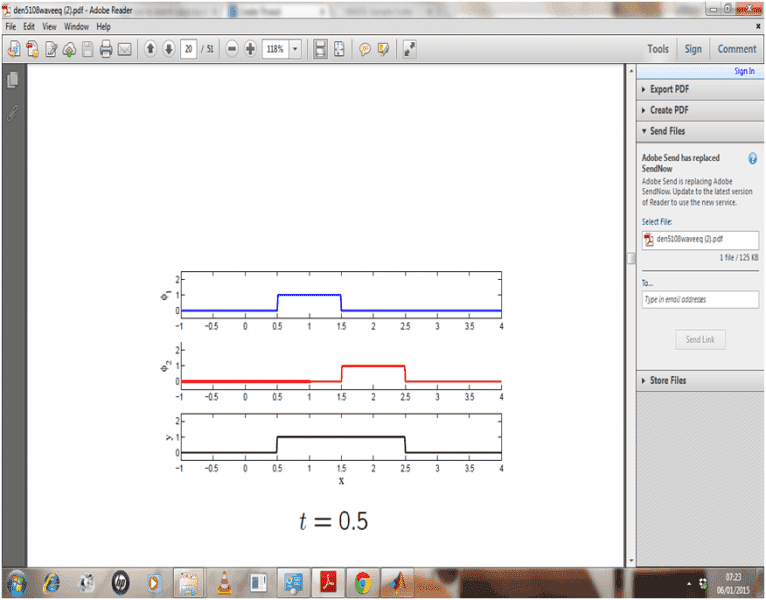
Can someone please help me in plotting a D'Alembert wave equation solution in MATLAB? I am so confused as how to plot it in MATLAB

I need to plot a graph like the one below
upload_2015-1-6_7-24-35.png
 
Physics news on Phys.org
It talks about plotting multiple lines.

If you're looking for more info like generating the data for plot then you'll need to find another tutorial.
 
jedishrfu said:
It talks about plotting multiple lines.

If you're looking for more info like generating the data for plot then you'll need to find another tutorial.

No man I already know how to plot multiple lines...its on how to generate the data actually
 
JI567 said:
No man I already know how to plot multiple lines...its on how to generate the data actually
Show us what you have already tried. Be advised, however, that we're not going to do your work for you...
 
Mark44 said:
Show us what you have already tried. Be advised, however, that we're not going to do your work for you...

What do you want to see? I have typed all sorts of commands in MATLAB getting nothing as a result so I have nothing to show you.

I tried x = [-1 -0.5 0 0.5...4] then did y = [0,0,0 placed 2 for all the x values in the picture that had y as 2] then did plot(x,y) but got some stupid graph

anyways I don't know how to use PDE commands in MATLAB unless someone wants to be generous and teach me...I am good at coding and maths I swear! I will learn fast.
 
JI567 said:
What do you want to see?
Show us what you have tried.
JI567 said:
I have typed all sorts of commands in MATLAB getting nothing as a result so I have nothing to show you.

I tried x = [-1 -0.5 0 0.5...4] then did y = [0,0,0 placed 2 for all the x values in the picture that had y as 2] then did plot(x,y) but got some stupid graph

anyways I don't know how to use PDE commands in MATLAB unless someone wants to be generous and teach me...I am good at coding and maths I swear! I will learn fast.
PDE? Partial differential equations?
 
JI567 said:
I tried x = [-1 -0.5 0 0.5...4] then did y = [0,0,0 placed 2 for all the x values in the picture that had y as 2] then did plot(x,y) but got some stupid graph
To get straigth veritcal lines (by hand), you need to double the points at which the lines appear. For instance, you need two points at x = 0.5, one with y=0 followed by one with y=2.
 

Similar threads

  • · Replies 4 ·
Replies
4
Views
4K
  • · Replies 1 ·
Replies
1
Views
2K
  • · Replies 5 ·
Replies
5
Views
3K
  • · Replies 7 ·
Replies
7
Views
2K
  • · Replies 4 ·
Replies
4
Views
2K
  • · Replies 32 ·
2
Replies
32
Views
4K
  • · Replies 5 ·
Replies
5
Views
4K
  • · Replies 1 ·
Replies
1
Views
3K
  • · Replies 5 ·
Replies
5
Views
3K
  • · Replies 1 ·
Replies
1
Views
3K