Discussion Overview
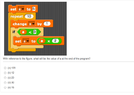
The discussion revolves around understanding a Scratch programming code snippet, specifically focusing on the behavior of a variable 'a' and the implications of the "repeat 10" block. Participants explore how the code modifies the value of 'a' through iterations and clarify the difference between "set" and "change by" commands.
Discussion Character
- Exploratory
- Technical explanation
- Conceptual clarification
- Debate/contested
Main Points Raised
- Some participants express confusion about the "repeat 10" block and its effect on the variable 'a'.
- One participant suggests that the block indicates executing the following code 10 times in succession.
- Another participant proposes that if 'a' is initially set to 1, and the loop doubles 'a' each time, they question how to handle the value of 'a' across iterations.
- There is a clarification that the instruction "change a by 1" does not replace the value of 'a' but rather increments it.
- Participants discuss the initial value of 'a' when it first reaches the "change a by 1" instruction, with some asserting it remains 5.
- One participant concludes that repeating the increment results in 'a' reaching 15 after 10 iterations, while another emphasizes that the condition for 'a' being less than 3 is never met.
- A participant mentions the existence of tutorials for Scratch that could help clarify these concepts.
Areas of Agreement / Disagreement
Participants generally agree on the mechanics of the "change a by 1" instruction and its implications for the variable 'a', but there is some confusion regarding the initial conditions and the interpretation of the code's behavior. Multiple interpretations of the code's execution remain present.
Contextual Notes
Some participants express uncertainty about the initial value of 'a' and how it interacts with the loop, highlighting the potential for misunderstanding Scratch's commands.
Who May Find This Useful
Individuals new to Scratch programming or those seeking clarification on variable manipulation and control structures in programming.