leejohnson222
- 76
- 6
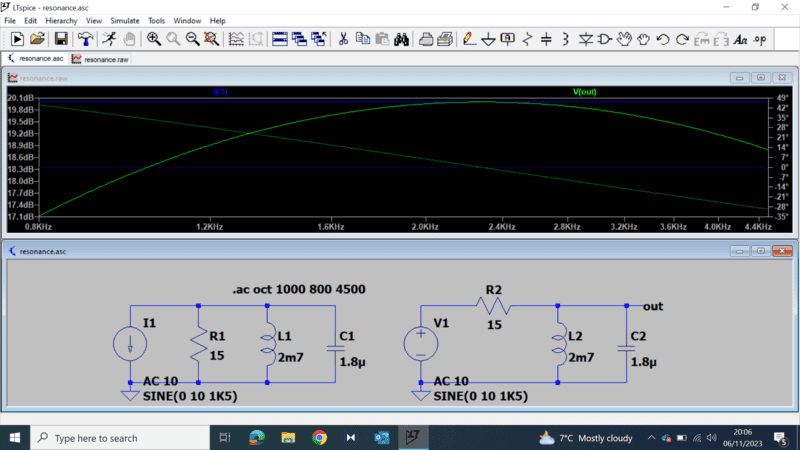
this is what i have so far, looks like a very wide curve here
Last edited by a moderator:
The Q of the resonance is low, because the resistor value is too low.leejohnson222 said:this is what i have so far, looks like a very wide curve here
Baluncore said:Then increase that resistor value by 10, 100, 1000, to reduce the damping of the resonance, to see a sharper resonance with higher Q.

So called "resonance curves" can be concave up (like a notch filter) or concave down. If a simulation is run on the circuit of post #1 and the current supplied by the voltage source (call it Is) is plotted, the result will be a low Q, concave up, "resonance curve". Plotting the reciprocal of Is (1/Is) will result in a concave down "resonance curve". Increasing the value of R1 to 150 ohms gives nicer looking "resonance curves". The 1/Is curve will have the same shape as plotting the impedance seen by the voltage source.Baluncore said:You have a voltage source, probably with zero internal resistance. A current will flow through the individual parallel RLC components, but there will not be resonance, because the components are short-circuited by the voltage source.
If you replaced the voltage source with a current source, LC resonance would be possible.
Do not be afraid to try new or different things. You cannot destroy the components in a simulator, and you can always use the "undo" to revert your changes.leejohnson222 said:I will continue to play with this circuit and see the different results.