Why is my CPU not running at max published speed?

Click For Summary

Discussion Overview

The discussion centers around the performance of the Intel(R) Xeon(R) E-2274G CPU, specifically why it does not reach its maximum published speed of 4.9 GHz under load when all cores are utilized. Participants explore various factors affecting CPU performance, including thermal throttling, software efficiency, and hardware limitations.

Discussion Character

  • Technical explanation
  • Debate/contested
  • Mathematical reasoning

Main Points Raised

  • One participant notes that the CPU is rated for a maximum speed of 4.9 GHz but only reaches around 4.5 GHz under load, questioning the conditions under which the maximum speed can be sustained.
  • Some participants suggest that thermal throttling limits the CPU speed to prevent overheating, indicating that the CPU may only reach its maximum speed for short bursts.
  • Another participant mentions that performance issues may be software-related, suggesting that optimizing the program could lead to better performance rather than solely relying on clock speed.
  • Concerns are raised about the RAM potentially being a bottleneck, with questions about the impact of using buffered versus unbuffered RAM on performance.
  • Several participants discuss the importance of understanding how the CPU utilizes its cores, with one suggesting that the software must be designed to effectively use all available cores to maximize performance.
  • One participant highlights that various factors, including I/O speed and memory bandwidth, also significantly affect overall performance, not just CPU clock speed.

Areas of Agreement / Disagreement

Participants express multiple competing views regarding the reasons for the CPU not reaching its maximum speed. There is no consensus on whether the primary issue is thermal throttling, software inefficiencies, or hardware limitations.

Contextual Notes

Participants mention various assumptions about CPU performance, including the impact of running multiple cores versus a single core, and the role of software optimization in achieving better performance. There are unresolved questions about the specific conditions under which the CPU can reach its maximum speed.

Who May Find This Useful

This discussion may be useful for individuals interested in computer performance optimization, particularly those working with multi-core CPUs and parallel processing applications.

aheight
Messages
318
Reaction score
108
TL;DR
How can I get my CPU to run at max turbo-boost speed?
I have a Intel(R) Xeon(R) E-2274G CPU @ 4.00GHz 4.01 GHz machine which has a published max speed of 5.0 GHz. However, when I run it under load on all 4 cores, it only gets up to about 4.5 GHz: Could someone explain to me why it's not ramping up to the full 5.0 GHz or what I could do to increase the speed without overclocking it? I have a practical reason for this: I wait a long time for my work to complete so would cut down the wait time if I could do something to increase the speed.

Thanks,
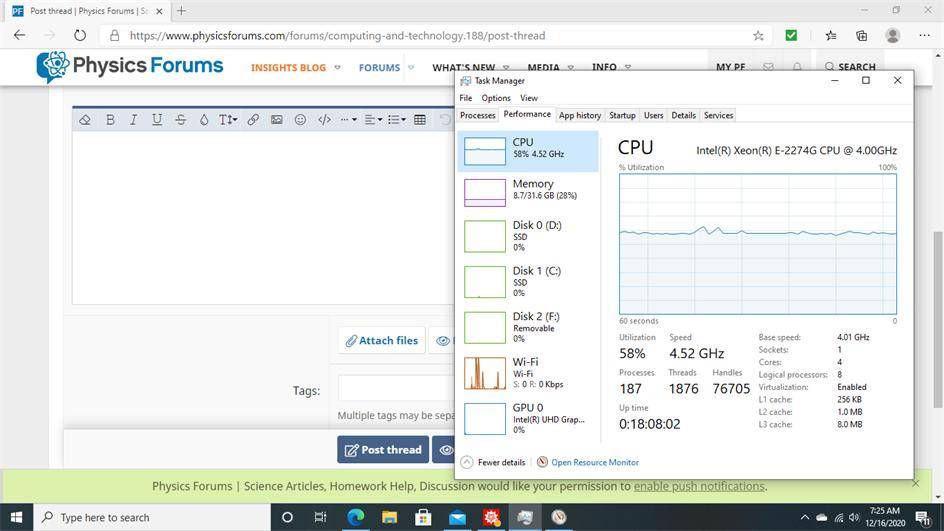
cpuload.jpg
 
Computer science news on Phys.org
aheight said:
E-2274G CPU @ 4.00GHz

See the 4.00 GHz? Why do you expect 5 GHz?
 
Modern CPUs are limited by power dissipation. The speed is throttled so they don't overheat. It may well be running at 5GHZ for short periods of time. The 4.52 GHZ you are seeing is probably an average speed.
 
  • Like
Likes   Reactions: Spinnor
Vanadium 50 said:
See the 4.00 GHz? Why do you expect 5 GHz?

Slight error. I meant 4.9 GHz: When I purchased it from hp.com, the quoted specs were:

Intel® Xeon® E-2274G Processor (4.0GHz, up to 4.9GHz w/Boost, 8MB cache, 4 core) + Intel® UHD Graphics P630

just wondering why I can't get it up to this speed. I'm running Mathematica "ParallelTable" which is using all cores. Does the 4.9 figure apply when only one core is running or is the speed being reduced because of heat flow. If so under what conditions can I see the speed at the full published figure of 4.9 for an extended period rather then just a spike I was wondering?
 
phyzguy said:
Modern CPUs are limited by power dissipation. The speed is throttled so they don't overheat. It may well be running at 5GHZ for short periods of time. The 4.52 GHZ you are seeing is probably an average speed.

Ok, sorry, didn't see this before I posted above. Basically then it's just a heat problem? Little misleading to say 4.9 when, as I watch the task manager it never gets this high or may just spike to this. Disappointing I guess. Purchased it to reduce wait time, ramped up the CPU load a bit and here I am waiting just as long as before I got it.
 
I do not know what you are doing, so I am assuming lots of floating point operations.

Unless you have profiling in place and are seeing a cause, asserting that clock speed is the primary driver of completion time -- may not fly.

Generally about 80% of performance issues are software (your program) related. For example, data locality issues with large arrays, or failure to use parallel processing options. After installing CUDA and NVDIA GeForce 960, then parallelizing I got a 70% speedup. Mostly on loops. Your options are not necessarily going to be anything I just mentioned.

Ulrich Drepper, when not playing curmudgeon, has a lot of good things to say. Yes, this is dated but all of the concepts are very insightful, IMO. And it shows that you need to understand your archectecture to make good decisions.

http://www.sgidepot.co.uk/misc/cpumemory.pdf
 
  • Like
Likes   Reactions: Spinnor and aheight
I have an Asus gaming laptop. When I put it in turbo mode, it also speeds up the fans so much that the fan background noise becomes a fan roar. It also monitors the temperatures and silently turns down the clock speed to limit max temperature.

I understand that other gaming systems have liquid cooling.

It's not trivial to just speed up the clock.
 
anorlunda said:
It's not trivial to just speed up the clock.
 

Attachments

  • what he said (very small).jpg
    what he said (very small).jpg
    3.3 KB · Views: 197
Maybe the RAM I purchased is the bottle-neck. I got 32 GB of DDR4 2666 NECC RAM which is believe is buffered. I think the 2666 means it's operates at 2.666 GHz? I just ran something that took 1 hour to finish at 4.5 GHz. Would unbuffered RAM have made a significant difference?
 
  • #10
Did you look up the chip on Intel's?

Intel® Turbo Boost Technology 2.0 Frequency is the maximum single core frequency at which the processor is capable of operating using Intel® Turbo Boost Technology.

You are using 4 cores and keeping 2+ busy.
 
  • #11
On that Task Manager view right click and select "Change graph to > Logical processors." What is almost certainly happening is that you have 4 or more CPU's and your program is only designed to use one of them. If that is so you will see one CPU maxed while the others are not. That is a software programming issue, the software has to be programmed to use all the available cores.
 
  • #12
Here is a screen shot of my Mathematica session. I'm basically running a 2000 length table of Newton Iterations to find roots of very high degree polynomials of high precision using Mathematica's built-in parallel-processer "ParallelTable". This launches 4 kernels. As the iterations of each table index is completely independent of the others, I can run them in parallel (4 at a time). As you can see at the left, Mathematica is using four kernels (cores) as each kernel is reporting the table index mod 25 and the Task Manager Resource Monitor showing 8 logical cores running at 111% of maximum I think. I don't understand if HP states the CPUs can reach 4.9, why the max I see on the usage is 4.5? I'm just saying that's 4 MHz difference which is significant I think.

cpuStats.jpg
 
Last edited:
  • #13
aheight said:
I don't understand if HP states the CPUs can reach 4.9

Read what Intel says. One core.

Your chip will run one core at 4.9 MHz and run four cores at 4.0 MHz. You're getting 4.5 MHz. That's 12% better than promised. You should be happy.
 
  • #14
Vanadium 50 said:
Read what Intel says. One core.

Your chip will run one core at 4.9 MHz and run four cores at 4.0 MHz. You're getting 4.5 MHz. That's 12% better than promised. You should be happy.

Ok sorry. Didn't quite understand what you said above. 4.5 is still pretty fast.
 
Last edited:
  • #15
The performance of a computer is limited by a number of factors

a) the CPU speed
b) the I/O speed - how fast can you read/write from/to disk
c) the memory bandwidth - how fast can you read/write from/to memory
d) the quantity of memory - whether you are paging the memory in and out.

The CPU is often waiting for data to be retrieved from disk or memory, for data to be written to disk or memory. It is why modern CPUs have 2 virtual CPUs per core - while one CPU is stalled waiting the other can process its data.

It is very rare for even a well optimised program to run at 100% CPU (except for a trivial program needing no data from memory and doing no I/O).

See the Top 500 supercomputers list where supercomputers typically run at about 70% CPU (Rmax / Rpeak) even with highly optimised Linpack test cases.

An analysis of what is causing the CPU to run slowly identifies what needs upgrading: faster I/O, faster memory, more memory.
 
Last edited:
  • Like
Likes   Reactions: aheight
  • #16
I once had to figure out how long a specific problem using a finite element code was going to run on an exoscale sytem. According to the code developers, less than 10% of the time to run was floating point operations.
 

Similar threads

  • · Replies 8 ·
Replies
8
Views
2K
  • · Replies 40 ·
2
Replies
40
Views
5K
Replies
18
Views
3K
  • · Replies 6 ·
Replies
6
Views
5K
  • · Replies 13 ·
Replies
13
Views
13K
  • · Replies 26 ·
Replies
26
Views
34K
  • · Replies 11 ·
Replies
11
Views
7K
  • · Replies 1 ·
Replies
1
Views
3K
  • · Replies 1 ·
Replies
1
Views
4K
  • · Replies 14 ·
Replies
14
Views
7K