Gain limiter circuit in LTspice - current flowing in wrong direction

Click For Summary
SUMMARY

The discussion focuses on simulating a gain limiter circuit in LTspice, where the user encounters an issue with current direction. The user is performing a DC sweep on voltage source V3, but the current flows in the opposite direction compared to a reference video. Solutions provided include using a current sense resistor (Rsense) to accurately measure current and adjusting the plot equation with a unary minus to invert the current direction. The conversation highlights the importance of understanding LTspice's current flow conventions and the impact of component orientation on simulation results.

PREREQUISITES
  • Familiarity with LTspice simulation software
  • Understanding of gain limiter circuits
  • Knowledge of current sensing techniques using resistors
  • Basic principles of DC voltage sweeps
NEXT STEPS
  • Learn how to implement current sense resistors in LTspice simulations
  • Research LTspice current flow conventions and their implications
  • Explore methods for inverting current measurements in LTspice
  • Study gain limiter circuit design and analysis techniques
USEFUL FOR

Electronics engineers, circuit designers, and students learning about simulation techniques in LTspice, particularly those working with gain limiter circuits and current measurement methods.

Wrichik Basu
Science Advisor
Insights Author
Gold Member
Messages
2,180
Reaction score
2,690
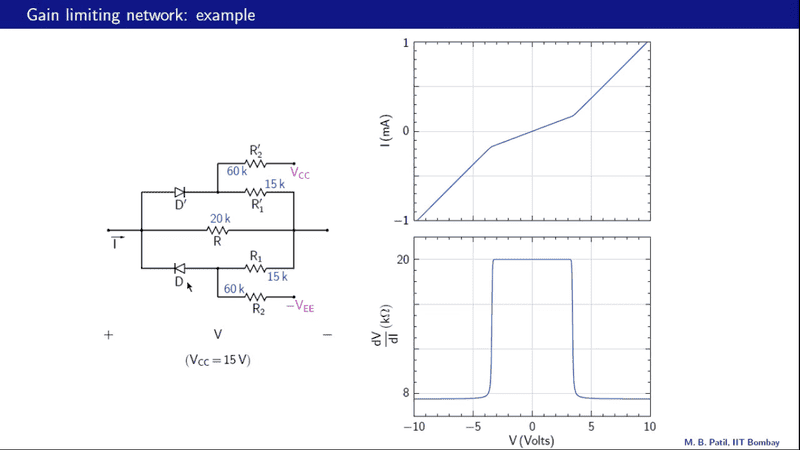
This is one more thread in my quest to learn simulations in LTspice. I am trying to simulate the gain limiter network shown in this video. A snapshot of the video is available for quick reference:
1623312950591.png

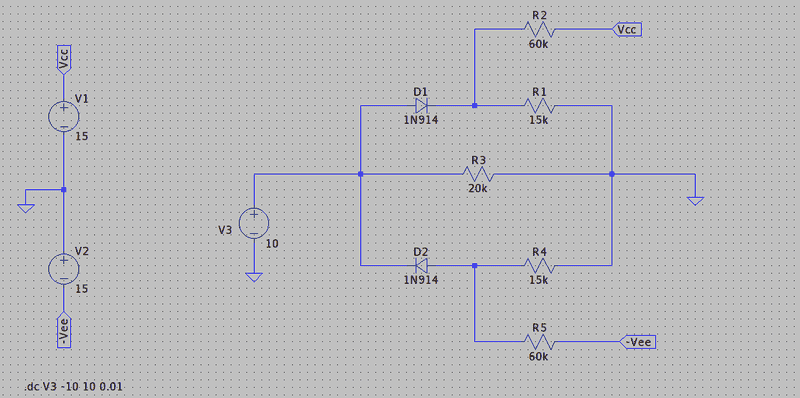
My schematic in LTspice is shown below:
1623313011515.png

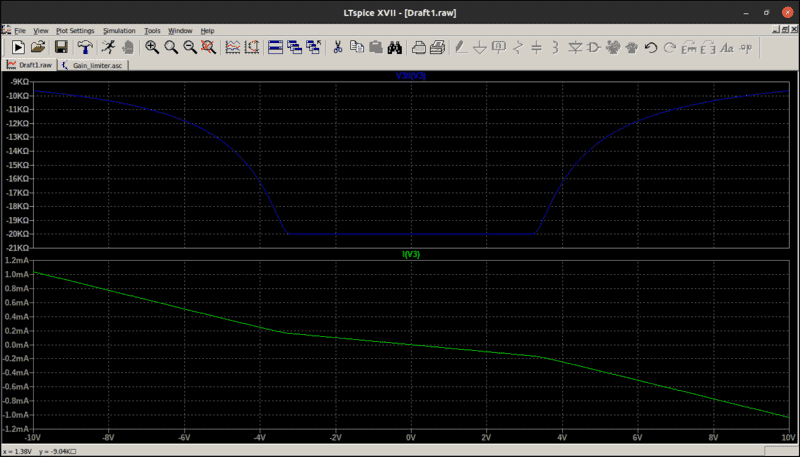
For the simulation, I am using DC sweep on voltage source V3, starting from -10 V to 10 V, incrementing by 0.01 V. Regarding the diode, I have picked the first one available in the library of LTspice. I am plotting the current through V3 vs the voltage of V3, and the ratio V3/I(V3) vs V3. The results are shown below:
1623313052678.png

As you can see, my graphs are almost identical to those in the video, except that they are flipped. Actually, the current in my circuit is flowing in the opposite direction to what has been shown in the video.

What is the error that I am making?

The LTspice files are attached; please remove the .txt extension before loading them in the software.
 

Attachments

Engineering news on Phys.org
The positive current direction in the first picture is in the opposite of the positive current direction in the LTSpice simulation. In order to see the direction of positive current in the simulation, hover the mouse over V3 and you will see a symbol with an arrow, which points down (at least when I run your .asc file).

jason
 
jasonRF said:
The positive current direction in the first picture is in the opposite of the positive current direction in the LTSpice simulation. In order to see the direction of positive current in the simulation, hover the mouse over V3 and you will see a symbol with an arrow, which points down
Yes, I know, and that's what I wrote — in my simulation, the current is flowing in the opposite direction to what is shown in the video. I can easily plot the negative of the current and dV/dI and get the required plot, but that is not what has been done in the video. I need to find the error in the simulation.
 
The spice current direction and polarity of voltage sources makes it difficult sometimes. The easiest way here is to use a current sense resistor, then plot "V3/I(Rsense)". If you need to reverse the sign of the current then "end for end" Rsense on the schematic. Alternatively insert a unary - in the plot equation; -V3/I(V3); to invert the plot.
 

Attachments

  • Informative
Likes   Reactions: Wrichik Basu
Baluncore said:
The spice current direction and polarity of voltage sources makes it difficult sometimes. The easiest way here is to use a current sense resistor, then plot "V3/I(Rsense)". If you need to reverse the sign of the current then "end for end" Rsense on the schematic. Alternatively insert a unary - in the plot equation; -V3/I(V3); to invert the plot.
Thanks a lot; sensing the current through Rsense instead of V3 solves all the problems. But this was a bit weird.
 
@Baluncore I found something more weird: If I disconnect the Rsense in your file, rotate it by 180°, and reconnect it, the direction of current changes! How is this possible?
 
Baluncore said:
If you need to reverse the sign of the current then "end for end" Rsense on the schematic.
Wrichik Basu said:
If I disconnect the Rsense in your file, rotate it by 180°, and reconnect it, the direction of current changes! How is this possible?
There is a spice convention that current always flows into "pin one" of a component. That current in the component will be reversed if you turn the component around, but the current actually flows the same way in the circuit wires between the nodes. LTspice can't measure the current in a wire, only the current in a terminal. You can always edit the plot equation with a unary minus to fix the sign.
 
  • Informative
Likes   Reactions: Wrichik Basu
Wrichik Basu said:
But this was a bit weird.
My experience with simulations has been that there are a lot of trivial problems that are often easier to fix than to understand. I think it is important to have a basic understanding of what the result should look like, as you did. I've done lots of simulations with 1μΩ or 1GΩ resistors and such added to get the result I need.
 
  • Like
Likes   Reactions: Wrichik Basu

Similar threads

Replies
9
Views
7K
Replies
1
Views
3K
  • · Replies 39 ·
2
Replies
39
Views
5K
  • · Replies 4 ·
Replies
4
Views
4K
  • · Replies 14 ·
Replies
14
Views
2K
  • · Replies 19 ·
Replies
19
Views
38K
  • · Replies 10 ·
Replies
10
Views
3K
  • · Replies 1 ·
Replies
1
Views
2K
  • · Replies 6 ·
Replies
6
Views
4K
  • · Replies 4 ·
Replies
4
Views
2K