Replacing smoke detector alarm battery help

Click For Summary
SUMMARY

The forum discussion centers on troubleshooting a smoke detector and its associated wall mic, specifically addressing issues with battery replacement and persistent beeping. Users suggest that if the smoke detector continues to beep after battery replacement, it may indicate a defective unit or require cleaning due to dust accumulation. Additionally, the wall mic, identified as a remote horn connected to a master alarm panel, does not have a battery backup and may need to be inspected by the building manager if it continues to malfunction. Safety precautions regarding 9V battery disposal are also highlighted.

PREREQUISITES
  • Understanding of smoke detector models and battery types
  • Familiarity with building fire alarm systems
  • Knowledge of basic electrical safety practices
  • Ability to identify and troubleshoot common alarm issues
NEXT STEPS
  • Research the specific model of smoke detector for detailed maintenance instructions
  • Learn about the proper disposal methods for 9V batteries to prevent fire hazards
  • Investigate local fire and building codes regarding smoke detector maintenance
  • Explore techniques for cleaning smoke detectors to enhance performance
USEFUL FOR

Homeowners, apartment residents, property managers, and anyone responsible for maintaining fire safety equipment in residential buildings.
Messages
19,865
Reaction score
10,851
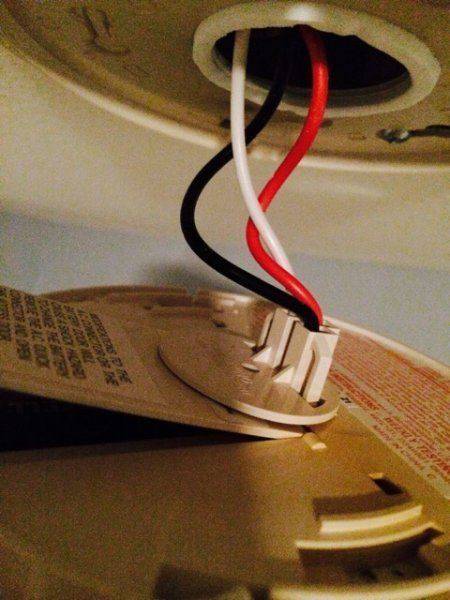
I know I've done this before but for some reason I am stuck. I have a smoke alarm where the battery compartment is being blocked by the permanent power. I can't disconnect or a monitoring alarm will trip (i think?). There is a great deal of tension here and any more force I feel will break the connector. So how do I open the battery area here?

ImageUploadedByPhysics Forums1420157193.311576.jpg
 
Physics news on Phys.org
Can you see an indication of the brand and model number - to look on-line for instructions?
 
Turns out I did have to disconnect. However, I replaced the battery and my wall mic is still beeping. hmm
 
Greg Bernhardt said:
I know I've done this before but for some reason I am stuck. I have a smoke alarm where the battery compartment is being blocked by the permanent power. I can't disconnect or a monitoring alarm will trip (i think?). There is a great deal of tension here and any more force I feel will break the connector. So how do I open the battery area here?

View attachment 77113
Squeeze the sides (clips) of the plug and remove it from the back of the detector. Replace the battery. Reinstall the plug - it should just push in. Reinstall the smoke detector in the ceiling.
 
Greg Bernhardt said:
replaced the battery and my wall mic is still beeping. hmm
How many other smoke detectors on same circuit?
 
If it continues to beep or chirp every 1 minute after replacing the batteries, then you may have a defective unit that needs to be replaced.
 
At this time I'm going to try removing the two alarms from power, removing the battery and holding the test button for 15 seconds and killing the circuit breakers for the rooms
 
What a bad design. Mine have a little slide open door on the outside, no need to open the detector.
 
I killed every circuit breaker in my apt and the wall mic is still beeping
 
  • #10
Greg Bernhardt said:
At this time I'm going to try removing the two alarms from power, removing the battery and holding the test button for 15 seconds and killing the circuit breakers for the rooms
They may need cleaning in addition to new batteries. We've had the same alarm go off because of dust or fiber accumulation. Using a vacuum cleaner to draw out the foreign material worked.
 
  • #11
Greg Bernhardt said:
I killed every circuit breaker in my apt and the wall mic is still beeping
You've changed both batteries?
 
  • #12
Bystander said:
You've changed both batteries?
In the detectors yes, but at the moment they are offline. I can't seem to be able to reset this mic.
 
  • #13
Kitchen, BR. Bet there's another hiding in a closet, entryway, somewhere.
 
  • #14
The mic appears to be powered outside my unit and there is no reset switch
ImageUploadedByPhysics Forums1420161470.770686.jpg
 
  • #15
Bystander said:
Kitchen, BR. Bet there's another hiding in a closet, entryway, somewhere.
another what?
 
  • #16
Smoke detector.
 
  • #17
Bystander said:
Smoke detector.
nah, I'm in a small 1 bed apt and have been for 8 years :)
 
  • #18
Water heater hiding in a closet off the bathroom?
 
  • #19
Bystander said:
Water heater hiding in a closet off the bathroom?
There was one breaker I didn't kill and that was for the washer and heater because there was a danger sticker and it needed some key to turn off.
 
  • #20
This is the intermittent "beep/chirp" for low battery, not the "wake the dead/get out now" end of the world alarm noise? Check the area around the washer and heater for a hidden unit --- I've had a couple that the battery lasted for nearly a decade before the chirping started and took me literally forever to find.
 
  • #21
Bystander said:
This is the intermittent "beep/chirp" for low battery
right. no other alarms that I can find
 
  • #22
Murphy's Law: something that requires the landlord or super is always going to happen after hours. Get the aeroduster and try A-nuc's cleaning trick. I'm out of ideas where to find a third alarm, and if that doesn't work, hope the landlord still has enough specs on the building to fix things.
 
  • #23
After more thinking I don't think it has anything to do with my detectors. The wall mic is connected to the fire panel downstairs. I think either the mic is broken or something with the panel is setting it off.
 
  • #24
Some alarms apparently have a 10-year power cell. After that goes, that whole unit needs to be replaced.
 
  • #25
Greg Bernhardt said:
whole unit needs to be replaced.
For a "nominal" fee.
 
  • #26
Greg Bernhardt said:
The mic appears to be powered outside my unit and there is no reset switch
View attachment 77114
What's a "mic"?
[edit]
The model number is readable in your pic: http://www.thesignalsource.com/documents/GX93.pdf
It's a remote horn (speaker) for a building-wide evacuation from the master building alarm panel. It doesn't have a battery backup.
 
Last edited by a moderator:
  • #27
Greg Bernhardt said:
After more thinking I don't think it has anything to do with my detectors.
siren.gif


Now you've done it. :devil:

Glad you figured it's involves more than your apartment. e.g.

FireAlarm.jpg


images compliment of http://attendancesystems.in/fire-alarm-systems.html
 
  • #28
russ_watters said:
What's a "mic"?
I'm glad Russ asked. I've just been assuming it's what dlgoff has just informed us it is --- the anunciator to inform residents that someone else is trying to burn down the building.
 
  • Like
Likes   Reactions: Greg Bernhardt
  • #29
I'm wondering now if my alarms are just old and need to be replaced. I haven't replaced them since moving in 8 years ago.
 
  • #30
If you missed my edit, I found the data sheet for the annunciator -- it doesn't have a battery backup or a "chirp" mode. If it is making noise and it isn't blasting you out of the house, something is wrong with it or the building alarm system.

Since it is just a speaker, it shouldn't ever need to be replaced. There isn't anything in it that can wear out.
 
  • Like
Likes   Reactions: Greg Bernhardt

Similar threads

  • · Replies 7 ·
Replies
7
Views
2K
  • · Replies 8 ·
Replies
8
Views
3K
  • · Replies 20 ·
Replies
20
Views
13K
  • · Replies 33 ·
2
Replies
33
Views
3K
Replies
19
Views
4K
  • · Replies 10 ·
Replies
10
Views
3K
  • · Replies 4 ·
Replies
4
Views
3K
  • · Replies 2 ·
Replies
2
Views
4K
  • · Replies 56 ·
2
Replies
56
Views
54K
  • · Replies 152 ·
6
Replies
152
Views
11K