Simulink: How to fix given error for a closed loop model w/ PID controller?

  • Context: Engineering 
  • Thread starter Thread starter simphys
  • Start date Start date
  • Tags Tags
    Simulink
Click For Summary
SUMMARY

The forum discussion addresses troubleshooting a closed-loop model with a PID controller in Simulink. Users are advised to verify the accuracy of component values, particularly checking for errors in sign and unit representation, such as using 'm' instead of 'M'. Additionally, adjusting the time step and error band settings is recommended to resolve the encountered error. These steps are crucial for ensuring the model operates correctly and efficiently.

PREREQUISITES
  • Familiarity with Simulink for modeling dynamic systems
  • Understanding of PID controller principles and configurations
  • Knowledge of MATLAB coding for implementing control algorithms
  • Basic grasp of numerical methods and simulation parameters
NEXT STEPS
  • Investigate Simulink model validation techniques
  • Learn about PID tuning methods in MATLAB
  • Explore error handling and debugging in Simulink
  • Research best practices for setting simulation time steps
USEFUL FOR

Control engineers, MATLAB users, and anyone involved in developing or troubleshooting Simulink models for dynamic systems.

simphys
Messages
327
Reaction score
46
Homework Statement
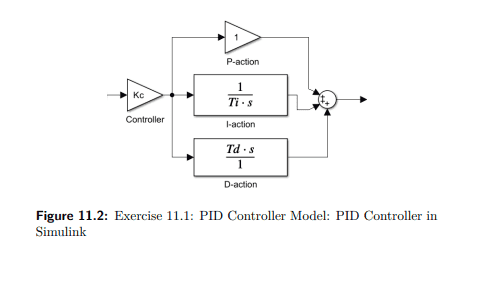
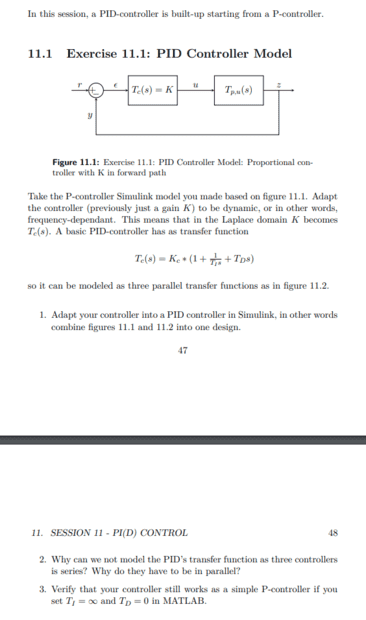
The question that is asked is basically to create a closed loop model with a PID controller. (if necessary more information on the picture)
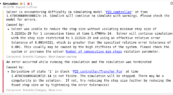
The problem that I am encountering is an error which I don't understand and know how to fix?
Relevant Equations
not relevant
Could I get some input on how to fix this problem please? Thanks in advance!

The exercise for which I need the model.
Screenshot from 2023-06-07 17-26-12.png
Screenshot from 2023-06-07 17-25-52.png


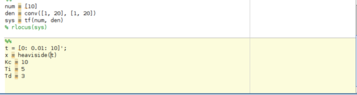
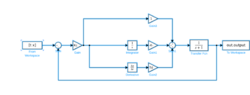
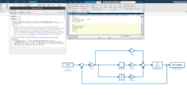
The simulink model together + the error that needs to be fixed + Matlab code used:


Note: Gain 1 = 1/Ti
 

Attachments

  • Screenshot from 2023-06-07 17-33-21.png
    Screenshot from 2023-06-07 17-33-21.png
    26.5 KB · Views: 152
  • error.png
    error.png
    22.5 KB · Views: 166
  • matlab_code.png
    matlab_code.png
    5.3 KB · Views: 142
  • simulink_model.png
    simulink_model.png
    7.4 KB · Views: 168
Physics news on Phys.org
I'm not an expert on this, but it looks like some of the equations it is solving are changing in value so fast that further calculations make no sense.

Please check the values of all the components/variables you have supplied. For instance maybe one is missing a minus sign or a decimal point. Another common problem is that an 'm' was entered instead of 'M' (or the other way around -- one means milli-, the other Mega-).

Then try changing the time step or error band, as the Error Msg. suggested.

Good Luck,
Tom

p.s. please keep us posted on what you find that works.
 

Similar threads

  • · Replies 2 ·
Replies
2
Views
3K
Replies
2
Views
1K
  • · Replies 4 ·
Replies
4
Views
3K
  • · Replies 4 ·
Replies
4
Views
4K
Replies
2
Views
2K
  • · Replies 3 ·
Replies
3
Views
2K
Replies
1
Views
9K
  • · Replies 7 ·
Replies
7
Views
3K
  • · Replies 12 ·
Replies
12
Views
4K
  • · Replies 9 ·
Replies
9
Views
4K