Why is My Matlab Function Not Providing Critical Points at the Expected Maximum?

  • Context: MATLAB 
  • Thread starter Thread starter FocusedWolf
  • Start date Start date
  • Tags Tags
    Matlab Maxima Minima
Click For Summary

Discussion Overview

The discussion revolves around a MATLAB function that is not yielding expected critical points for a maximum in a mathematical context. Participants explore the behavior of the function, its critical points, and the implications of boundary evaluations within a specified region.

Discussion Character

  • Exploratory
  • Technical explanation
  • Debate/contested
  • Mathematical reasoning

Main Points Raised

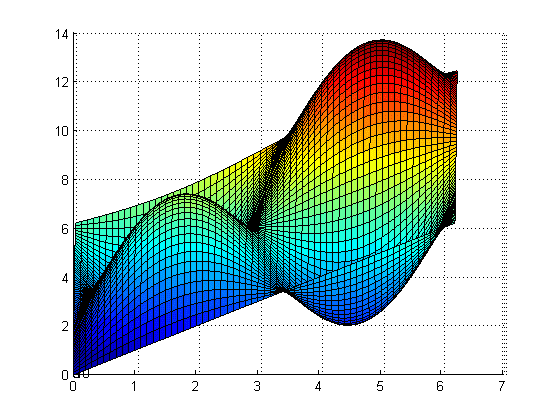
  • One participant notes that the function does not provide critical points at what appears to be a maximum, specifically around x=y=5, despite having calculated several critical points.
  • The critical points calculated include values such as -0.2618, -1.3090, 1.8326, and 2.8798, but there is uncertainty about the presence of a critical point at the visual maximum indicated in the plot.
  • Another participant questions whether the critical points are being solved correctly, suggesting that the equations fx = fy or fx - fy = 0 should be used.
  • There is mention of using Mathematica to verify critical points, with one participant stating that Mathematica provided the same critical points as MATLAB.
  • A later reply discusses a warning from Mathematica about potentially missing solutions due to the use of inverse functions, suggesting the use of a function called Reduce to find additional critical points.
  • After further exploration, another participant reports finding additional critical points using Reduce, including values around 4.97419 and 6.02139, which were not initially identified.

Areas of Agreement / Disagreement

Participants express differing views on the existence and identification of critical points, with some suggesting that additional solutions may exist while others are uncertain about the accuracy of the initial calculations. The discussion remains unresolved regarding the presence of critical points at the expected maximum.

Contextual Notes

There are indications of limitations in the methods used for solving the equations, as well as potential dependencies on the definitions and approaches taken in both MATLAB and Mathematica. The discussion highlights the complexity of finding critical points in the given function.

FocusedWolf
Messages
81
Reaction score
0
I have a function that is not giving me critical points for where their appears to be a maximum.

from plot their seems to be a cp at approximately x=y=5
plot.png


However, these are the cp's:
cpx =

-0.2618
-1.3090
1.8326
2.8798
-2.8798
-1.8326
1.3090
0.2618cpy =

-0.2618
-1.3090
1.8326
2.8798
0.2618
1.3090
-1.8326
-2.8798

When evaluated on the boundry [0,2pi]x[0,2pi] F(0,0)=0 as a absolute minimum and F(2*pi, 2*pi)=12.5664 as absolute maximum...even though in the graph... 2*pi is lower then the imaginary big red mountain on right...for which their seems to be no cp...

Here's code that generates plot and finds critical points

Code:
%plotting it
[x,y] = meshgrid(0 : .1 : 2*pi)
z = x+y+4.*sin(x).*sin(y)
surf(x,y,z)
%contour(x,y,z,20); axis square; colorbar;

syms x y
f = x+y+4*sin(x)*sin(y)
fx = diff(f,x)
fxx = diff(fx,x)
fy = diff(f,y)
fyy = diff(fy,y)
fxy = diff(fx,y)
d = fxx*fyy-fxy^2

% Solve for all critical points of f using solve
[cpx,cpy] = solve(fx,fy)

% Make critical points decimals
cpx = double(cpx)
cpy = double(cpy)

% Make inline functions for f, fxx, and d
F = inline(vectorize(f),'x','y')
D = inline(vectorize(d),'x','y')
Fxx = inline(vectorize(fxx),'x','y')

% define boundries
%[0 0; 0 2*pi; 2*pi 0; 2*pi 2*pi]
boundx = [0; 0; 2*pi; 2*pi]
boundy = [0; 2*pi; 0; 2*pi]

% Make a table of the cp's, F(at cp's), D(at cp's), and Fxx(at cp's)
T = [cpx cpy F(cpx,cpy) D(cpx,cpy) Fxx(cpx,cpy)]

%Evaluate F at boundries of region [0,2pi]x[0,2pi]
T = [boundx boundy F(boundx,boundy)]

So my question is...is their a cp at that red mountain? or is their no red mountain :P
They say when fx and fy DNE their is also cp...but i don't see that happening since fx and fy are polynomials...
 
Last edited:
Physics news on Phys.org
FocusedWolf said:
I have a function that is not giving me critical points for where their appears to be a maximum.

from plot their seems to be a cp at approximately x=y=5
plot.png


However, these are the cp's:
cpx =

-0.2618
-1.3090
1.8326
2.8798
-2.8798
-1.8326
1.3090
0.2618


cpy =

-0.2618
-1.3090
1.8326
2.8798
0.2618
1.3090
-1.8326
-2.8798

When evaluated on the boundry [0,2pi]x[0,2pi] F(0,0)=0 as a absolute minimum and F(2*pi, 2*pi)=12.5664 as absolute maximum...even though in the graph... 2*pi is lower then the imaginary big red mountain on right...for which their seems to be no cp...

Here's code that generates plot and finds critical points

Code:
%plotting it
[x,y] = meshgrid(0 : .1 : 2*pi)
z = x+y+4.*sin(x).*sin(y)
surf(x,y,z)
%contour(x,y,z,20); axis square; colorbar;

syms x y
f = x+y+4*sin(x)*sin(y)
fx = diff(f,x)
fxx = diff(fx,x)
fy = diff(f,y)
fyy = diff(fy,y)
fxy = diff(fx,y)
d = fxx*fyy-fxy^2

% Solve for all critical points of f using solve
[cpx,cpy] = solve(fx,fy)

% Make critical points decimals
cpx = double(cpx)
cpy = double(cpy)

% Make inline functions for f, fxx, and d
F = inline(vectorize(f),'x','y')
D = inline(vectorize(d),'x','y')
Fxx = inline(vectorize(fxx),'x','y')

% define boundries
%[0 0; 0 2*pi; 2*pi 0; 2*pi 2*pi]
boundx = [0; 0; 2*pi; 2*pi]
boundy = [0; 2*pi; 0; 2*pi]

% Make a table of the cp's, F(at cp's), D(at cp's), and Fxx(at cp's)
T = [cpx cpy F(cpx,cpy) D(cpx,cpy) Fxx(cpx,cpy)]

%Evaluate F at boundries of region [0,2pi]x[0,2pi]
T = [boundx boundy F(boundx,boundy)]

So my question is...is their a cp at that red mountain? or is their no red mountain :P
They say when fx and fy DNE their is also cp...but i don't see that happening since fx and fy are polynomials...

Are you solving for fx = fy? Or better yet fx - fy = 0?

I kind of see that in your little problem, but everything after that seems like a blur.

Why don't you just solve the above expression, and check if those critical points are maximums?

I'm not sure if that is exactly what the graph looks like, so I'll assume you did it right. If you did it right, it seems like you do have a maximum. Now the problem is either the program can't solve it or the steps you're following are wrong.
 
Yea it looks like it's solving them equal to each other or considering both...same thing. It's how an example i found did it for these sorts of problems.

Mathematica gave same answers for critical points.

Solve[{0.0 == Fx[x, y], 0.0 == Fy[x, y]}, {x, y}]

{{y -> -2.87979, x -> 0.261799}, {
y -> -1.8326, x -> 1.309}, {y -> -1.309, x -> -1.309}, {y -> -0.261799,
x -> -0.261799}, {y -> 0.261799, x -> -2.87979}, {y ->
1.309, x -> -1.8326}, {y -> 1.8326, x -> 1.8326}, {
y -> 2.87979, x -> 2.87979}}
 
Hmm i think i got em...was reading some warning messages in mathematica that saying not all solutions may be found cause it was using inverse functions, and to use some function called Reduce...so with a bit of tinkering...

N[Reduce[{0 == Fx[x, y] , 0 == Fy[x, y], 0 ≤ x ≤ 2*\[Pi] , 0 ≤ y ≤ 2*\[Pi]}, {x, y}]]

finds these:

(x == 4.97419 && y == 4.97419) || (x == 6.02139 && y == 6.02139) || (x ==
1.8326 && y == 1.8326) || (
x == 2.87979 && y == 2.87979) || (x == 3.40339 && y == 0.261799) || (x == 4.45059 && y == 1.309) || (x == 0.261799 && y == 3.40339) || (x ==
1.309 && y == 4.45059)

and those look like the cp's i was looking for.
 

Similar threads

  • · Replies 2 ·
Replies
2
Views
2K
  • · Replies 3 ·
Replies
3
Views
3K
  • · Replies 4 ·
Replies
4
Views
2K
Replies
3
Views
4K
Replies
5
Views
7K
Replies
5
Views
3K
  • · Replies 8 ·
Replies
8
Views
3K
  • · Replies 3 ·
Replies
3
Views
2K
Replies
9
Views
2K
  • · Replies 4 ·
Replies
4
Views
2K