How can I plot a 3D vertical plane in Mathematica?

Join the discussion
Registration is free. Ask a follow-up in this thread, or start your own.
2 replies · 5K views
SwaGGeReR
Messages
6
Reaction score
0
I'm trying to plot something like x+y=2 in 3D. The image should look like this:
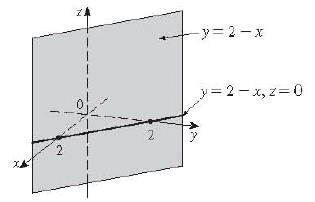
h1jnw.png


Been trying to do it in Mathematica using Plot3D, but the it treats the input as a function of z.

Another example: Plot3D[x=4,{x,0,10},{y,0,10},AxesLabel{x,y,z}] plots z=4, not x=4.

A similar thread, with no conclusive answer: https://www.physicsforums.com/showthread.php?t=101840
 
Last edited:
Physics news on Phys.org
SwaGGeReR said:
I'm trying to plot something like x+y=2 in 3D. The image should look like this:

h1jnw.png


Been trying to do it in Mathematica using Plot3D, but the it treats the input as a function of z.

Another example: Plot3D[x=4,{x,0,10},{y,0,10},AxesLabel{x,y,z}] plots z=4, not x=4.

A similar thread, with no conclusive answer: https://www.physicsforums.com/showthread.php?t=101840

Hey SwaGGeReR and welcome to the forums.

Have you looked at the documentation?

Also what do the arguments mean for the function? What does {x,0,10} refer to? Are they just bounds for the variables?

The other thing is what is the default coordinate system for Mathematica? Is it RHS? LHS? Does the z-axis point up? (In many math programs it does and in many maths courses they treat z as pointed up and not in or out of the page).
 
I'm not familiar with Mathematica but maybe it is like Maple. Can you plot surfaces as parametric plots? If so, you could use the parameterization:

x = x
y = 2 - x
z = z
##\vec R(x,z) =\langle x, 2-x,z\rangle## and plot it using whatever syntax Mathematica requires.